 K-Cycles





K-Cycles 2027 updated to 5.3
Improved Performance: It is the fastest K-Cycles to date.
DLSS for Preview, Final Render and Animation: Amazing flicker free at EEVEE speed with Cycles rendering quality.
DLSS works with the rest of K-Cycles features: Including light mixer, PostFX, Render Camera, Playback and more.
Ultra Denoiser: Is now integrated with blender denoiser.
Limitations:
1. DLSS only for Nvidia RTX 20x or better and need at least drivers version 6.20.
2. DLSS for final render and animation needs to render to a single tile.
3. DLSS Final Render only combined pass is upscale, so if you need passes e.g. cryptomatte or others need to have Upscale Mode set to "None".
Video on K-Cycles 2027 5.3 uprate with all the new features include in DLSS:
Recent features for K-Cycles:
• EEVEE support for the New Features - The PostFX, Render Camers, Playback, and Ultra Temporal Denoiser support Cycles and EEVEE (Check videos above).
• Ultra Temporal Denoiser - Flicker removal and video stabilization (Check videos above).
• Playback System - Playback system work with ultra temporal denoiser and vector blur (Check videos above).
• PostFX for Compositor - New PostFX for the compositor completely new updated (Check videos above).
• Update Render Cameras - Render Cameras can now handle RAW format to work with Playback and Ultra Temporal Denoiser.(Check videos above).
• Multi-Pass Denoiser GPU - Automatically denoising of all the light and lightgroup passes before the compositor.
• Performance Update - New faster core for K-Cycles (Check video below).
• Ultra Lighting - New powerful Light Mixing with new outliner view and filtering (Check videos below).
• Light Mixing - New with two modes for all the scene lights or lightgroups.
• Light Mixing - Collection and individual control for visibility, solo, selection, exposure, color and white balance.
• Lightgroups Mixing - Real-time presets and lightgroup mixing line control.
• Light & Shadow Linking - Improve ease of use, accuracy and control.
Previous K-Cycles Users: Use upgrade code "upgrade2026" (Extra 25% off) discount.
What is K-Cycles?
K-Cycles is a custom build of Blender with highly optimized Cycles render engine, ultra lighting, post FX, multi-pass denoiser, multi-camera render, camera override and realtime viewport lighting and effects for Blender. K-Cycles uses the same configuration, preferences and add-ons as vanilla Blender making it fully compatible. Performance works best at higher render samples and low threshold see performance section below for the performance charts and limitations.
Features include:
• Ultimate rendering performance for viewport and final renders.
• Amazing Ultra Lighting the most powerful and complete lighting features for Cycles.
• Ultra Denoiser with the latest Intel denoiser technology and multi pass for clean and super sharp images.
• New Ultra Denoiser with GPU with a huge performance speed up.
• Ultra Denoiser works inside Blender without needing the compositor and has great performance avoiding complicated compositor nodes.
• Animation Denoiser uses the latest OptiX temporal denoising to improve animation render times.
• Even faster renders using intelligent scene and settings optimizations preset modes with higher • K-Cycles performance while still maintaining good image quality.
• Amazing viewport Ultra Lighting, Post FX including BLOOM effects, FLARES with glare, anamorphic and ghosts, Tone Mapping and Lens effects that elevates your art to the next level.
• Camera mode/override for Ultra Lighting, Post FX and Output Resolution.
• Render Cameras for rendering individual cameras to the image editor or to automatically save file render.
• All K-Cycles the Post FX effects are animation ready with all the settings fully keyable and with previews on the viewport.
• The K-Cycles Ultra Lighting, Post FX effects can be done in the viewport or final render both in GPU or CPU.
• Cycles image quality with less render noise.
• Fully compatible with Cycles and all Blender addons.
• Regular stable release and alpha builds updates with the latest features from the Blender.
• Easy to use without the need of changing Cycles settings for fast performance.
K-Cycles Performance
• K-Cycle performance mode.
• GPU Boost.
• Global Illumination presets.
• Sampling render presets.
• Optimize viewport updates.
A set of Cycles performance features and options for improving the Cycles viewport and final rendering.The K-Cycles performance mode for maximizing the rendering time. GPU Boost controls Cycles GPU memory to help improve performance and memory usage. Global Illumination presets allow scene lighting settings for faster rendering or higher lighting quality. Sampling final render presets is the best way to control the render time, noise level and scene image quality. Reduce viewport updates for faster viewport rendering. Performance optimizations are best at higher render samples.
Here is the performance chart below comparing K-Cycles 2027 with RTX 4090 to the same Cycles build of Blender. Tests done with the default Cycles final render settings of noise threshold of “0.01” and samples of “4096” without denoiser.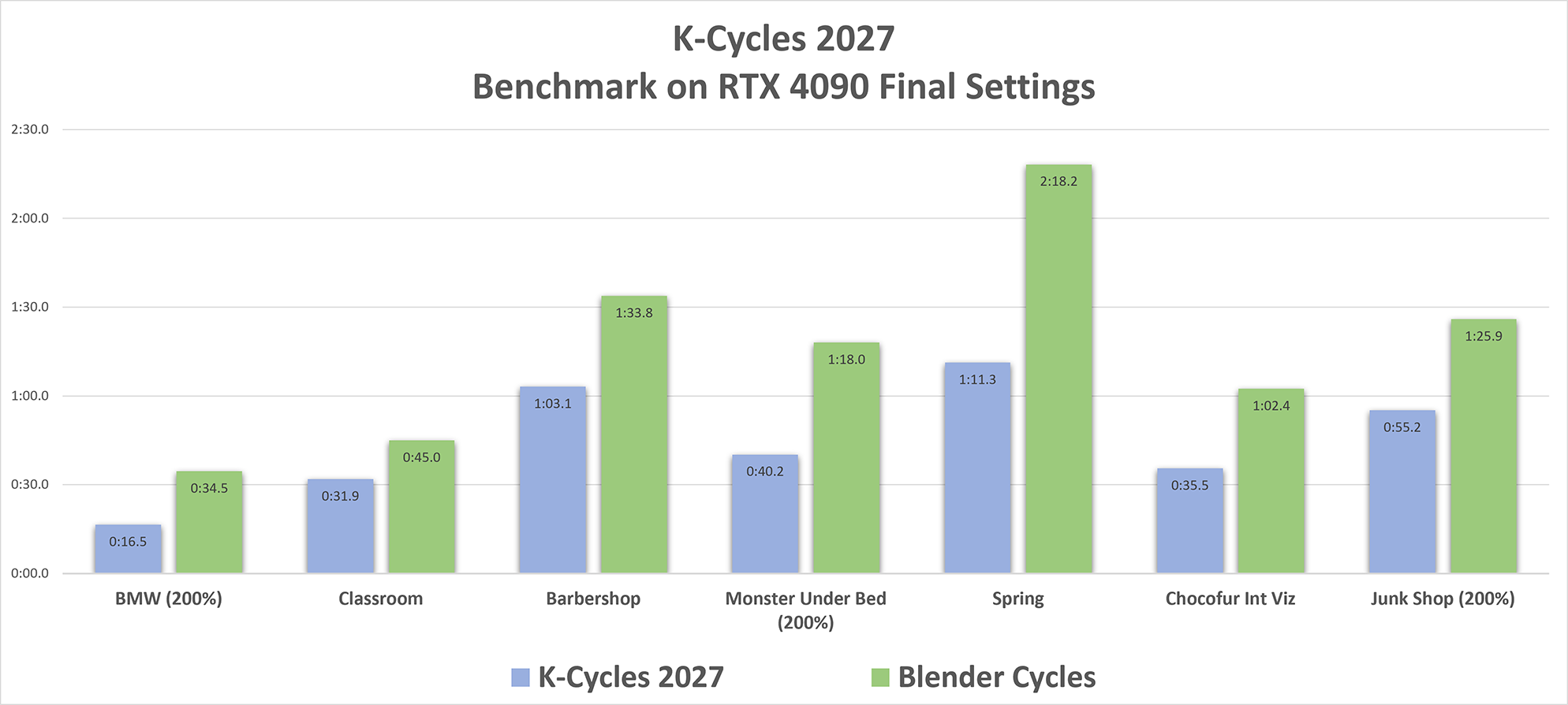
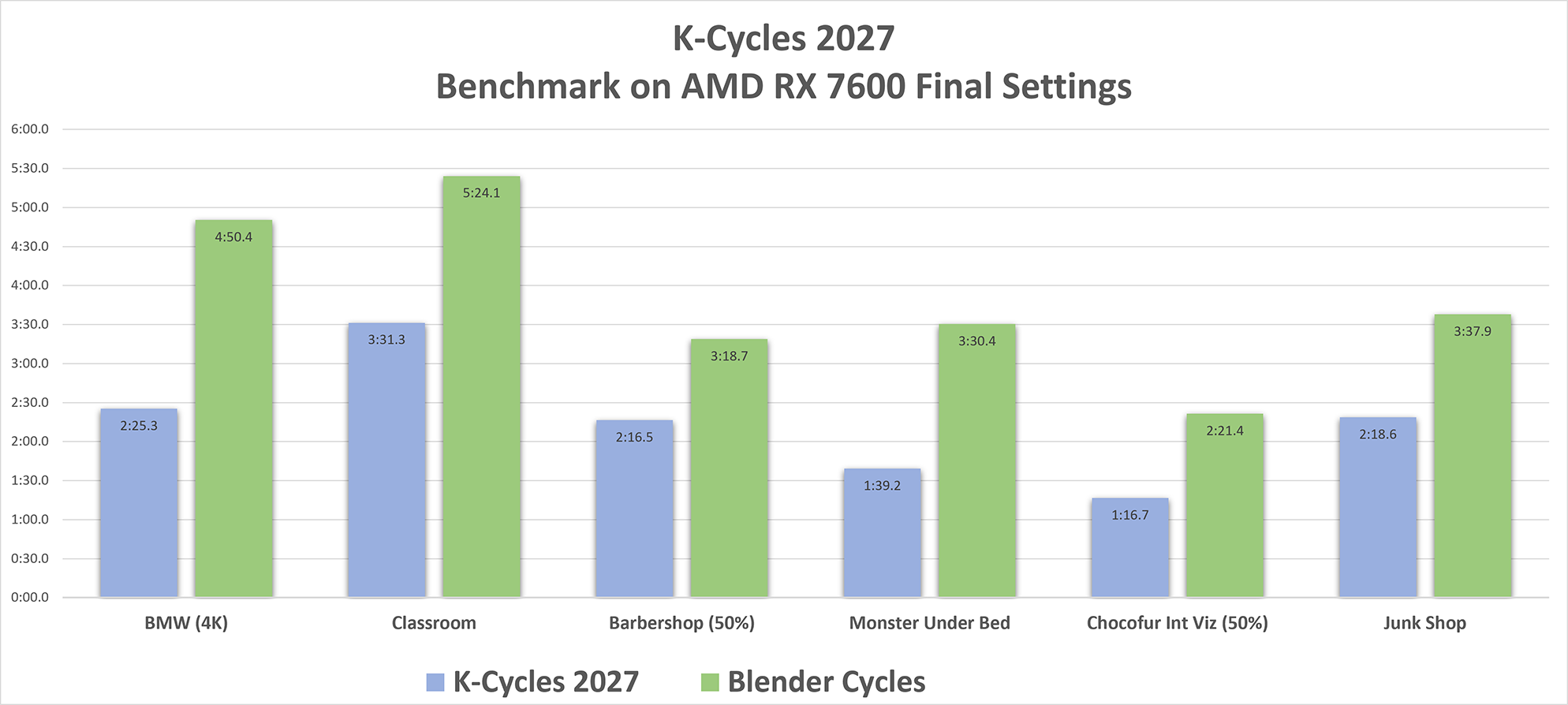
Here is the performance chart below comparing K-Cycles 2026 with AMD RX 7600 to the same Cycles build of Blender. Tests done with the default Cycles final render settings of noise threshold of “0.01” and samples of “4096” without denoiser.
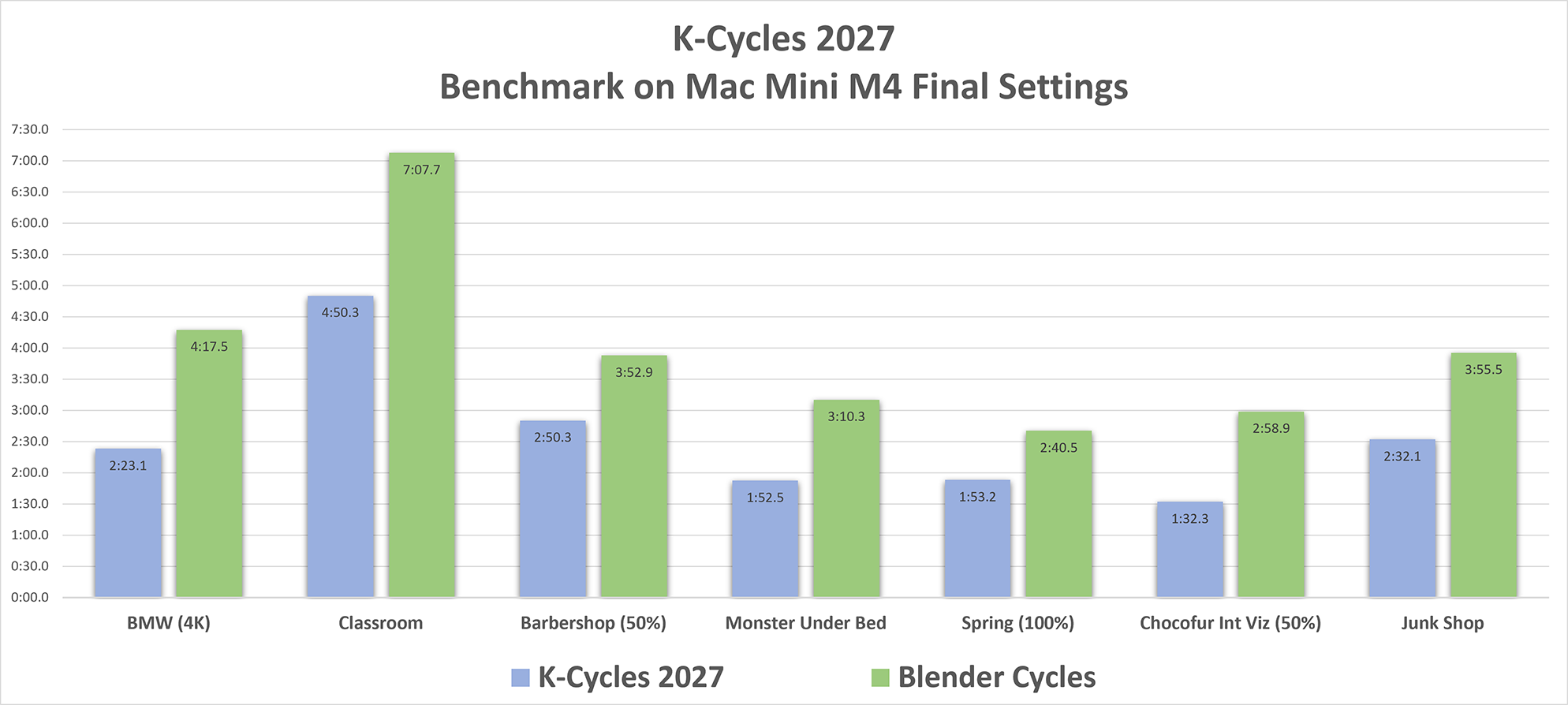
Here is the performance chart below comparing K-Cycles 2026` Mac with Mac Mini M4 to the same Cycles build of Blender. Blender scenes have the output resolutions adjusted (see labels). Tests done with the default Cycles final render settings of noise threshold of “0.01” and samples of “4096” without denoiser.
Video on K-Cycles Performance:
K-Cycles Performance Limitations:
• K-Cycles will not improve time for scene loading, textures, synchronization, scattering, particle generation, BSP, or other pre-rendering calculations.
• K-Cycles performance gains will be minimal at low render samples or high noise threshold above 0.05. In this case it is recommended to use “Ultra Denoiser” to improve scene texture and geometry detail, and image quality that requires considerably less render samples compared with the standard denoiser.
• K-Cycles performance gains can not be guaranteed due to differences in graphics hardware, system configuration, render setting or specific scene issues.
Post FX
Post FX Bloom & Flares
• Creating beautiful Bloom effects in no time.
• The Bloom settings have all the options that are needed to design and easily create and customize your Bloom effect.
• Lens flare types include glare, anamorphic and ghosts effects.
• Flares are physically based on light brightness, size and color.
• K-Cycles Flares have many artistic controls to create all types of amazing flare effects.
• Animation ready with all the settings fully keyable and with previews on the viewport.
• Create great lens flare effects as seen in movies, tv shows or photographic stills.
Vanke Future by 3D Shaker - Render with K-Cycles Flares and Bloom:

Post FX Tone Mapping
• Tone Mapping controls allows you to create a more dynamic scene or change the mood of the scene in no time.
• EASY to use and design to give great results without the need of Photoshop.
• Change the mood of your scene with Tone Mapping effects with speed and ease of use.
• The Tone Mapping settings have the most useful options that are needed for your image to stand out or have the final polish.
Post FX Lens
• Lens allow you to add realism to your scene with lens and photographic effects.
• Adjusting quickly the Lens settings with fast performance.
• Improve the visual quality by adding lens and photographic effects with imperfections to your scene.
• The Lens settings have the most useful options that are needed for your image to stand out or have the final polish.
Video on K-Cycles PostFX, Playback & Ultra Temporal Denoiser:
K-Cycles Playback & Ultra Temporal Denoiser
K-Cycles Ultra Lighting
• Huge speed up with GPU for denoising all lightgroups done internally before compositor
• Interactive real-time viewport and final lighting workflow.
• Full immediate access to all your scene lights.
• Powerful new light mixing with a new outliner view and filtering.
• Light mixing has two modes for all the scene lights or lightgroups.
• Light mixing with line control for visibility, solo, selection, exposure, color and white balance.
• Ultimate Lightgroups mixing features with ease of use and real-time presets.
• Solo preview for lights and lightgroups mode.
• Remainder lightgroup mode.
• Compositor mode.
• Complete accurate lighting setup.
• Real-time lightgroup line mixing for viewport and final render.
• Advanced tonemapping per lightgroup.
• Light and shadow linking with lightgroup integration.
• Real-time PostFX integration lights and lightgroup.
• Full and fast denosing for all the lightgroups.
The most complete and powerful lighting system for Cycles. Lighting is critical in bringing your art to the next level. Using ultra lighting features like lightgroups, light mixing, outliner view, filtering, line control, light & shadow linking and real-time PostFX integration with ease of use to get amazing lighting results. Fully denoise lightgroups layers to continue work in the compositor if needed. See below all ultra lighting options:
Ultra Lighting - Lightgroups Mode:

Ultra Lighting - LightMix - Lights Mode:

Video on K-Cycles Ultra Lighting: Lightgroups, Light mixing, Light & Shadow Linking and Presets:
Video on K-Cycles Ultra Lighting - Compositor Mode and Apply Tone Mapping:
K-Cycles Multi-Pass Denoiser
• Multi-Pass Denoiser is integrated with Render Denoise ImageOpenDenoiser options.
• Multi pass feature for noise free and very sharp detail.
• Huge speed up with GPU for denoiser mutli-pass and lightgroups
• Automatically denoising of all the light passes before the compositor.
• Has amazing detail at very low render samples.
• Artifact free and smooth volumetrics.
• Works inside Blender without needing the compositor.
• Has great performance avoiding complicated compositor nodes.
• Improve rendering time by using less render samples compared to the standard denoiser to have the same scene texture and geometry detail, and image quality especially noticeable with noisy images.
Using the best denoiser technology with the addition of Multi Pass. Get great results without the compositor. Noise free and sharp images at very low render samples save valuable rendering time compared to standard denoiser. High quality volumetrics and great performance inside Blender.
Dark Interior by Entity Designer Denoise with Cycles at 8 render samples:

Using with Multi Pass at 8 render samples:

Video on K-Cycles - Ultra Denoiser GPU - Huge Speed Up Update:
K-Cycles Camera Mode/Overrides
• Individual Ultra Lighting settings per camera.
• Individual Post FX settings per camera.
• Individual Resolution/Frame Range settings per camera.
• Instantly switch between global scene settings or individual camera settings for Resolution/Frame Range, Ultra Lighting or Post FX by enabling the camera icon.
Ultimate control for all your K-Cycles settings per individual camera. Instantly switch in the viewport and final render from default global scene settings for Ultra Lighting, Post FX or Resolution/Frame Range to a per camera setting by just clicking on the “Camera Icon”. These adjustments are done in real-time without re-rendering. By duplicating cameras can explore multiple lighting and post fx variations of the same camera with instant comparisons. Allows full customization and artistic control of the multi-camera setup in the scene by just enabling the camera icon see below for the UI.

K-Cycles Render Cameras
• Render All, Selected or Single cameras to the image editor or to save file render.
• Background and command line rendering for best performance and memory usage.
• Animation is supported per camera.
• Slot Auto to move the renders to the next image slot with a user setting for maximum slots..
• Slot Naming adds the camera name to the image slot name.
• Reset Slot Names to clear all the image slot names.
• File Save options include relative path and increment.
• File Save naming options to include camera and/or blend file name.
Easy to use and powerful multi-camera render to the image editor and/or file save. A great complement to the K-Cycles Camera Mode/Override with many features to quickly view and save the individual camera K-Cycles settings results. See below for the UI options:

Video on K-Cycles Camera Mode Overrides and Render Cameras:
Post FX Mask, Viewport Match and Presets
• Mask allows to include/exclude objects and collections to have the specific Post FX applied.
• Presets saves the Post FX settings and are like other presets used in Blender
• Changes the Cycles preview to match exactly the output resolution.
Post FX Mast. Allows to include/exclude objects and collections to have the specific Post FX applied. Quite Useful for controlling which objects to apply the bloom and flares, or tone mapping for visual importance.
Post FX Presets saves the Post FX settings and are like other presets used in Blender. On the right of the Post FX header or individual effects like Bloom or other effects is the preset button. The Post FX preset button adjusts the settings for all the Post FX. The other individual effects presets settings are specific to that effect only.
Post FX Viewport match to output resolution. Changes the Cycles preview to match exactly the output resolution. This is very useful for pixel based effects like Bloom and Flares because the amount of the effects depends on the render resolution. While in this preview render mode it is possible to make adjustments exactly like they would appear in the final render. It will also disable viewport selected outlines for better visibility. This feature can have other uses for better accuracy in adjusting materials, depth of field, etc.
Video on K-Cycles Post FX Mask, Viewport Match and Presets:
What the Artists Say
Jerry Perkins (masterxeon1001) hardOps and boxcutter creator
“K-Cycles provides an alternative way to utilize the power of the RTX in ways vanilla Cycles cannot. From the moment you begin rendering with it you’ll notice an immense difference in speed and performance. I am proud of the work that has gone into optimizing such a classic renderer. Even in a post EEVEE work Cycles can prove itself competitive and giving a result that just can’t be matched. And with K-Cycles you’ll get there in a fraction of the time”
Chipp Walters (chippwalters) KIT OPS, SYNTH, BEVEL, BATCH, SMART SKETCH, CHALK STYLE PRO, QUICK SHOT, EEVEE Materials System and SIMPLE TABS creator
“I created the very first course on Interior Rendering with EEVEE, and what luck it was to have Eric as a beta tester. There is no one who knows more about Interior Rendering in Blender, both EEVEE and Cycles, than Eric. His technical expertise is unsurpassed. So, when he asked me to test K-Cycles, I jumped at the chance. Most will tell you I almost always render in EEVEE– but not anymore. I can’t believe the speed increases I now have rendering in K-Cycles. It’s a must have for any serious Blender artist!”
Andrew Markert (GREEZYBEAR) KPACKS creator:
“K-Cycles has been an awesome addition to my workflow by utilizing my GPU in order to render Cycles. I have a Nvidia RTX Titan graphics card and this is such a LEAP from CPU rendering to now GPU rendering! My render times have increased 3-4x faster than my current Blender 2.91. I feel this is a solid build and runs very smoothly. The image quality is also better to me and the viewport display has much more detail in it when in dev and render views. I am seriously impressed with the render times in K-Cycles and would definitely recommend this to anyone who loves to use the GPU for rendering!”
Artists Render Images
Here are examples of images rendered in K-Cycles.

Evermotion vol.49 render with K-Cycles

Evermotion vol.50 render with K-Cycles

Evermotion vol.54 render with K-Cycles
