3D Tessellation
 Ergo Cogito Design


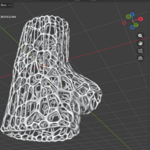
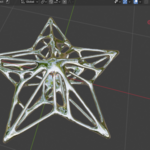
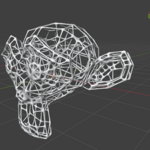
Version 2.3.2 · also enabled for Blender 5.0.1+ · Ergo Cogito Design
Version 2.3.1 · only for Blender 5.1+ · Ergo Cogito Design
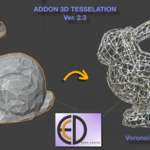
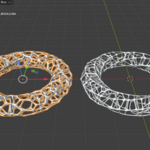
3D Tessellation generates volumetric Delaunay and Voronoi structures inside any closed mesh — directly in Blender, without external tools. The result is a single unified mesh whose cells conform exactly to the original surface, ready for Geometry Nodes, subdivision, or further modeling.
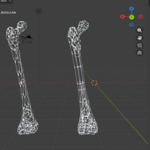
The addon ships with Smooth SFD, a Geometry Nodes modifier that blends the cell edges into a continuous, organic surface reminiscent of trabecular bone.
- Blender 5.0.1 or later
- Python package scipy (bundled)
- A manifold (watertight) mesh as input
- In Blender, open Edit → Preferences → Add-ons.
- Click Install… and select
3D-Tessellation-2.3.2.zip. - Enable the addon by ticking its checkbox.
- In the N-panel → Tessellation tab.
- Select a manifold mesh object.
- Open the N-panel → Tessellation tab.
- Click Check & Fix Normals to verify the mesh is valid.
- Choose a tessellation type and set the desired parameters.
- Click Generate Tessellation.
The tessellated mesh is created as a new object. The source mesh is left untouched.
Fills the mesh volume with tetrahedra derived from a Delaunay triangulation of interior sample points. Internal faces shared by exactly two tetrahedra are extracted to produce a lightweight wireframe-like structure.
Best suited for FEM analysis, physics simulations, and uniform lattice structures.
| Parameter | Default | Description |
|---|---|---|
| Volume Samples | 20 | Number of random interior points to generate |
| Include Original Vertices | On | Adds mesh vertices to the sample set for denser surface detail |
Uses a Cell Fracture approach: each Voronoi cell is intersected with a copy of the source mesh via a boolean modifier, then all cells are joined into a single output object. The surface of every cell follows the original mesh boundary exactly.
Requires a watertight (manifold) mesh. Processing time scales with the number of cells and the complexity of the source geometry.
| Parameter | Default | Description |
|---|---|---|
| Number of Cells | 20 | Number of Voronoi seed points |
| Boolean Solver | Exact | Exact — best surface accuracy; Float — faster; Manifold — fastest, requires strictly manifold input |
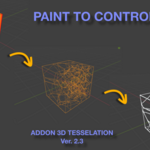
Both modes support weight-paint-driven density, allowing finer tessellation in selected regions and coarser structure elsewhere.
- Enter Weight Paint mode on the source object.
- Paint the desired density map: red (1.0) = dense cells, blue (0.0) = sparse cells.
- Return to Object mode.
- In the panel, enable Use Weight Paint and select the vertex group.
Applies iterative Lloyd relaxation to the seed points before computing the Voronoi diagram, producing more uniform cell sizes.
The implementation is weight-aware: high-weight seeds move less, so denser regions defined by weight paint are preserved even after relaxation.
| Parameter | Default | Range |
|---|---|---|
| Lloyd Iterations | 3 | 1 – 10 |
Enabling Lloyd relaxation increases computation time proportionally to the number of iterations.
Runs automatically after tessellation when Auto Cleanup is enabled. Can be tuned or disabled entirely.
| Parameter | Default | Description |
|---|---|---|
| Merge Distance | 0.0001 | Threshold for merging coincident vertices. Scales automatically relative to the mesh bounding-box diagonal |
| Dissolve Planar | On | Dissolves coplanar face boundaries to reduce polygon count |
| Planar Angle | 5° | Maximum angle between adjacent faces to be considered coplanar |
Smooth SFD is a Geometry Nodes modifier bundled with the addon. It softens the sharp edges of the tessellation into a continuous, rounded surface — particularly effective on Voronoi output.
To apply: select the tessellated object, then click Apply Smooth SFD in the Edge Smoothing section of the panel. The modifier remains live and non-destructive; its parameters can be adjusted in the Geometry Nodes modifier stack.
If the asset is not loaded automatically, click Load Asset Manually.
| Setting | Behaviour |
|---|---|
| Auto-name Output (on) | Names the output _DELAUNAY or _VORONOI_BOOLEAN
|
| Auto-name Output (off) | Uses the name entered in the Output Name field |
No cells generated (Voronoi)
The source mesh is likely non-manifold. Run Check & Fix Normals, then use Mesh → Clean Up → Merge by Distance and Fill Holes in Edit Mode before retrying.
Long processing times
Reduce Number of Cells or Volume Samples. Disable Lloyd Relaxation. Switch the Boolean Solver to Float or Manifold. Simplify the source mesh before tessellating.
Tessellation misaligned with the viewport mesh
The source object has unapplied transforms. Use Object → Apply → All Transforms before generating, or rely on the automatic world-space correction introduced in v2.3.
GPL-3.0-or-later · © 2026 Ergo Cogito Design
Have questions about this product?
Login to message
| Blender Extension Compatible | Yes |
| Dev Fund Contributor | |
| Published | 5 months ago |
| Blender Version | 5.0 - 5.1 |
| Extension Type | Add-on |
| Render Engine Used | Cycles, Eevee |
| License | GPL |