Animated Viscous Honey Simulation 3D Model on Spoon for Commercials in Blender 3D
 Alaa Eddine ZAIR


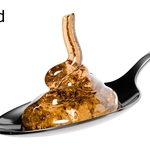


The paths of the MeshSequenceCache modifiers are relative. Keep the ABC files folder and the .blend file in the same folder for the paths not to break.
The honey ABC file contains mesh sequence. The bubbles ABC files contain 'point clouds'. You'll have to instance a spherical object (bubble) on those points using geometry nodes or any other method in your target application. Use a 'random' node to randomize the size of the bubbles.
Importing the included files into Blender and other software:
1) Import the FBX of the spoon
2) Import the ABC files (move the animation frame to preview)
3) Scale each ABC file by '0.01' to fit with the spoon (Transform Pivot Point must be set to Cursor, and the cursor must be set to world origin!)
4) Apply honey material to 'honey' ABC
5) Create a bubble (sphere)
6) Apply glass, water or air material to the bubble instance object
7) Instance the bubble on the bubbles point clouds using geometry nodes or any other method you prefer in your target application.
Have questions about this product?
Login to message
| Published | almost 2 years ago |
| Blender Version | 4.0 - 5.0 |
| Render Engine Used | Cycles, Eevee |
| Misc Data | Animated |
| License | Royalty Free |
Discover more products like this
honey commercial honeycomb 3d-bee simulation FLIP honey-bee 3d spoon honey ad bee viscous uutensil liquid animation 3d utensils utensile honey blender spoon honey-comb honeybee viscous water flipfluid flip simulation flip animation utensiles honey-dipper honeydipper viscous honey Viscous liquid animation flip fluid