Autoremesher Now! | Automatic Remeshing
 Giambattista Von Nettesheim



AutoRemesher NOW!
Complete User Guide
💻 Compatibility
✅ Windows 11 x64: tested
⚠️ macOS arm64: not yet tested but must work
Version 1.0.1+ of the addon only compatible with Blender 5.1.1
🖥️ UI Preview
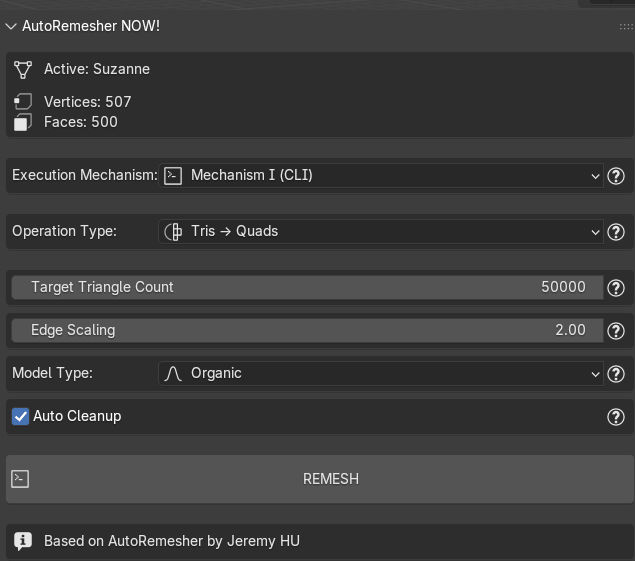
🎯 What AutoRemesher NOW! does
AutoRemesher NOW! is an all‑in‑one toolkit for triangle meshes. It can:
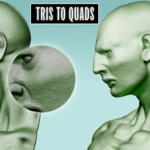
- Convert triangles to clean, animation‑ready quads (Tris → Quads)
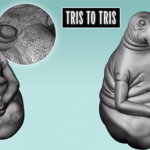
- Remesh triangles for uniform, high‑quality distribution (Tris → Tris)
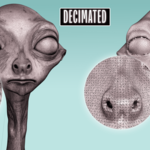
- Decimate triangle meshes while preserving shape (Decimate)
- Repair triangle meshes by merging close vertices and filling holes (Repair)
It's designed to be fast, simple, and predictable for day‑to‑day modeling, scanning workflows, and asset prep of AI generated meshes from Hunyuan, Rodin, Meshy, etc.
🚀 Getting Started
- Select a mesh object in Object Mode.
- Choose Execution Mechanism: Mechanism I (CLI) is recommended and set by default for maximum reliability.
- Pick an Operation Type: Tris → Quads, Tris → Tris, Decimate, or Repair.
- Adjust the parameters for that operation (see guides below).
- Click the action button. A progress bar and status will display during processing. If something fails, a detailed report opens in Blender's Text Editor.
💡 Tips
- Start with defaults. For quads, first try adjusting only Target Triangle Count and Edge Scaling.
- For heavy scans or fragile meshes, consider the robust pipeline: Repair → Tris → Tris → Quads.
⚙️ Operation Types & Parameters
1️⃣ Tris → Quads (Triangle to Quad)
What it's for
Produce clean, mostly‑quad topology from triangle meshes. Ideal for animation, subdivision, and downstream modeling.
Key parameters
- Target Triangle Count
Controls sampling resolution. More target triangles → more detail → slower.
Rule of thumb: approximate quads ≈ target_triangles ÷ 4.
Examples: 20k target → ~5k quads; 50k → ~13k quads; 100k → ~25k quads. - Edge Scaling
Multiplies inferred edge length.
1.0 = baseline. 2.0 (default) = coarser/larger quads (faster). 0.5 = finer/smaller quads (slower). - Model Type
Organic: smoother curvature flow (characters, natural forms).
Hard Surface: preserves sharp features and alignments (mechanical/archviz). - Auto Cleanup
Removes degenerate geometry before quad extraction for stable parameterization.
⚡ Pro tip
Balance target vs scaling: slightly lower target with scaling around 1.2–1.8 often yields a good quality/performance trade‑off.
2️⃣ Tris → Tris (Geogram CVT)
What it's for
Re‑tessellate a mesh into well‑distributed triangles. Great to stabilize challenging inputs before converting to quads or simply to achieve better organization and distribution of the mesh triangles, both anisotropically and isotropically.
Key parameters
- Points: Target vertex count. More points = denser mesh.
- Lloyd / Newton: Iterations that improve uniformity and triangle quality. Higher = better but slower.
- Shape Adaptation (anisotropy): 0.0 = isotropic (uniform). >0.0 = elongate along curvature directions.
- Size Adaptation: 0.0 = uniform size. >0.0 = smaller triangles in detailed areas (uses Local Feature Size sampling).
- Normal Iterations: Smooth normals for cleaner anisotropic directions.
- Newton‑M: Advanced Newton parameter; default works best for most models.
- Boundary Adjustment: Adjust Max Edge Distance (how far boundary vertices are allowed to move) and Border Importance (how strongly boundaries are preserved).
3️⃣ Decimate (Triangle Simplification)
What it's for
Reduce triangle count quickly while preserving overall shape. Ideal for LODs and speed‑ups before further processing.
Key parameters
- Bins: Main decimation control. Lower = more aggressive reduction; higher = more detail preserved.
- Keep Borders: Preserve open boundaries.
- Remove Degree‑3: Clean up degree‑3 vertices that often cause shading artifacts.
- Post‑Decimation Repair: Optional quick topology fix after decimation.
4️⃣ Repair (Mesh Repair)
What it's for
Fix damaged topology and prepare problematic meshes for remeshing.
Key parameters
- Epsilon: Merge tolerance for near‑duplicate vertices (relative to model size).
- Max Hole Edges: Fill only holes with ≤ N boundary edges (0 = unlimited).
- Min Component Area: Remove tiny disconnected parts below a percentage of total area.
- Max Hole Area: Fill holes up to a percentage of total surface area.
- Max Degree‑3 Distance: Remove "needle" degree‑3 vertices within a small distance (relative).
- Remove Intersections: Fix self‑intersecting surfaces. Powerful but very slow — use only when necessary.
🔄 What if my mesh is in quads?
The remesher expects triangles. If your input is a quad mesh:
- In Edit Mode: Select all faces and use Triangulate Faces (face menu or Ctrl+T), or
- Add the Triangulate modifier and Apply.
Then run your desired operation.
⚡ Performance Notes (Dense Meshes)
General
- Processing time scales primarily with input triangle count and, for Tris → Quads, with Target Triangle Count.
- For very dense inputs, prefer Decimate first if turnaround time matters.
Important (Tris → Quads)
- We do not guarantee sub‑minute processing for meshes above ~500k faces.
- In testing, a 1,499,996‑triangle mesh took ~25 minutes to convert to quads.
- Actual time depends on the face/vertex ratio and the Target Triangle Count you choose.
Tips for speed
- Reduce Target Triangle Count or increase Edge Scaling (2.0+).
- Apply heavy modifiers (Subdivision/Boolean) before remeshing to freeze geometry.
🛡️ Failure Handling and Troubleshooting
If processing fails, AutoRemesher NOW! gives you a detailed report.
Most common causes (especially for Tris → Quads)
Non‑manifold edges, degenerate boundary loops, tiny disconnected islands, or self‑intersections — very common in scanned meshes.
ALGORITHMS DO NOT WORK AND OFTEN DO NOT EVEN PROCESS MODELS THAT ARE NOT MONOLITHIC. In other words, if your model is a car and is joined in a single object but has loose parts, no algorithm will work, and the same applies to characters, etc. The model must be a single connected mesh and not degenerate. Avoid having a mesh with non-manifold topology, as the mathematics of many algorithms fail because of this. Trist to Quads by Autoremesher NOW! has the highest error rates, meaning that the more degenerate and complex your mesh is, the less likely it is that everything will turn out well. The most robust is Instant Meshes by Mutamesh, which can handle meshes of higher caliber and geometric complexity.
Autoremesher NOW! works best on 2-manifold surface meshes (closed, monolithic surfaces or those with well-defined edges). It hates “non-manifold” meshes or those with self-intersections. It works best with organic models with smooth curvature; with models with sharp edges, it has a high probability of failure.
Recommended recovery pipeline
- Run Repair on the original mesh to merge near‑duplicate vertices and fill holes.
- If needed, run Tris → Tris (Geogram CVT) to produce a clean, well‑distributed triangle mesh.
- Then run Tris → Quads.
Additional tips
- If boundaries are critical, tweak boundary parameters in Tris → Tris (Max Edge Distance and Border Importance).
- For extremely dense inputs, run Decimate first to reach a manageable size.
✨ Best Practices
- Prefer Mechanism I (CLI) — it's the default and the most reliable.
- For quads: start by tuning only Target Triangle Count and Edge Scaling.
- For scans: Repair → Tris → Tris → Quads greatly increases success rates.
- Use Decimate first when input density is excessive and speed matters.
- If you encounter a failure, read the generated report and apply the suggested fixes.
📧 Support
Issues or questions? Provide your Blender version, OS, operation settings, and a short description of the mesh or a image of the error, the mesh, etc.
AutoRemesher NOW! © 2025 — Made with ❤️ for the Blender community