Batch Rename
 alexdepario
in Asset Management


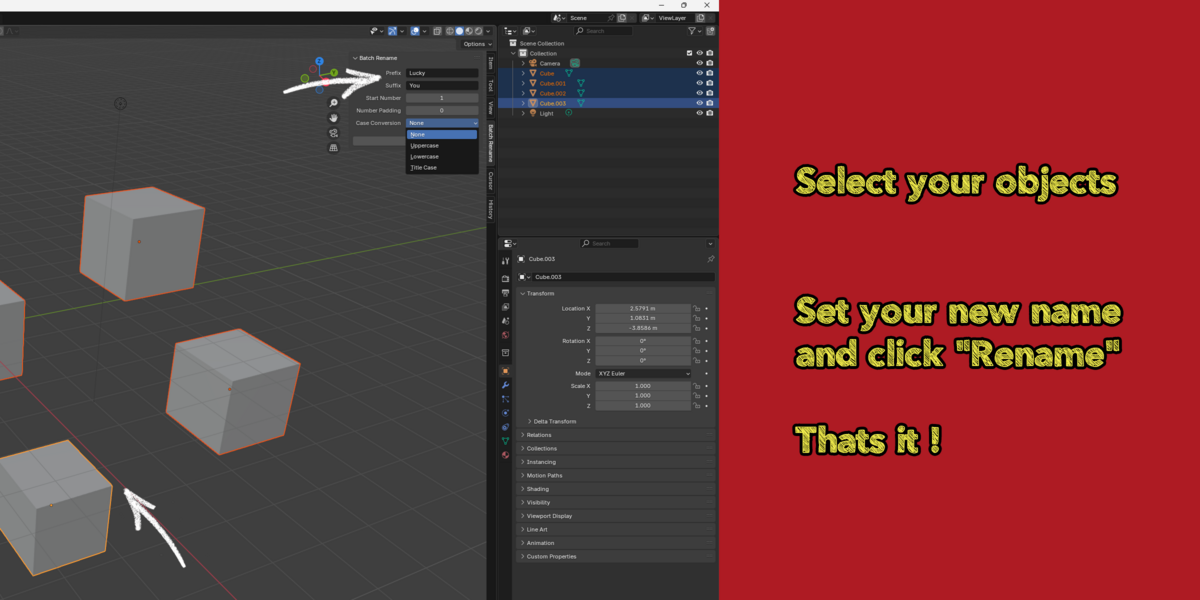


Batch Rename streamlines scene organization in Blender by allowing you to rename multiple objects simultaneously. Designed for asset organization, game production pipelines, and clean scene management, it provides full control over prefixes, suffixes, sequential numbering, and case formatting right from the 3D Viewport.
Installation
Open Blender and go to Edit > Preferences > Add-ons.
Click Install... (or Install from Disk in Blender 4.2+) and navigate to your downloaded
Batch Rename.zipfile.Select the file and click Install from Disk.
Check the box next to Batch Rename to enable it, then save your preferences.
Feature Breakdown
Prefix & Suffix: Append text to the start or end of selected object names.
Start Number: Set the starting numerical index for sequential naming.
Number Padding: Define the total digit count for zero-padding (e.g., padding of
3generates001,002).Case Conversion: Toggle between None, Uppercase, Lowercase, and Title Case.
Real-Time Feedback: Preview resulting names in real time before executing the rename operation.
How to Use
Select all objects in the 3D Viewport or Outliner that you wish to rename.
Press
Nto bring up the 3D Viewport Sidebar and open the Batch Rename tab.Enter your desired Prefix or Suffix, and adjust the Numbering or Case Conversion settings.
Click Rename to apply the updates to all selected objects.
Have questions about this product?
Login to message
| Blender Extension Compatible | Yes |
| Published | almost 2 years ago |
| Blender Version | 4.3, 4.2, 4.1, 4.0, 3.6, 3.5, 3.4, 3.3, 3.2, 3.1, 3.0 |
| Extension Type | Add-on |
| License | GPL |

alexdepario