 Roham Rafi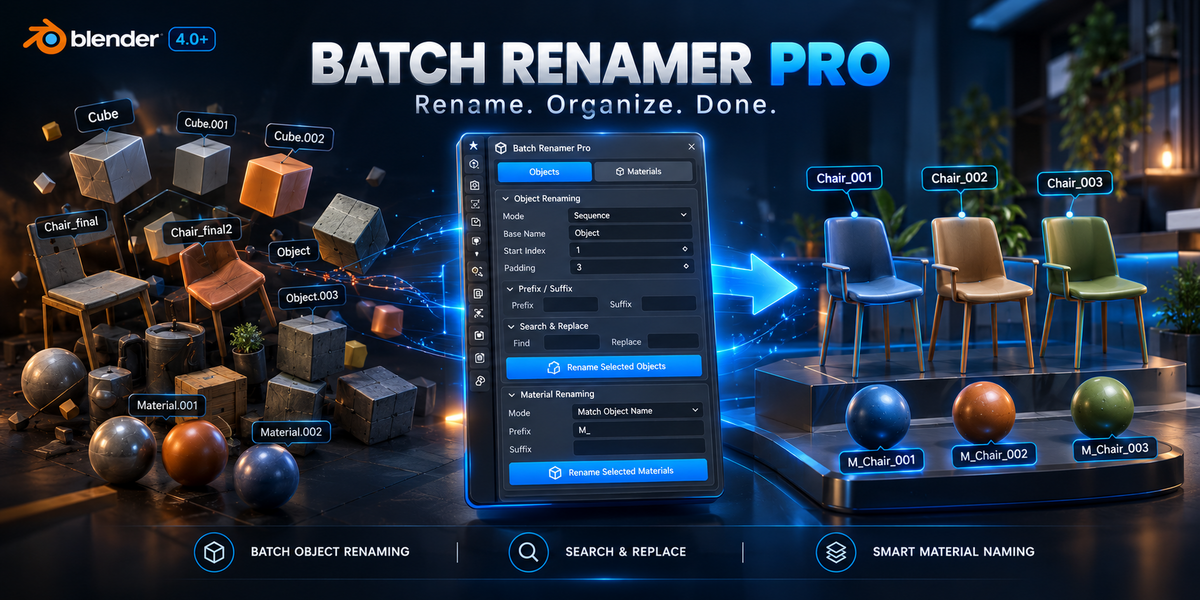

Batch Renamer Pro
Rename objects and materials faster. Keep your Blender projects clean and organized.
Overview
Batch Renamer Pro is a lightweight Blender add-on designed to make batch renaming simple and efficient.
Whether you're organizing a kitbash library, cleaning up a complex scene, preparing assets for export, or managing a large collection of objects, Batch Renamer Pro lets you rename multiple items at once instead of doing it manually.
Key Features
Object Batch Renaming

Rename multiple selected objects using three flexible methods:
Sequence — Add a base name with automatic numbering.
Prop_001, Prop_002, Prop_003...Prefix / Suffix — Add custom text to the beginning or end of existing names.

Search & Replace — Find specific text in object names and replace it across your selection.
Material Organization
Quickly clean up and organize material names:

Match Object Name — Rename a material based on its assigned object's name.
Add a custom prefix or suffix to material names.
Example:SciFi_Panel→M_SciFi_PanelSequence Numbering — Apply consistent numbering to multiple materials.
Clean & Minimal UI

The add-on is integrated directly into the Blender 3D Viewport Sidebar under the Batch Mod tab.
Its compact, collapsible interface keeps the tools accessible without taking unnecessary space in your workspace.
Use Cases
Asset & Kitbash Creation
Organize objects and materials before publishing your Blender assets on marketplaces such as Blender Market, ArtStation, or Sketchfab.
Game Development
Maintain consistent naming conventions when preparing assets for engines such as Unreal Engine and Unity.
Large Blender Scenes
Quickly clean up object and material names in architectural, hard-surface, environment, and other complex scenes.
Why Batch Renamer Pro?
Fast batch renaming
Simple workflow
Object and material support
Custom prefixes and suffixes
Search & Replace
Automatic numbering
Clean Blender-native interface
Lightweight and easy to use
Spend less time renaming. Spend more time creating.
Requirements
Blender: 4.2 - 5.2