Batch Shader Assigner Pro – Mass Material Assignment For Blender
 Anvil Interactive Solutions


Overview
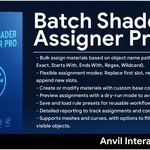
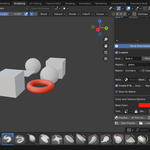
Batch Shader Assigner Pro is a powerful Blender 4.4 add-on designed to streamline material management by automating the assignment of shaders to multiple objects based on name patterns. It enhances workflow efficiency with customizable rules, color adjustments, texture support, and preset management. Ideal for artists, animators, and developers working with complex scenes needing consistent material application.
Version: 3.0.0
Blender Compatibility: 4.4 (tested on 3.0+)
Author: Serena + Anvil interactive solutions
License: MIT
Location: 3D View > Sidebar > Batch Shader
Features
The add-on offers a suite of configurable material assignment tools, accessible via an intuitive panel:
- Rule-Based Assignment: Apply materials to objects matching name patterns (e.g., "metal", "glass").
- Custom Colors: Set base colors for materials using RGB values.
- Texture Integration: Import and apply textures to enhance materials.
- Multiple Rule Support: Manage and prioritize multiple assignment rules.
- Preset Management: Save, load, and export rule sets for reuse.
- Dry Run Mode: Preview changes without applying them.
Installation
Follow these steps to install Batch Shader Assigner Pro in Blender:
Download the Add-on:
Obtain the batch_shader_assigner_pro_v3.0.0.zip file from the SuperHive Marketplace or the author’s repository.
Install in Blender:
- Open Blender and go to Edit > Preferences > Add-ons.
- Click Install... and select the downloaded batch_shader_assigner_pro_v3.0.0.zip.
- Enable the add-on by checking the box next to "Batch Shader Assigner Pro".
- Verify Installation:
- Open the 3D View, press N to open the sidebar, and look for the "Batch Shader" tab.
- If the tab is missing, ensure the add-on is enabled and Blender is version 4.4 or higher.
Note:
The add-on is distributed as a ZIP containing a folder (BatchShaderAssignerPro) with __init__.py, additional scripts (if any), README.md. Do not extract the ZIP manually; Blender handles it during installation.
Usage
To use Batch Shader Assigner Pro:
Open the Interface:
- In Blender’s 3D View, press N to open the sidebar.
- Navigate to the "Batch Shader" tab.
Configure Options:
The panel includes:
- Rules List: Add rules with keywords, match types (e.g., Contains, Regex), priorities, and target materials.
- Color Options: Adjust RGB values for material base colors.
- Texture Options: Import textures to apply to materials.
- Dry Run Toggle: Enable to preview without applying.
- Run Assignment Button: Execute the material assignments.
Run Assignment:
- Enable desired rules and options.
- Click Run Assignment to apply materials.
- A confirmation message appears in the Blender status bar (e.g., "Materials assigned successfully").
Example Workflow
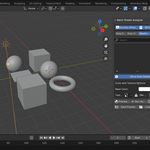
- Starting Scene: A scene with objects like "Metal_Cube", "Glass_Sphere", and "Wood_Panel" with no materials.
- Run Assignment:
- Add a "Metal Rule" (keyword "metal", color [0.5, 0.5, 0.5]).
- Add a "Glass Rule" (keyword "glass", color [0.1, 0.2, 0.8], texture "glass_texture.jpg").
- Click Run Assignment.
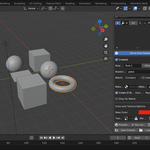
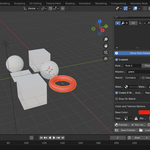
- Result: "Metal_Cube" gets a gray material, "Glass_Sphere" gets a blue textured material, and "Wood_Panel" remains unchanged.
Feature Details
- Rule-Based Assignment
- Purpose: Assigns materials to objects based on name patterns.
- Technical Details: Uses string matching (e.g., re.search for Regex) and prioritizes rules by user-defined order.
- Use Case: Efficiently apply materials to large groups (e.g., all "metal" objects).
- Custom Colors
- Purpose: Sets base colors for materials.
- Technical Details: Updates ShaderNodeBsdfPrincipled inputs with RGB values via node.inputs['Base Color'].default_value.
- Use Case: Quickly prototype material looks without external editors.
- Texture Integration
- Purpose: Applies textures to materials.
- Technical Details: Imports images via bpy.data.images.load and connects them to shader nodes.
- Use Case: Enhances realism with custom textures (e.g., wood grain, metal scratches).
- Multiple Rule Support
- Purpose: Handles complex scenes with varied materials.
- Technical Details: Sorts rules by priority and applies them sequentially with stop-on-match options.
- Use Case: Assign different materials to "metal" and "glass" objects in one pass.
- Preset Management
- Purpose: Saves rule sets for reuse.
- Technical Details: Stores configurations as JSON in add-on preferences, exportable to files.
- Use Case: Speeds up repetitive tasks across projects.
- Dry Run Mode
- Purpose: Previews changes safely.
- Technical Details: Simulates assignments and logs results without modifying the scene.
- Use Case: Avoids accidental overwrites in critical scenes.
Compatibility
- Blender Versions: 4.4 (tested on 3.0+).
- Operating Systems: Windows, macOS, Linux (Blender-supported platforms).
- Dependencies: None; uses Blender’s Python API (bpy, mathutils).
Troubleshooting
- Interface Not Visible: Ensure the add-on is enabled in Preferences and Blender is 4.4+.
- No Materials Applied: Check object names match rules and materials are creatable (enable "Create If Missing").
- Texture Not Loading: Verify file path and format (e.g., JPG, PNG); re-import if needed.
- Crashes on Run: Open the console (Window > Toggle System Console) for errors; disable unused rules and retry.
For further support, contact xAI or visit the SuperHive product page.
Developer Notes
The add-on is structured for maintainability and extension:
File Structure:
- __init__.py: Contains bl_info and registration logic.
- batch_shader_assigner.py: Implements core functions, properties, operator, and panel.
Extending the Add-on:
- Add new assignment types (e.g., normal maps) in batch_shader_assigner.py and register them in the settings class.
- Update the operator’s execute method to handle new features.
- Add UI elements to the panel’s draw method.
Example:
To add material roughness control, create a function to adjust Roughness inputs and add a FloatProperty toggle.
Code Style:
- Follows PEP 8 guidelines.
- Includes error handling (e.g., try-except for texture imports).
- Uses Blender’s context overrides for safe operations.
Customization:
- Adjust rule priority ranges or match types by editing batch_shader_assigner.py.
- Extend texture support for additional formats (e.g., EXR) with proper node connections.
Contribute via the SuperHive ZIP or author’s repository (if available).
Changelog
- v3.0.0 (2025):
- Initial release with rule-based assignment, colors, textures, and presets.
- Added dry run mode for safe previews.
License
Batch Shader Assigner Pro is licensed under the MIT License.
Contact
- Author: Serena + Anvil interactive solutions
- Support: Report issues on the SuperHive Marketplace product page.
- Feedback: Suggest features via SuperHive or direct contact.
Thank you for using Batch Shader Assigner Pro! Elevate your Blender material workflow with ease.
Have questions about this product?
Login to message
| Published | about 1 year ago |
| Blender Version | 3.5 - 5.0 |
| Extension Type | N/A |
| Render Engine Used | Cycles, Eevee |
| License | Mit |
Discover more products like this
automation Workflow textures batch organization productivity Material Shader