 Kamil
Kamil




Batch Render Manager - Transform Your Blender Workflow Into a Rendering Powerhouse
The Complete Automation Solution for batch render. Created by an Artist Who Lives Your Daily Challenges
After over a decade working in architectural visualization, product catalogs, and commercial brochures, I've rendered thousands of variations. Literally thousands. The same chair with twelve fabric options. An entire furniture line photographed from five angles. Product families where each component needed three finish choices. Every single time, the workflow was the same exhausting cycle: swap material, position camera, render, save, repeat.
There had to be a better way.
So I started developing the first version that was crude, a simple Python script that automated the. Over the past year that idea grew into something far more ambitious. Through countless production tests, late-night coding sessions, and real-world project demands, it grew into a complete three-addon ecosystem.
That's how the Batch render manager born
I rebuilt the rendering core to keep Blender responsive. Added intelligent object-material pairing for complex scenarios. Or a dedicated list for batch render. Designed pie menus because I was tired of hunting through dropdown lists. Built CSV export/import because I could save or import different configurations without building them again .
Every feature exists because I needed it in actual paid work. The automatic objects/collections hiding? That came from overlapping product variations in the same scene. The live preview system? Born from rendering the wrong material combination and wasting an hour. The queue editing tools? The idea was to easily organize render jobs. Pause/Stop/Resume render system because it’s easier to start from a certain point.
Now set up for batch render takes minutes, not hours. You can batch render on the other machine during night. Rendering one object with different materials or multiple objects with different materials in a single pass, something that used to require careful manual coordination happens automatically. The workflow that once consumed my evenings now runs in the background while I work on the next project.
This isn't a tool built in a vacuum by someone who thinks they understand artist workflows. This is built by an artist who's lived in the trenches of commercial production for over years. Every button placement, every shortcut, every automation exists because it solved a real problem I faced repeatedly in client work.
I created a Batch Render Manager because I needed it to survive in production. Now I'm sharing it because I know you need it too.
Features That Set This Extension Apart
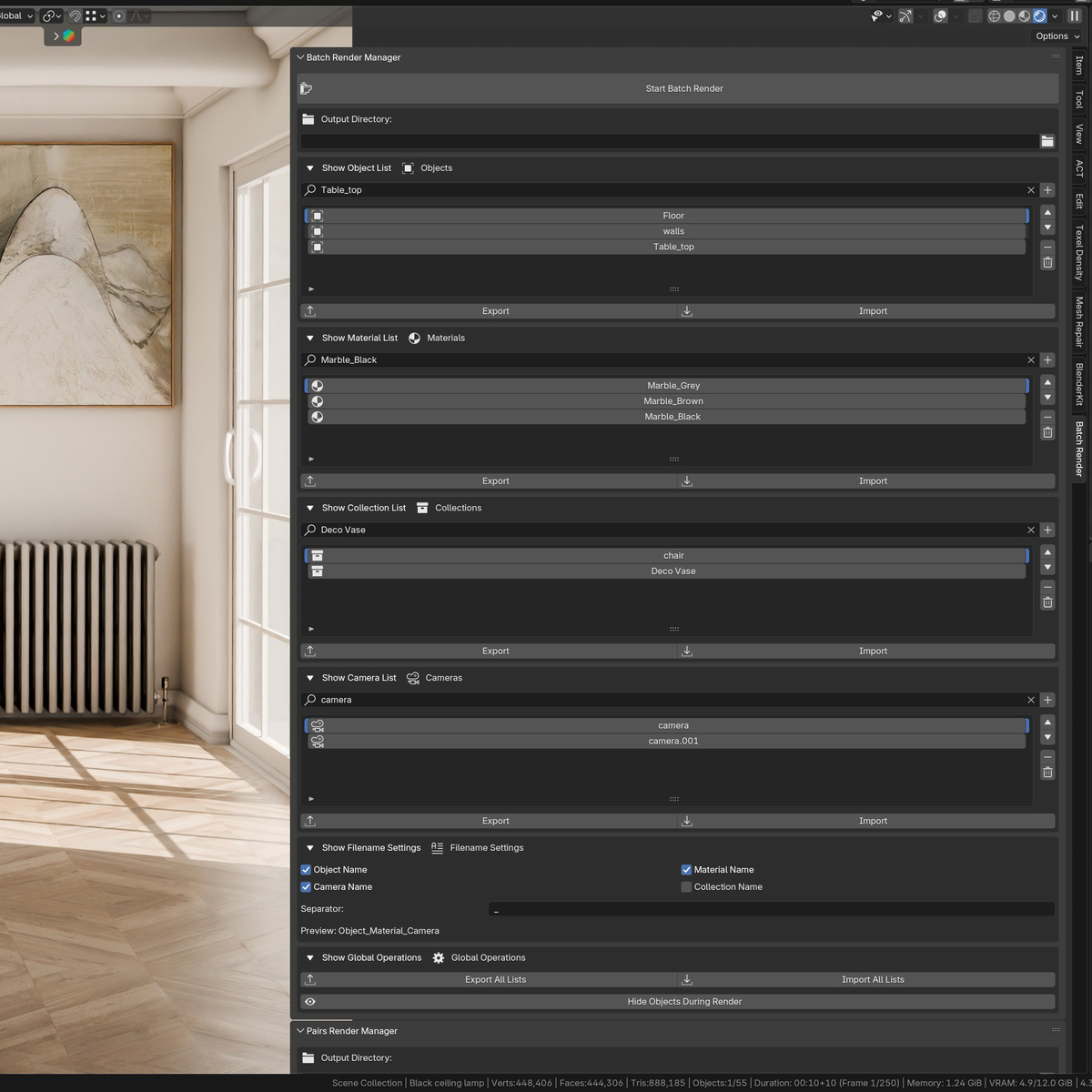
- Non-Blocking Render Core: Blender stays fully responsive during batch renders while renders process in the background
- Pause / Stop / Resume - system for rendering.
- Dedicated list for: Objects / Materials / Collections/ Cameras for fast batch render organisation.
- Smart Object-Material Pairing System: Create sophisticated combinations where multiple objects receive different materials simultaneously in a single render
- Intelligent Collection Management: Automatically shows and hides collections during rendering to prevent overlapping geometry and maintain clean outputs
- Live Preview System: Click any item in your lists to instantly preview materials, switch cameras, or highlight objects no test renders needed
- Flexible Queue Control: Pause after any job, skip specific renders with checkboxes, or reorder your queue on the fly with drag-and-drop simplicity
- Animation-Ready Architecture: Render animation sequences with customizable frame ranges perfect for turntables, product demonstrations, or material transitions. Yes! this support animation KeyFrame
- Lightning-Fast Pie Menus: Add objects, materials, and cameras to your batch with customizable hotkeys no more digging through endless dropdown menus
- Material Picker Eyedropper: Grab materials directly from objects in your viewport and instantly add them to render lists
- CSV Import/Export: Save complete batch configurations as spreadsheet files for reuse across projects or team collaboration
- Comprehensive Filename Control: Customize output names with automatic object, material, camera, and collection tags organize thousands of renders effortlessly
- Real-Time Progress Tracking: Visual progress bar shows exactly where you are in your queue with job counts and percentage completion
- Editable Summary Groups: Modify existing batch configurations without rebuilding from scratch swap one material and update instantly
- Dual Operating Modes: Choose Single mode for systematic individual renders or Pair mode for complex multi-object material combinations
- Assistant Material Lists: Pre-define frequently-used materials for complex scenes with hundreds of shaders find what you need in seconds
What Artists Achieve With This Extension
-
- Render entire product catalogs overnight -handle dozens of items with multiple material options across various camera angles, completely automated while you sleep
- Test material combinations in minutes instead of hours-see how different finishes, textures, and surfaces work together before finalizing presentations
- Generate comprehensive variation sheets effortlessly-capture every design option with different colors, materials, and lighting setups for review and approval
- Create systematic comparison frames automatically-explore color palettes, material properties, and composition variations without repetitive manual setup
- Produce consistent imagery across massive collections-maintain standardized angles and lighting throughout entire projects with zero manual intervention per item
- Deliver client revisions at unprecedented speed-save batch configurations as reusable templates, swap materials based on feedback, and re-render only what changed
- Document every design variation for reference-build complete visual libraries showing every material option for presentations, portfolios, or internal documentation
- Explore finish options comprehensively-visualize designs with metallic, matte, glossy, wooden, fabric, and textured surfaces to present full ranges to stakeholders
- Showcase complete color collections systematically-generate entire palette ranges across multiple angles and lighting conditions without touching render settings
- Display material alternatives instantly-show how designs transform with different textures, finishes, and surface treatments in organized, comparable outputs
- Meet tight deadlines with confidence—-hundreds of renders to process overnight or over weekends, delivering complete sets when you return
- Maintain creative momentum during production-eliminate the mental drain of repetitive tasks so you stay focused on design decisions that matter
- Scale projects without workflow breakdown-handle small boutique jobs and massive commercial campaigns using the exact same efficient process
-
How This Extension Accelerates Your Batch Rendering
-
- Eliminate 80% of Setup Time: Pie menus and right-click shortcuts let you build render queues in seconds instead of minutes what took an hour now takes ten minutes
- Work While Rendering: Non-blocking architecture means your creative flow never stops prepare your next project while the current one renders
- Catch Mistakes Early: Preview any job in your queue instantly before committing to hours of rendering spot framing issues, material mismatches, or lighting problems immediately
- Saved different combinations: CSV saves different variations of lists or pairs. To future use
- Scale Without Pain: Managing ten renders versus a thousand uses the same simple workflow complexity doesn't increase with project size
- Iterate at preview Speed: Click-to-preview system lets you test material combinations visually before rendering make creative decisions faster
- Batch Edit Configurations: Modify existing render groups without rebuilding change one material across dozens of jobs with a single update
- Never Lose Progress: Pause and resume functionality means you can stop, adjust lighting, and continue without restarting from job one
- Organize Automatically: Customizable folder structures sort renders by collection, camera, or material find specific outputs instantly in massive batches
Stop wasting valuable creative time on repetitive rendering tasks. Whether you're managing a solo project or coordinating with a team, Batch Render Manager gives you back hours every week to focus on what matters: creating stunning artwork that wins clients and builds your portfolio.
If you have any questions about this add-on, or if you’re unsure whether it will help with batch rendering, feel free to ask!
You can also share your ideas for new features I’m always open to suggestions.
Join the Discord server below, where I’ll be happy to answer any questions before or after your purchase.
https://discord.gg/NeNN5yaK
