 BEXAR STUDIO







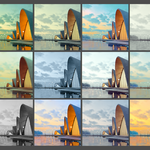
Professional Color Grading,
Inside Blender.
A Lightroom-inspired color grading system built for Blender artists. Cinematic looks, real-time editing, and a professional preset library — all without leaving Blender.
|
30+
Cinematic Looks
|
40+
Blender Artists
|
v1.1
Current Version
|
$0
Extra Software
|

Professional Workflow.
Without The Complexity.
BEXAR STUDIO eliminates multiple applications, monthly subscriptions, and repetitive export workflows. Everything happens directly inside Blender.
Save more than $200+ per year compared to traditional subscription-based workflows.
Core Workflow
Everything you need, inside one tool.
Dual Editing Workflow
Scene Mode and Photo Mode in one tool. Edit Blender scenes and imported images without touching your compositor node tree.

Lightroom-Inspired Controls
Professional exposure, contrast, highlights, shadows, color balance, mood, and atmosphere. No nodes. No wiring.

Real-Time Viewport
Adjust grading controls and watch your scene respond in real time. No baking, no waiting.

Before & After
Toggle a full before/after split view at any point in your workflow. See exactly what your grade is doing.

Professional Color Grading.
Directly Inside Blender.
BEXAR STUDIO brings a professional Lightroom-style workflow directly inside Blender. Edit light, color, contrast, mood, and atmosphere with powerful presets and intuitive controls — all fully integrated into your scene.
|
✓ One-Click Looks
Instantly switch between cinematic and professional looks with a single click. |
✓ Smart Libraries
Organized preset libraries with thumbnails for a fast and modern workflow. |
|
✓ Non-Destructive
Keep full control over your scene while editing colors and mood safely. |
✓ Real-Time Preview
Viewport grading with instant before/after preview directly inside Blender. |
|
✓ Beginner Friendly
No prior compositing or nodes knowledge required to achieve professional results. |
✓ Blender 5.0 Ready
Fully compatible with Blender 5.0 and optimized for modern workflows. |
Presets & Library
Professional looks, one click away.
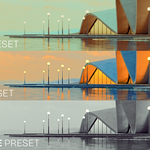
Browse cinematic presets visually. Save your own. Batch render multiple looks simultaneously.


Full Workflow Walkthrough
See everything in action.
A complete walkthrough of the grading system, preset workflow, cinematic effects, and real-time editing tools.
Complete Feature List
Everything in BEXAR STUDIO.
|
Presets Workflow
|
Editing Workflow
|
Workflow Tools
|
Compatibility
|
Save More Than $200+ Per Year
Most artists pay monthly for Lightroom, Photoshop, or other editing tools. With BEXAR STUDIO you pay once and own it forever.
|
Recommended
BEXAR STUDIO
$25
Lifetime Access
✔ One-Time Purchase
✔ No Monthly Fees
✔ Real-Time Workflow
✔ Blender Integrated
✔ Presets & Cinematic Grading
✔ No External Software Required
✔ All Future Updates Included
|
Traditional Workflow
$18+
Monthly Subscription
✖ Recurring Monthly Cost
✖ Multiple External Apps
✖ Export & Re-Import Workflow
✖ Higher Long-Term Cost
✖ Slower Pipeline
✖ Multi-App Workflow Complexity
✖ Subscription Lock-In
|
What's Included
✓
BEXAR Addon (.zip) — Ready to install via Blender Preferences.
✓
BEXAR Presets Library — Cinematic, Studio, Natural, Neutral, Stylized, and more.
✓
Quick Start Guide (Video) — Get up and running in minutes.
|
How to Install
1
Install via Edit → Preferences → Add-ons → Install.
2
Open the panel in Sidebar → BEXAR.
3
Browse included presets with thumbnails.
4
Apply any preset — instant cinematic result.
5
Create, edit, and save your own custom presets.
|