 AllanSPK


Installation & Quick Start
For a detailed overview of features, please check the main product description. Below is a quick guide to get up and running:
Installation: Download the .zip file, go to Blender Preferences > Add-ons, click Install from disk, select the file, and check the box to enable it.
Access: Press N in the 3D Viewport to open the Sidebar and find the Camera Guides panel.
-
Usage:
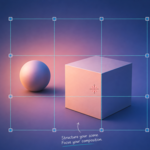
Use the Add New Guide panel to instantly create vertical or horizontal lines with one click.
Position your lines fluidly by dragging them manually with the mouse, adjust exact positions via coordinate values.
Toggle Mirror Mode for symmetrical layouts, customize line thickness, opacity, and colors (globally or individually via add-on preferences) to fit your project workflow.
Have questions about this product?
Login to message
| Published | about 2 months ago |
| Blender Version | 5.0 - 5.2 |
| Extension Type | N/A |
| License | GPL |

Discover more products like this
cinematography camera modeling layout rule of thirds reference guides framing composition animation overlay viewport