 Zubaryev


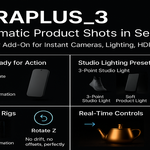
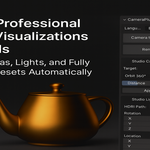
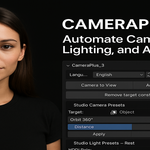
CameraPlus_3 v6 — Target–Bound Studio Camera & Lighting Toolkit for Blender
============================================================================
Author: Dmytro Zubaryev (Newpower)
Portfolio: https://www.behance.net/dmytrozubaryev
OVERVIEW
--------
CameraPlus_3 v3 builds on the original v1 toolset and v2 Light Distance logic, while keeping all presets and UI intact.
This version improves the way rigs follow your subject:
- All helper empties for camera moves are placed directly at the Target object origin.
- Studio light rigs are centered on the Target via AI_LIGHT_HUB and base vectors.
- Rotate Z and Light Distance now operate coherently around the Target’s origin.
FEATURES
--------
- 20 Camera Presets (unchanged from v1):
Orbit 360°, fast zoom, dolly, crane, side moves, reveals, spiral in, handheld, static framing and more.
- 20 Studio Light Presets (unchanged from v1):
Multiple 3-point variations, Rembrandt, Butterfly, Split, Loop, Clamshell, product, rim, fashion, ambient, etc.
- Target–Bound Camera Empties:
• All helper empties (e.g. AI_CAMCTRL) are created at the Target origin.
• Camera moves orbit and dolly around the actual object you picked in the Target field.
- Target–Bound Light Rigs:
• AI_LIGHT_HUB is placed and optionally parented at the Target origin.
• Each light stores a base offset relative to the hub/Target, so Light Distance scales cleanly from the object.
• Rotate Z spins the whole rig around the subject.
- Rotate Z + Light Distance Controls:
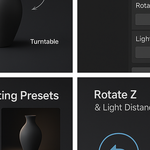
• Rotate Z (°) — rotates the studio light rig around the Target.
• Light Distance — pushes/pulls the rig radially away from the Target while keeping the composition.
- HDRI (Custom — Live):
• Load your own HDRI/EXR.
• Adjust rotation (XYZ), location (XYZ) and strength on the fly.
- EN/RU UI:
• All key labels are localized.
• Quick language switch via the addon header.
WORKFLOW
--------
1) Select a Target object or choose it in the Target field.
2) Apply a Camera Preset and adjust Distance as needed.
3) Apply a Studio Light Preset to build a complete rig around the Target.
4) Use Rotate Z and Light Distance to refine light direction and falloff around the object.
5) Optionally add HDRI and match it to the studio setup.
INSTALLATION
------------
1. In Blender, go to Edit → Preferences → Add-ons.
2. Click “Install…” and select `CameraPlus_3_v3.zip`.
3. Enable “CameraPlus_3” in the addon list.
4. Open the N-panel in the 3D Viewport and go to “CameraPlus_3”.
LICENSE
-------
You may use CameraPlus_3 for personal and commercial renders/animations.
Redistribution of the addon code as a competing product is not allowed.CameraPlus_3 v6 — Target–Bound Studio Camera & Lighting Toolkit for Blender
============================================================================
Author: Dmytro Zubaryev (Newpower)
Portfolio: https://www.behance.net/dmytrozubaryev
OVERVIEW
--------
CameraPlus_3 v3 builds on the original v1 toolset and v2 Light Distance logic, while keeping all presets and UI intact.
This version improves the way rigs follow your subject:
- All helper empties for camera moves are placed directly at the Target object origin.
- Studio light rigs are centered on the Target via AI_LIGHT_HUB and base vectors.
- Rotate Z and Light Distance now operate coherently around the Target’s origin.
FEATURES
--------
- 20 Camera Presets (unchanged from v1):
Orbit 360°, fast zoom, dolly, crane, side moves, reveals, spiral in, handheld, static framing and more.
- 20 Studio Light Presets (unchanged from v1):
Multiple 3-point variations, Rembrandt, Butterfly, Split, Loop, Clamshell, product, rim, fashion, ambient, etc.
- Target–Bound Camera Empties:
• All helper empties (e.g. AI_CAMCTRL) are created at the Target origin.
• Camera moves orbit and dolly around the actual object you picked in the Target field.
- Target–Bound Light Rigs:
• AI_LIGHT_HUB is placed and optionally parented at the Target origin.
• Each light stores a base offset relative to the hub/Target, so Light Distance scales cleanly from the object.
• Rotate Z spins the whole rig around the subject.
- Rotate Z + Light Distance Controls:
• Rotate Z (°) — rotates the studio light rig around the Target.
• Light Distance — pushes/pulls the rig radially away from the Target while keeping the composition.
- HDRI (Custom — Live):
• Load your own HDRI/EXR.
• Adjust rotation (XYZ), location (XYZ) and strength on the fly.
- EN/RU UI:
• All key labels are localized.
• Quick language switch via the addon header.
WORKFLOW
--------
1) Select a Target object or choose it in the Target field.
2) Apply a Camera Preset and adjust Distance as needed.
3) Apply a Studio Light Preset to build a complete rig around the Target.
4) Use Rotate Z and Light Distance to refine light direction and falloff around the object.
5) Optionally add HDRI and match it to the studio setup.
INSTALLATION
------------
1. In Blender, go to Edit → Preferences → Add-ons.
2. Click “Install…” and select `CameraPlus_3_v3.zip`.
3. Enable “CameraPlus_3” in the addon list.
4. Open the N-panel in the 3D Viewport and go to “CameraPlus_3”.
LICENSE
-------
You may use CameraPlus_3 for personal and commercial renders/animations.
Redistribution of the addon code as a competing product is not allowed.
Have questions about this product?
Login to message
| Blender Extension Compatible | Yes |
| Published | 11 months ago |
| Blender Version | 4.0 - 5.0 |
| Extension Type | Add-on |
| Render Engine Used | Cycles, Eevee |
| License | GPL |
Discover more products like this
product rendering hdri control cinematic camera 360 degree lighting #3DCamera add camera 3d-light blender addon product lighting 3D camera positions 1 click light setup Studio Lighting