Cineflow — Cinematic Camera Motion Made Easy
 Oculis Studio



Documentation
Cineflow
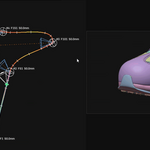
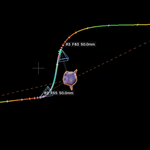
Cinematic spline-path camera system for Blender. Place waypoint cameras, build an arc-length-parameterised Bézier path, and shape timing with per-segment speed ramps.
Getting started
Installation
|
Install the add-on Edit → Preferences → Add-ons → Install…. Select the addon zip (or the cineflow folder) and enable Cineflow. |
Requirements Blender 3.0 or later, tested on 5.0.1. No external dependencies. |
Getting started
Where to find it
|
N-panel View3D → Sidebar → the Cineflow tab. |
Pie menu Press E in the 3D Viewport (Object mode) for the quick workflow menu. |
Core loop
Quick start
1 |
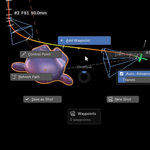
Place waypoints Position the 3D view and frame, then click Place Waypoint (or press E). Repeat for at least two waypoints. |
2 |
Build the path Click Build Path to generate an arc-length-parameterised Bézier path from your waypoints, then adjust it with the in-viewport handles. |
3 |
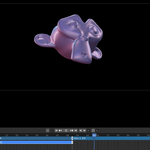
Refine pacing Use the Speed, Segment, and Shake panels to shape timing and add camera shake. |
Reference
Panel overview
| — Placement — add, select, and delete waypoints and control points | — Path — build, recalculate, and loop the camera path |
| — Speed — global speed ramp settings, apply or bypass | — Segment — per-segment timing, easing, and lens zoom keys |
| — Shake — add, remove, and reorder camera shake layers | — Viewport — toggle overlays: speed-coloured path, ticks, frustum, guides |
Reference
Key operators
| Place Waypoint | Adds a waypoint at the current view / frame |
| Build Path / Recalculate Path | Generates or updates the Bézier path |
| Apply Speed Ramps | Bakes speed ramp timing onto the path |
| Save as Shot / New Shot | Manages multiple camera shots |
| Add / Remove / Move Shake Layer | Manages the shake stack |
| Add Extra Zoom Key / Regenerate Lens Keys | Manages lens / zoom keyframes |
| Delete Waypoint / Delete All | Cleanup |
Reference
Preferences
Addon Preferences set factory defaults and the arc-length sample count, which controls path accuracy. Use Apply Defaults to Scene to push those defaults into the current file.
Specs
Under the hood
| Blender | 3.0+ (tested on 5.0.1) |
| Category | Camera |
| Version | 1.0.0 |
| License | GPL-3.0-or-later |
| Dependencies | None — Blender only |
| Author | oculis.studio |
 Included
Includes 12 months of
- Support from Oculis Studio
- Product updates
Extend this product’s Support Period +12 months: 50% of product price
Have questions before purchasing?
Login to message
| Blender Extension Compatible | Yes |
| Sales | 10+ |
| Dev Fund Contributor | |
| Published | about 2 months ago |
| Blender Version | 3.2 - 5.2 |
| Extension Type | Add-on |
| License | GPL |
Discover more products like this
camera follow path speed ramp animation animation camera camera rig path camera blocking