Clean Undo
 GabrielMoro


Clean Undo: Disable "Context Set" from Undo
Version 3.1
Author: Gabriel Moro
What it does
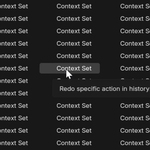
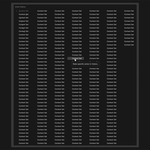
This add-on keeps Blender from adding "Context Set" entries to the undo history when switching Render Result slots with the number keys. It helps keep the undo list cleaner and focused on actual edits.
How to Install
1. Open Blender and go to Edit > Preferences.
2. Open the Add-ons tab.
3. Click Install... and choose the ZIP file.
4. Enable Render: Clean Undo: Disable "Context Set" from Undo.
How to Use
1. Open the Image Editor.
2. Set the image to Render Result.
3. Press keys 1 to 8 to switch render slots.
4. The add-on prevents those slot changes from cluttering the undo history with "Context Set".
Have questions about this product?
Login to message
| Published | 6 months ago |
| Blender Version | 3.0 - 4.5 |
| Extension Type | N/A |
| Render Engine Used | Cycles, Eevee |
| License | GPL |
Discover more products like this
blender blender3d 3d blender fix b3d undo blender 3d Workflow script render-slot