Cveld Flowting Windows
 Color Variations of Eldorado - cvELD -



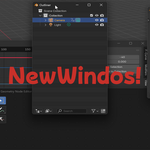
cvELD FloatingWindows - The Ultimate Window Management Add-on
Overview
Dramatically streamline your Blender workflow! "cvELD FloatingWindows" is a revolutionary add-on that lets you
instantly summon any editor window right at your mouse cursor, intelligently keeping it within the bounds of
your current monitor.
Stop wasting time arranging windows and focus on your creation. Whether it's the Outliner, Shader Editor, or
Geometry Nodes, this tool gives you complete control over your workspace, ensuring your creative flow is
never interrupted.
Key Features
* Summon Windows at Your Cursor: With a single shortcut, open any editor as a floating window exactly where
you need it.
* Intelligent On-Screen Clamping: Automatically adjusts window positions to ensure they never go off-screen.
Perfect for multi-monitor setups.
* Full Customization: Freely configure window sizes and keyboard shortcuts for each editor type to perfectly
match your personal workflow.
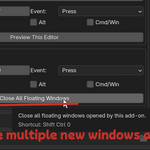
* One-Click Close All: Clean up your workspace in an instant with a global shortcut to close all floating
windows opened by the add-on.
* Localization Support: Comes with built-in Japanese language support, which automatically activates based on
Blender's interface language settings.
Installation
1. In Blender, navigate to Edit > Preferences.
2. Go to the Add-ons tab and click the Install... button.
3. Select the cvELD_FlowtingWindows .zip file or folder that you downloaded.
4. After installation, find "cvELD FloatingWindows" in the add-on list and enable it by ticking the checkbox.
Basic Usage
Once enabled, you can immediately use the following default shortcuts:
┌────────────────┬──────────┬──────────────┐
│ Editor │ Shortcut │ Default Size │
├────────────────┼──────────┼──────────────┤
│ Outliner │ 8 │ 600 × 980 │
│ UV Editor │ 7 │ 800 × 800 │
│ Graph Editor │ 0 │ 1920 × 800 │
│ Shader Editor │ 9 │ 1920 × 800 │
│ Geometry Nodes │ 6 │ 1920 × 800 │
└────────────────┴──────────┴──────────────┘
* Pressing a shortcut key will open the corresponding editor in a new window at your cursor's position.
* Press Shift + Ctrl + 0 to close all floating windows opened by the add-on.
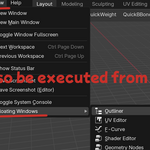
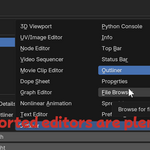
* All commands are also accessible from Blender's top menu under Window > Floating Windows.
Advanced Settings (Preferences)
You can customize the add-on's behavior by navigating to Edit > Preferences > Add-ons > cvELD
FloatingWindows.
* Editor List:
* Add (+): Add a new editor configuration.
* Remove (-): Delete the selected editor configuration.
* Reorder (Up/Down Arrows): Change the order of editors in the list.
* Restore Defaults: Reset all configurations to their initial state.
* Per-Editor Settings:
* Display Name: The name shown in the menu (auto-generated).
* Editor Type: Choose the type of editor to open.
* Subtype: Specify a more detailed editor type where applicable.
* Width & Height: Set the default window size in pixels.
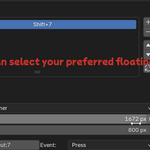
* Shortcut: Assign a unique key and modifier keys (Shift/Ctrl/Alt) for launching.
* Global Commands:
* Customize the shortcut for the "Close All Floating Windows" command.
All changes take effect immediately, and shortcuts are re-registered automatically.
FAQ & Troubleshooting
* Q: The "Close All Floating Windows" command doesn't work.
* A: Some operating systems or window managers may restrict programs from closing windows. This feature
works best on Windows, but its behavior may vary on macOS and Linux.
* Q: The add-on's UI is in English even though I set Blender to Japanese.
* A: Try reloading the add-on by disabling and then re-enabling it in the Preferences.
* Q: The add-on fails to enable.
* A: Check the Blender Console for error messages (Window > Toggle System Console). There might be a
conflict with another add-on using the same shortcuts.
License & Support
This add-on is provided under the MIT License.
For bug reports, feature requests, or any other questions, please feel free to contact us. (Please list your
support contact information or a link to your GitHub repository here).
日本語:
cvELD FloatingWindows - 究極のウィンドウ管理アドオン
概要
あなたのBlenderワークフローを劇的に効率化!「cvELD FloatingWindows」は、マウスカーソルの位置に必要なエディタ
ウィンドウを瞬時に呼び出し、常にモニター内にスマートに表示する画期的なアドオンです。
アウトライナー、シェーダーエディタ、ジオメトリノードなど、あらゆるエディタを自在に操り、制作のフローを一切妨
げません。もうウィンドウの配置に悩まされる時間は終わりです。
主な機能
* カーソル位置にウィンドウを召喚:
ショートカットキー一つで、マウスのある場所に目的のエディタをフローティングウィンドウとして表示します。
* インテリジェントな画面内表示:
生成されたウィンドウがモニターの範囲外にはみ出さないよう自動で位置を調整。マルチモニター環境でも快適です。
* 完全なカスタマイズ性: エディタごとにウィンドウサイズやショートカットキーを自由自在に設定可能。あなたの作業ス
タイルに完璧にマッチさせることができます。
* 一括クローズ機能:
散らかったフローティングウィンドウは、グローバルショートカットで一瞬にしてすべて閉じることができます。
* 多言語対応: 標準で日本語UIをサポート。Blenderのインターフェース言語設定に合わせて自動で切り替わります。
インストール方法
1. Blenderを起動し、トップメニューから 編集 > プリファレンス を選択します。
2. アドオン タブを開き、インストール... ボタンをクリックします。
3. ダウンロードした cvELD_FlowtingWindows のzipファイルまたはフォルダを選択し、インストールします。
4. インストール後、アドオンのリストに「cvELD
FloatingWindows」が表示されるので、チェックボックスをオンにして有効化してください。
基本的な使い方
アドオンを有効にすると、すぐに以下のデフォルトショートカットが利用可能になります。
┌────────────────────┬────────────────────┬──────────────────┐
│ エディタ │ ショートカットキー │ デフォルトサイズ │
├────────────────────┼────────────────────┼──────────────────┤
│ アウトライナー │ 8 │ 600 × 980 │
│ UVエディタ │ 7 │ 800 × 800 │
│ グラフエディタ │ 0 │ 1920 × 800 │
│ シェーダーエディタ │ 9 │ 1920 × 800 │
│ ジオメトリノード │ 6 │ 1920 × 800 │
└────────────────────┴────────────────────┴──────────────────┘
* 各ショートカットキーを押すと、対応するエディタがマウスカーソル位置に新しいウィンドウとして開きます。
* Shift + Ctrl + 0 を押すと、このアドオンで開いたすべてのフローティングウィンドウを閉じます。
* すべてのコマンドは、Blenderのトップメニュー ウィンドウ > Floating Windows からもアクセスできます。
詳細設定(プリファレンス)
編集 > プリファレンス > アドオン > cvELD FloatingWindows から、アドオンの詳細な設定を行えます。
* エディタリスト:
* 追加 (+): 新しいエディタ設定を追加します。
* 削除 (-): 選択中のエディタ設定を削除します。
* 並び替え (上下矢印): リストの順序を変更します。
* デフォルトに戻す: 設定を初期状態にリセットします。
* エディタごとの設定:
* 表示名: メニューに表示される名前です(自動生成されます)。
* エディタタイプ: 表示したいエディタの種類を選択します。
* サブタイプ: エディタによっては、さらに詳細なタイプを指定できます。
* 幅と高さ: ウィンドウのデフォルトサイズをピクセル単位で指定します。
* ショートカット: 起動用のキーと、Shift/Ctrl/Altなどの修飾キーを割り当てます。
* グローバルコマンド:
* 「すべてのフローティングウィンドウを閉じる」機能のショートカットキーをカスタマイズできます。
設定は即座に反映され、ショートカットキーも自動で再登録されます。
よくある質問とトラブルシューティング
* Q: 「すべてのフローティングウィンドウを閉じる」が機能しません。
* A: お使いのOSやウィンドウマネージャーの設定によっては、プログラムによるウィンドウのクローズが制限されて
いる場合があります。特にmacOS/Linuxでは、期待通りに動作しないことがあります。
* Q: UIが日本語設定なのに、アドオンの表示が英語のままです。
* A: アドオンを再読み込み(一度無効化し、再度有効化)することで解決する場合があります。
* Q: アドオンを有効化できません。
* A: Blenderのコンソールウィンドウ(ウィンドウ > システムコンソールを切り替え)に表示されるエラーメッセー
ジを確認してください。他のアドオンとショートカットキーが競合している可能性も考えられます。
ライセンスとサポート
このアドオンはMITライセンスの下で提供されます。
Have questions about this product?
Login to message
| Blender Extension Compatible | Yes |
| Sales | 20+ |
| Published | 12 months ago |
| Blender Version | 3.6 - 5.0 |
| Extension Type | Add-on |
| Render Engine Used | Cycles, Eevee |
| License | Mit |