 Joey Carlino




Last Updated 6-04-2026
Requires Blender 4.3+
Tested in 4.3 - 5.1
Please do not redistribute
Draw your 3D models
I've always wanted to draw my 3D models, and this tool is my attempt at making that a reality.
Works with curves and grease pencil!
Drop the Blend file into your asset folder or append the asset collection to use these in any project.
7 modes for ultimate control:
-
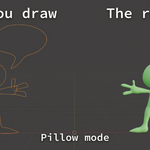
Pillow - fills your stroke and makes it inflate based on distance to edge
-
Clay Gun - Turns grease pencil into a smooth mesh, easy to color and animate (works best with grease pencil, but also works with curves)
-
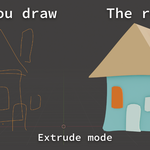
Extrude - fills your stroke and extrudes it
-
Stroke - gives thickness to your stroke, can be remeshed to make strokes merge together
-
Flat - fills your stroke with an ngon
-
Pillow + Stroke - combines all of the stroke and pillow options
-
Flat + Stroke - combines all of the flat and stroke options.
How to use it
https://www.youtube.com/watch?v=zCXbY_FhUMo
Directions
Use Shift A to add a curve or grease pencil object. For curves, go into edit mode and use the draw tool to draw a stroke.
In edit mode, try using ALT S to change the radius, and try using CTRL T to change the tilt.
If tilt and radius control doesn't seem relevant, then these controls will control different properties. For example, radius will change the extrusion depth and tilt will change the offset.
To turn a curve into a mesh, in object mode, right click and choose "convert to > mesh". Then you can make the topology better with the built in Quadriflow remesher, or something like the Exoside Quadremesher.
If you want to turn grease pencil into a mesh, make a new mesh object and add the "GP to Mesh" geo node modifier. Then you can apply it to get a mesh version of your grease pencil creation.
