 KiyohitoMaeda


Edge Bridge Fill
Fill a quad face between two edges — instantly. Then keep going.
The Problem
You're modeling a hard-surface object and you need to fill a recessed area with a new face. With standard Blender tools, that means:
- Extrude an edge inward with E
- Manually merge vertices one by one
- Clean up the resulting geometry
It works — but it breaks your flow every single time.
The Solution
Edge Bridge Fill reduces that whole process to a single shortcut.
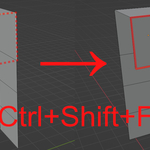
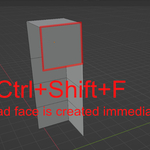
Select two edges, press Ctrl+Shift+F, and the quad face is created immediately — no extrude, no merge, no cleanup.
How It Works
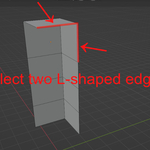
Select two L-shaped edges that meet at a corner.
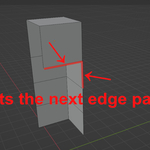
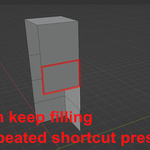
Edge Bridge Fill automatically creates the missing corner vertex, fills the quad face, and selects the next edge pair — so you can keep filling with repeated shortcut presses.
Before — select A-S and S-B:
C
|
A
|
S -------- B
After — face filled, X-A and A-C auto-selected:
C
|
A -------- X
|          |
S -------- B
If A-C does not exist, only X-A is selected. If no next edges are found, the selection is cleared.
Features
- One shortcut — select two L-shaped edges and the face is created instantly
- Smart vertex creation — missing corner vertex is placed using the parallelogram rule for a perfectly aligned result
- Continuous fill — after each fill, the next L-shaped edge pair is auto-selected so you can chain fills with repeated shortcut presses
- Re-uses existing vertices — if the corner vertex already exists, it is detected and reused instead of duplicated
- Full Undo support — Ctrl+Z works as expected
- Mac friendly — both Ctrl+Shift+F and Cmd+Shift+F are registered
Shortcuts
| Shortcut | Platform |
|---|---|
| Ctrl + Shift + F | Windows / Linux / Mac |
| Cmd + Shift + F | Mac |
Requirements
- Blender 3.0 or later
- Works in Edit Mode, Edge Select mode
Installation
- Download the
.zipfile - Go to Edit > Preferences > Add-ons > Install
- Select the
.zipand click Install Add-on - Enable Edge Bridge Fill in the list
