 dgtl-graphics


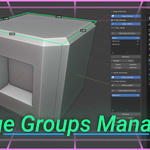
Edge Groups Manager
Addon for Blender 4.3+
Overview
Blender 4.3 introduced custom float attributes for creating edge groups for the Bevel Modifier, surpassing the single bevel weight limit of older versions. However, managing these attributes with default tools is awkward. Edge Groups Manager simplifies this with an intuitive interface for creating, renaming, and managing edge and vertex float attributes, with visual overlays, weight labels, and a quick-access pie menu.
Usage
Accessing the Panel
The addon panel is located in 3D Viewport › Sidebar (N-Panel) under the category specified in addon preferences (default: Edit).
The panel is available in all modes. Attribute controls, overlay, and weight assignment are only available in Edit Mode. In all other modes, you can rename or delete attributes.
Interface Overview
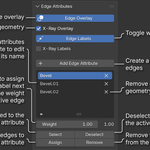
Edge Attributes Panel
Edge Overlay: Enables/disables the edge highlight overlay in Edit Mode, coloring edges with non-zero attribute values.
X-Ray Overlay: Makes the overlay visible through other geometry.
Edge Labels: Shows numerical weight values on top of edges.
X-Ray Labels: Disables occlusion for weight labels, showing them through geometry.
Add Attribute: Creates a new float edge attribute with a unique name (default: “Bevel”).
Attribute List: Displays all edge float attributes. Click the × button to remove one. Double-click an existing attribute to edit its name. Renamed attributes are automatically synchronized in any Bevel and Geometry Nodes modifiers referencing them.
Weight Slider: Sets the weight value to assign to selected edges. A label next to the slider displays the weight of the currently active edge.
Select / Deselect: Select or deselect edges based on their attribute values.
Assign / Remove: Assign the current weight to selected edges, or remove them from the active attribute.
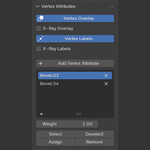
Vertex Attributes Panel
An optional panel for managing vertex float attributes. Can be shown or hidden in addon preferences (Show Vertex Panel).
Vertex Overlay: Enables/disables the vertex highlight overlay, drawing colored circles on vertices with non-zero attribute values.
X-Ray Overlay: Makes the vertex overlay visible through geometry.
Vertex Labels: Shows numerical weight values next to vertices.
X-Ray Labels: Disables occlusion for vertex weight labels.
All other controls (Add, List, Weight, Select/Deselect, Assign/Remove) work identically to the Edge panel.
Pie Menu
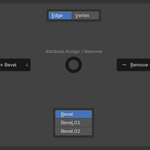
A quick-access pie menu for assigning and removing attribute weights without navigating the sidebar. The hotkey is configurable in addon preferences (default: Shift+Q in Edit Mode).
West — Assign: Assigns the current weight to selected edges or vertices.
East — Remove: Removes selected elements from the active attribute.
South — Attribute List: Shown when more than one attribute exists. Click to switch the active attribute. (Can be turned off in Preferences)
North — Domain Switcher: Shown when both Edge and Vertex panels are active. Switch between domains without closing the menu.
Preferences
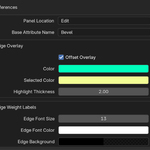
Panel Location: Category name for the panel in the Sidebar (default: “Edit”).
Base Attribute Name: Base name for newly created attributes (default: “Bevel”).
Edge Overlay
Color: Color for edges in the attribute that are not selected.
Selected Color: Color for edges that are both in the attribute and selected.
Highlight Thickness: Line thickness for the edge overlay.
Use Offset: Offset overlay slightly toward the camera for better visibility in non-X-ray mode.
Edge Weight Labels
Font Size: Font size for edge weight labels.
Font Color: Color of the label text.
Background Color: Background fill color (with transparency) for label boxes.
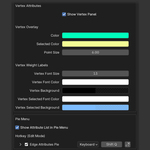
Vertex Attributes
Show Vertex Panel: Show or hide the Vertex Attributes panel.
Vertex Overlay
Color: Color for vertices in the attribute that are not selected.
Selected Color: Color for vertices that are both in the attribute and selected.
Point Size: Radius of the vertex highlight circles.
Vertex Weight Labels
Font Size: Font size for vertex weight labels.
Font Color: Color of the label text.
Background Color: Background fill color for label boxes.
Selected Background Color: Background fill color for labels on selected vertices.
Pie Menu
Show Pie List: Show the attribute list in the pie menu when multiple attributes exist.
Hotkey (Edit Mode)
Changelog
V1.09:
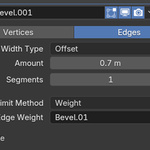
- Added a drop-down list to each attribute row for binding it to a Bevel modifier (visible when the object has at least one Bevel modifier), along with an option to disable this feature in the add-on settings. A link icon next to a modifier's name in the list indicates that it has already been bound to an attribute.
- Fixed some bugs.
V1.08:
Added inline rename — the dedicated rename button is no longer needed.
Fixed logic in attribute name updating in modifiers when the attribute is renamed.
Attributes in the list are no longer sorted by name by default. Use the "Sort by Name" button in the filtering options if needed.
Weight label occlusion now respects modifiers.
The attribute list in the pie menu now splits into columns when there are more than 6 attributes.
V1.07:
Added Vertex Attributes panel.
Weight labels now support occlusion by default — hidden geometry blocks labels. Toggle X-Ray Labels to disable.
Pie menu updated: domain switcher (Edge / Vertex) added to North slot when Vertex panel is active. Also was added optional attribute list.
Fixed bug with weight label font size.
v1.06:
Added an overlay offset for better visibility in non-X-ray mode, along with an option to disable it in the add-on settings, should any issues occur.
Fixed small bugs.
v1.05:
Added a field in the panel to display the weight of the current active edge.
Added a toggle to show weight labels on top of edges.
v1.0.4:
Added a separate customizable overlay color for edges that belong to the current attribute and are selected.
v1.0.3:
Added a simple pie menu for assigning/removing edges from the current edge attribute/group.
v1.0.2:
Resolved an issue where the "Edge Attributes" panel would not appear in the specified category upon opening a new Blender file until the panel category setting was manually updated in the addon preferences.
v1.0.1:
Added synchronization of renamed attribute if it was already assigned in the Bevel modifier.