Escalerillas_Pro
 Arq. Gustavo Garcia ARCHS


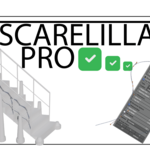
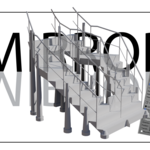
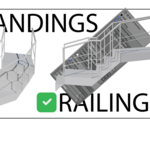
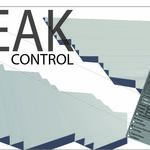

Escalerillas Pro - Complete Documentation
🎯 Introduction
Escalerillas Pro is a professional staircase generator addon for Blender, designed to revolutionize architectural visualization workflows. Created by an architect for architects, this tool eliminates the tedious process of manual staircase modeling while ensuring technical precision and aesthetic excellence.
📦 Installation Guide
System Requirements
- Blender Version: 4.2 or higher
- Operating Systems: Windows 10/11, MacOS 10.15+, Linux
- Hardware: Standard Blender requirements
Installation Steps
1. Download the addon file (.zip)
2. Open Blender → Edit → Preferences
3. Navigate to Add-ons → Click "Install"
4. Select the downloaded .zip file
5. Enable the add-on by checking the box next to "Object: Escalerillas Pro"
6. Save Preferences to keep addon enabled
🚀 Quick Start Guide
Step 1: Create Your Base Curves
Option A - Use Templates (Recommended for Beginners)
1. Go to 3D Viewport → Escalerillas Pro Panel
2. Click "📊 Crear Curvas de Ejemplo"
3. Choose from 25+ pre-designed staircase types
4. Templates automatically configure optimal parameters
Option B - Create Custom Curves
1. Add → Curve → Bezier
2. Create two curves representing stair edges
3. Position them appropriately (typically parallel)
4. Name them clearly (e.g., "Curve_Left", "Curve_Right")
Step 2: Assign Curves to System
1. In Escalerillas Pro panel, find "Configuración Básica"
2. Select your curves for "Curva Superior" and "Curva Inferior"
3. System automatically detects compatible curves
Step 3: Configure Basic Parameters
- Huella (Tread): 0.25m - 0.35m (recommended)
- Contrahuella (Riser): 0.15m - 0.20m (recommended)
- Espesor Huella (Tread Thickness): 0.02m - 0.05m
### Step 4: Generate Staircase
1. Click "🔄 Generar" button
2. Watch real-time generation
3. Review results in 3D viewport
⚙️ Complete Feature Reference
Core Staircase System
📐 Basic Dimensions Panel
- Huella (Tread Depth): Depth of each step
- Range: 0.1m - 1.0m
- Default: 0.3m
- Professional Tip: Maintain 2×Riser + Tread ≈ 0.6m-0.65m
- Contrahuella (Riser Height): Height between steps
- Range: 0.1m - 0.3m
- Default: 0.18m
- Safety Standard: Keep below 0.2m for comfort
- Espesor Huella (Tread Thickness): Material thickness
- Range: 0.01m - 0.1m
- Default: 0.03m
🏗️ Structural Components
Descansos (Landings)
- Automatic Mode: Place landings every N steps
- Individual Mode: Manual placement per specific step
- Configuration:
- Position (Left-aligned, Right-aligned, Centered)
- Depth and width customization
- Transition types (Smooth, Sharp)
Barandas (Railings)
- Types Available:
- Clásica (Traditional wood/metal)
- Moderna (Minimalist glass/metal)
- Ornamental (Decorative elements)
- Industrial (Exposed structural)
- Position Options:
- Left, Right, Both sides, Center, Three rails
- Advanced Features:
- Separate posts and rails
- Custom height and thickness
- Post spacing control
Pilares (Structural Pillars) - BETA
- Placement: Automatic at calculated support points
- Styles: Square, Round, Conical, Fluted, Octagonal
- Customization:
- Base and top dimensions
- Segments for round pillars
- Expanded base options
- Capital additions
Vigas (Support Beams)
- Placement: Under staircase at configurable intervals
- Customization:
- Height, width, and spacing
- Position (Left, Right, Center, Both)
- Vertical offset control
🎨 Visual Enhancement System
Surface Details
Narices (Step Nosing)
- Types: Rectangular, Rounded, Bullnose, None
- Configuration:
- Projection distance
- Height and depth
- Width and offset
Sistema Antideslizante (Anti-slip)
- Pattern Types: Grooves, Dots, Ribbed
- Customization:
- Projection height
- Element size
- Spacing pattern
Bordes Redondeados (Rounded Edges)
- Automatic edge smoothing
- Adjustable radius (0.01m - 0.1m)
- Performance-optimized geometry
⚡ Advanced Features
Curve Enhancement System
Extrusión de Curvas
- Individual or global extrusion control
- Real-time 3D visualization
- Non-destructive application
Bevel de Curvas
- Edge rounding for curves
- Resolution control (0-32)
- Fill caps option
Modificador Mirror
- Automatic mirroring based on curve objects
- Multi-axis support (X, Y, Z)
- Merge threshold control
- Clipping and quality optimization
Quality Controls
- Resolución Curvas: 1-64 (higher = smoother curves)
- Auto-actualizar: Real-time updates (disable for complex stairs)
- Mostrar Wireframe: Visual mesh structure
- Suavizar Bordes: Automatic edge smoothing
---
🎨 Material System
Pre-configured Palettes
- Moderno: Grays, metals, glass
- Madera Natural: Oak, walnut, pine tones
- Industrial: Concrete, raw metals
-*Elegante: Marble, gold accents
- Personalizado: Full color control
Application Methods
1. Paleta Rápida: Select palette → Click "Aplicar Paleta"
2. Colores Personalizados:
- Enable "Colores Personalizados"
- Adjust colors per component
- Click "Aplicar" for each part
Material Cleanup
- Limpiar Materiales del Add-on: Remove only add-on materials
- Limpiar TODOS los Materiales: Full scene material cleanup
- Warning: Full cleanup affects all scene materials
📐 Professional Workflow Tips
Best Practices
Curve Creation
- Use smooth Bezier curves for best results
- Maintain consistent curve direction
- Avoid extremely tight curves
- Test curve resolution before final generation
Parameter Optimization
- Start with standard dimensions (0.3m tread, 0.18m riser)
- Use landings every 8-12 steps for comfort
- Consider railing height regulations (0.9m standard)
- Balance detail level with performance
Performance Management
- Disable "Auto-actualizar" for complex designs
- Lower curve resolution during prototyping
- Use mirror modifier sparingly with high-poly geometry
- Clean up unused materials regularly
Common Solutions
Issue: Staircase Not Generating
- Check: Both curves assigned and valid
- Verify: Curves have sufficient length
- Confirm: No overlapping curve points
Issue: Geometry Artifacts
- Solution: Increase curve resolution
- Alternative: Simplify curve complexity
- Check: Validate curve normals direction
Issue: Performance Lag
- Reduce: Curve resolution temporarily
- Disable: Real-time updates during work
- Simplify: Railing detail level
🔧 Technical Reference
Object Naming Conventions
- Main Staircase: `Escalera_Principal`
- Railings: `Barandas_Escalera`
- Posts: `Postes_Baranda`
- Rails: `Rieles_Baranda`
- Pillars: `Pilares_Estructurales`
- Beams: `Vigas_Soporte`
Modifier Stack
- Edge Split: Automatic edge management
- Wireframe: Optional visual aid
- Mirror: Conditional application
- All modifiers are non-destructive
Export Considerations
- Geometry is quad-dominant for clean subdivision
- UV maps are automatically generated
- Materials are Blender-native for compatibility
- Scale is real-world metric (meters)
Support Resources
- Integrated Tutorial: Check Preferences panel
- Online Documentation: This guide
- Creator Contact: Instagram @gustavo_a_garcia_nova
- Community: Blender Artists forum
📞 Support & Updates
Technical Support
- Response Time: 24-48 hours
- Channels: Blender Market messages
- Scope: Installation, functionality, bug reports
Update Policy
- Free Updates: 1 year from purchase
- Update Frequency: Quarterly feature updates
- Bug Fixes: Immediate priority
License Terms
- Personal Use: Single user, multiple computers
- Commercial Use: Allowed for freelance work
- Studio Use: Requires separate license per user
- Redistribution: Strictly prohibited
🎓 Advanced Techniques
Custom Curve Creation
```python
# Example: Python script for perfect curves
import bpy
import mathutils
# Advanced users can script custom curve patterns
```
Integration with Other Addons
- Works seamlessly with Archipack, BlenderBIM
- Compatible with all major render engines
- Supports asset library systems
✨ Final Notes
Escalerillas Pro represents years of architectural visualization experience condensed into a powerful, intuitive tool. Whether you're creating a simple residential staircase or a monumental architectural centerpiece, this add-on provides the precision, flexibility, and speed that modern workflows demand.
Remember: The best results come from experimenting with different combinations of features. Don't hesitate to try unconventional curve shapes or material combinations - creativity is your only limit!
Happy designing!
- Arq. Gustavo Garcia
-
$1
Free version, so you can try the add-on and be encouraged to help me and try this wonder.
-
$15.99
This is the complete English version of the add-on, just as you see it.
-
$15.99
Esta es la versión del add-on en español, completa, esta traducida para mejor control intuitivo del conplemento
Have questions about this product?
Login to message
| Published | 11 months ago |
| Blender Version | 4.2 - 4.5 |
| Extension Type | N/A |
| Render Engine Used | Cycles, Eevee |
| License | Mit |

Discover more products like this
ladder staircase 3d ladder Curve_to_ladder PRO stairs Escalerrillas_pro Curve_to_strairs