Flipbook For Blender
 Taylor S. Ellis


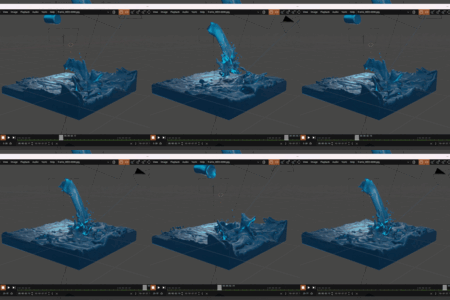
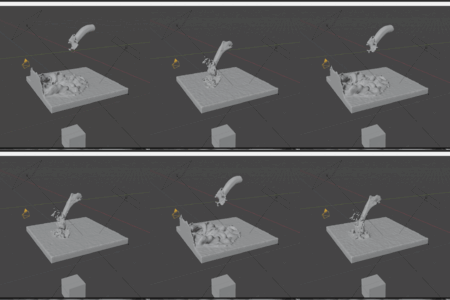
Flipbook for Blender: Realtime Viewport Playback With One Click
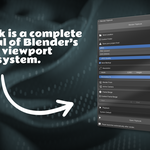
Flipbook gives you a fast, independent playback preview straight from the 3D viewport. Hit the button, let it cache, watch it play.
What It Does
Blender Flipbook works just like the flipbook feature in Houdini or playblast in Maya. It captures your viewport as an image sequence and immediately plays it back so you can check timing, spacing, and motion without committing to a full render.
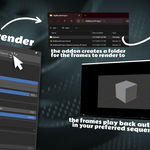
After rendering, the flipbook opens automatically in a lightweight browser-based player or your system’s default sequence player. You get smooth playback, a scrub bar, frame stepping, and FPS control. Re-render and it quietly updates the existing player without needing to reload files.
Features
Viewport Capture
Captures whatever shading mode you're using: Solid, Material Preview, or Rendered (Cycles not supported)
Renders from the Active Camera, Current View, or any named camera in the scene
Fully respects your viewport shading, overlays, and lighting setup
Captures whatever shading mode you're using: Solid, Material Preview, or Rendered (Cycles not supported)
Renders from the Active Camera, Current View, or any named camera in the scene
Fully respects your viewport shading, overlays, and lighting setup
Use your preferred player or a browser-based player
Opens automatically when rendering finishes, no extra steps needed
Re-renders update the player without needing to manually reload frames
Point it at any player on your machine: DJV, RV, Chaos, etc
If you don’t have a player, the addon uses your browser to create one locally (no internet connection required)
Passes the first frame path directly so sequence-aware players load the whole sequence automatically
Opens automatically when rendering finishes, no extra steps needed
Re-renders update the player without needing to manually reload frames
Point it at any player on your machine: DJV, RV, Chaos, etc
If you don’t have a player, the addon uses your browser to create one locally (no internet connection required)
Passes the first frame path directly so sequence-aware players load the whole sequence automatically
Flexible Output
JPEG (small, fast), PNG (lossless), or EXR DWAA (VFX pipeline)
Custom resolution and percentage scale
Saves to a flipbook/ folder next to your .blend file automatically, or choose any folder you like
Custom frame range, or just use the scene range
JPEG (small, fast), PNG (lossless), or EXR DWAA (VFX pipeline)
Custom resolution and percentage scale
Saves to a flipbook/ folder next to your .blend file automatically, or choose any folder you like
Custom frame range, or just use the scene range
Automatic Backup
Optional automatic backup saves a numbered copy of your .blend file before every render (myproject_flipbook_backup_001.blend, _002, etc.)
Overwrite protection with a confirmation dialog (can be turned off once you're comfortable)
Optional automatic backup saves a numbered copy of your .blend file before every render (myproject_flipbook_backup_001.blend, _002, etc.)
Overwrite protection with a confirmation dialog (can be turned off once you're comfortable)
Requirements
Blender 5.0 or newer (working on older versions)
No external dependencies - everything runs on what Blender already ships with
Works on Windows, macOS, and Linux
Blender 5.0 or newer (working on older versions)
No external dependencies - everything runs on what Blender already ships with
Works on Windows, macOS, and Linux
How to install
5.0+
Download the addon from the superhive downloads page
Drag and drop the .zip file directly into your blender project
4.0 - 4.9
Download the addon from superhive downloads page
In Blender, navigate to Edit>Preferences>Addons
Click the down arrow in the top right corner of the window
Click install from disk
Select the zip file from wherever you downloaded it.
How to use the addon
Open the N-Panel in the 3D Viewport and go to the Blender Flipbook tab
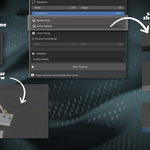
Set your format, resolution, camera source, and frame range
Hit Render Flipbook
The player opens automatically.
Make changes in Blender, render again, and the player updates with your new frames
Known Issues
While the addon supports resolutions higher than 3840x2160, it’s not recommended, as it can cause render to crash on more complex scenes
Cycles viewport rendering is not supported. If you want a rendered viewport render, it’s best to use Eevee.
When “transparent” is enabled in the render properties panel, the addon will render much slower. It’s best to disable transparency in the render properties panel when rendering with Eevee using Flipbook.
The “Output” tab must have the media type set to “Image” before flipbook can work. This is usually set by default but if you’ve done a few real renders you’ll have to set it back. Otherwise you will get an error.
While the addon supports resolutions higher than 3840x2160, it’s not recommended, as it can cause render to crash on more complex scenes
Cycles viewport rendering is not supported. If you want a rendered viewport render, it’s best to use Eevee.
When “transparent” is enabled in the render properties panel, the addon will render much slower. It’s best to disable transparency in the render properties panel when rendering with Eevee using Flipbook.
The “Output” tab must have the media type set to “Image” before flipbook can work. This is usually set by default but if you’ve done a few real renders you’ll have to set it back. Otherwise you will get an error.
Have questions about this product?
Login to message
| Blender Extension Compatible | Yes |
| Sales | 10+ |
| Dev Fund Contributor | |
| Published | 6 months ago |
| Blender Version | 5.0 |
| Extension Type | Add-on |
| Render Engine Used | Eevee |
| License | GPL |
Discover more products like this
viewport render playblast flipbook viewport animation preview