 zebus3d



Documentation version 0.0
Top to down all options:
All options depends on the elements you have selected.
Block one Bevel:
Add bevel > this button add bevel modifier to selected objects.
Clamp Bevel > is for limit the level of the bevel.
Hide Bevel > this button is for view or hide the bevel modifier for the objects selecteds.
Width > is the amount of bevel for all object (global)
Segments > is the number of segments that will use the bevel modifier.
Profile > this is for create bevel with inside corners or outside cornes.
Apply > if you need apply the bevel modifier.
Remove > if you need remove the bevel modifier.
Block two Subsurf:
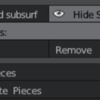
Add Subsurf > this button add Subsurf modifier to selected objects.
Hide Subsurf > this button is for view or hide the subsurf modifier for the objects selecteds.
Levels > is the number of subdivisions are used in the subsurf modifier.
Apply > if you need apply the subsurf modifier.
Remove > if you need remove the subsurf modifier.
Work in progress...
Have questions about this product?
Login to message

Discover more products like this
Video Game substance Game polyutils polyutilities mychamfer unreal poly dev Modeling tools poly utilities unity modeling Game-Dev-Tools gamedev Workflow mychamferworkflow Poly-Reduction Substance painter