 iwashi


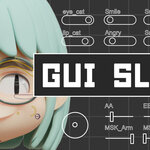
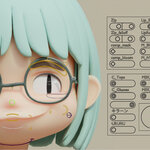
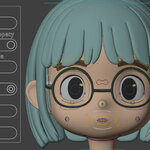
Consolidate shape keys, custom properties, and more into sliders for at-a-glance control.
Tired of digging through panels to tweak shape keys and properties? GUI Slider attaches slider panels directly to your armature, putting all your parameters within reach in the viewport.
Works with Auto Rig Pro, custom rigs, and scenes with multiple armatures — no rebuild required.
Easy Setup

Add sliders with just a few clicks — no rigging experience needed. Beginners and pros alike can get started right away.
Quick View Mode

Instantly display all sliders at once, no matter where you are in the viewport. Even as your slider count grows, you can always reach the parameter you need right away. The grid layout is adjustable to fit your workflow.
Connect to Any Parameter

Create sliders and connect them to a wide range of Blender parameters:
- Shape Keys
- Custom Properties
- Node Parameters
- Modifier Parameters & On/Off
- Constraint Parameters & On/Off
- Object Visibility
- Camera & Light
Supports any property that allows Add Driver — including bool, float, and int types.
Customization

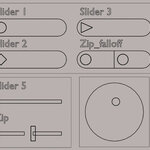
Customize the look and layout of your sliders to match your workflow. Choose between slider styles — Capsule for a rounded look, or Line for a minimal style. Adjust scale, width, and height to create your preferred layout.
Mirror & Multi-Column
Create L/R slider pairs in a single step — no need to set up each side individually. Perfect for facial rigs with left and right controls.
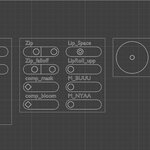
Containers support multiple columns, so you can group sliders by category — for example, eyes in one column, mouth in another. Keep your panel organized as it grows.
Joystick

Create a joystick controller and assign a shape key to each direction. For example, map eyebrow movements — up, down, left, and right — to a single joystick for intuitive control. Also great for blending between expressions like a smile and a frown from one place.
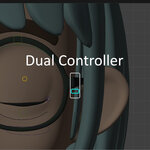
Dual Controller

Layer two controllers on a single bone. Move the main bone to control its position, while the sub-slider drives a shape key or other parameter at the same time — all from one place.
v1.2 — [2026-07-31]
- Add Sliders from the Right-Click Menu — Right-click any drivable property and create a slider for it on the spot, with no need to copy and paste its data path. Nested properties, such as those inside a material node tree, are resolved correctly.
- Add Linked Sliders from the Right-Click Menu — The same menu can attach a property to an existing slider as a Linked Driver, with its own output range, so one slider drives several properties at once.
- Blender 5.2 LTS support — Verified on Blender 5.2.0 LTS. Blender 4.2 and later remain supported.
- Driver Repair fix — Repair now restores drivers that target the first element of an array, such as location[0], which were previously skipped.
v1.1— [2026-04-04]
-
4.2 / 4.5 support — Added compatibility for Blender 4.2 and 4.5.
-
Linked Driver — Added a new Linked Driver feature.
-
Curve Objects as Targets — Slider creation now supports curve objects as target objects, in addition to mesh objects.
-
Various bug fixes — Includes a range of minor fixes and stability improvements.
v1.0.1 — [2026-03-25]
- Batch Add Shape Keys — Select a mesh object and bulk-create sliders from its shape keys in one step. Auto-detects L/R mirror pairs.
- Max Columns increased to 8 — Previously limited to 6 columns per container.
- Quick View mark fix — Fixed an issue where marking sliders with a mix of mirrored and non-mirrored selections would cancel each other out.