GilaDDD



🔢 Easily Adjust Object Numbering
With this add-on, you can quickly increase or decrease the numeric prefix of your selected objects — no need to rename them manually!
Just select all the objects you want to adjust and press the button.
Have a scene with 30 numbered objects and need to add a new one in the middle without re-numbering everything?
Now you can — instantly!
⚙️ How to Use
-
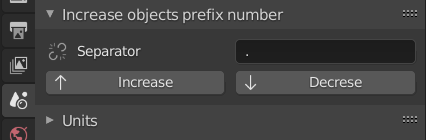
Open the Scene panel.
-
Enter the separator character used between your object’s name and its number.
-
For example:
-
Cube.001→ separator is. -
Cube_001→ separator is_
-
-
-
Press the desired button to shift your object numbers up or down — and you’re done!

(In the next version it will also change the numbers of the bones)