 insydium
in
insydium
in 





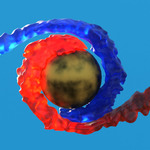


Simulate in real time. See it as you build it.
You know the loop. Set up a sim, hit bake, walk away. Come back to a splash that lands wrong, smoke that reads flat or sand piled in the wrong place. Change one value. Bake again. Lose another day.
NeXus takes that loop out. Simulation runs on your GPU and particles draw straight into the viewport, so the result updates while you work. You dial in the shot at the speed you think, not the speed your CPU bakes.
Where it came from
We are INSYDIUM. For over a decade we have built X-Particles and NeXus for Cinema 4D, used in production every day.
NeXus for Blender is not that code carried over. Rather than adapt the old engine, we rebuilt it.
Powered by Theron™
At the heart of NeXus for Blender is Theron, our new GPU simulation engine. It is written on a modern Vulkan foundation, with our own GPU compute core, so nothing waits on your CPU.
Vulkan is why it runs where you do. NVIDIA, AMD and Intel GPUs on Windows and Linux. On macOS it runs through Apple Metal. You get the raw power of a low level compute platform like CUDA, without being tied to one GPU vendor.
Simulations solve quickly, scale to high particle counts and update in real time in the viewport, so you can art direct as you go.
If you already know NeXus in Cinema 4D, most of it carries straight over. The great majority of modifiers, forces and features are the same and behave the same way, so your existing experience and training transfer directly. What changes is how you add things and wire them up in Blender.
One system, one workflow
Simulation work in Blender usually means assembling a pipeline. One add-on for liquids. Something else for fire. A separate application for the heavy volumetrics, then caches written out and read back in to line everything up. Different interfaces, different settings, different ideas about what a frame is.
That is several purchases, several sets of updates to keep track of and several places to ask for help.
NeXus does the whole job. Every one of these is usually a product on its own:
- Liquids with four solvers to choose from, FLIP, APIC, SPH and PBD, from a tap fill to an ocean splash
- Fire, smoke and explosions
- Granular material that piles, pours and collapses
- Foam and spray thrown off your own liquids
- Particles, forces, flocking and constraints
- Surface meshing and disk caching, ready to render
All of it lives in one add-on, inside Blender. One purchase, one licence, one workflow, instead of collecting tools that each solve a piece of the job and then stepping outside Blender for the rest.
The liquids, granular material and secondary particles share one particle system, so the parts work together. Foam reads the liquid solver's own surface field rather than guessing at it from a point cloud. The volumetric solver both feeds off those particles and drives them, so one turbulence force can shape your liquid and your smoke from a single set of settings.
Nothing gets exported. Nothing gets imported. There is no second application to learn, no timings to match up by hand and no pair of add-ons that do not know the other exists. One viewport, one hierarchy, one licence.
How it works
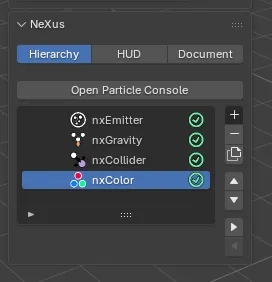
NeXus is a set of modifiers. They are not entries in Blender's own modifier stack. They live in the NeXus Hierarchy, so a whole simulation reads as one list you can reorder and nest.
Two ways to add one. From the 3D viewport, Add › INSYDIUM NeXus. Or from the NeXus tab in the viewport sidebar, using the + button on the hierarchy list. Same entries either way.

Each modifier is set up in the Properties editor › Physics tab, across its Object Properties, Groups Affected, Mapping and Falloff tabs.
The NeXus tab in the sidebar is your control room. It has three panels:
- Hierarchy: the whole simulation as one list. Add, remove, duplicate, reorder and indent to nest one modifier under another. The Particle Console opens from here.
- HUD: the on screen readout in the viewport, on or off per view.
- Document: the settings that apply to the whole scene.
There is a NeXus entry in the shader and geometry node editors too, so particle data can drive your materials and node setups.
What you can make
- Particle effects of every kind, shaped by twenty forces: gravity, wind, turbulence, vorticity, drag, attract, avoid, explode, flow fields and more, each with layered control over speed, direction, rotation, scale and colour
- Particles that stick to your geometry, crawl along its surfaces and edges or cover it completely
- Liquids, from a tap fill to an ocean splash, with four solvers to pick from: FLIP, APIC, SPH and PBD
- Sand and granular material that piles, pours and collapses
- Fire, smoke and explosions
- Foam and spray thrown off your own liquid sims
- Thin fluid sheets that hold their film instead of breaking into droplets
- Flocking behaviour for groups that move together
- Branching growth, spreading infection and contagion between particles
- Constraint based dynamics for linked structures
- Trails, curves and instanced geometry driven by every particle
- Meshed and cached output, ready to render
One more thing: Quill
Per-particle logic is the part most people avoid. nxQuestion handles it. You can write that logic yourself.
Quill is an optional helper that writes it for you. Describe what you want to happen and it wires the conditions. Quill holds no AI of its own. You point it at a model you choose. Out of the box that is a local Ollama server, so no account, key or subscription is needed and nothing leaves your machine. Connect a paid cloud service instead if you would rather. Every part of NeXus works fully with Quill untouched.
What you get
- Over 40 NeXus modifiers, one system. Liquids, fire, granular, forces, meshing and caching all talk to each other.
- Twelve months of updates. We ship new features and fixes all year. Everything released while your support period is running is included at no extra cost.
- What you receive is yours to keep. Every build you get during your support period stays yours and keeps working, whether you renew or not.
- We answer you either way. Our support does not switch off when a support period ends. Ask us anything, any time.
- Windows, macOS and Linux.
Will it run?
NeXus uses online licensing. This is not an offline product. It contacts our licence server to check your licence, so you need an active internet connection both to activate it and to run it.
Blender 4.3 or later. That covers Blender 4.3, the 4.5 LTS release and Blender 5.
You need a GPU with up to date drivers and at least 4GB of VRAM. Vulkan 1.3 on Windows and Linux. Metal 3 on macOS.
- Windows 8.1 or later, 64-bit. You also need the Microsoft Visual C++ 2015-2022 Redistributable (x64), which most machines already have.
- macOS 13.0 (Ventura) or later. On Intel Macs, Blender itself stops at 4.5 LTS.
- Linux with glibc 2.31 or later, for example Ubuntu 20.04 LTS
The download here covers Windows 64-bit, Apple silicon Macs and Linux 64-bit. Intel Macs are supported. Their build is not in this download. Intel Mac users get it from their free INSYDIUM Customer Account. Every update lives there too.
How your licence reaches you. It lives in a free INSYDIUM Customer Account. After buying, you claim it at insydium.ltd/superhive with your Superhive order number and it appears in your account straight away. The full steps are in the Documentation for this product.
Not ready to buy? Request a free 21 day trial of NeXus for Blender from an INSYDIUM Customer Account.
The small print
NeXus sends anonymous usage statistics. Nothing personal is stored. On a paid licence you can turn this off in the NeXus preferences. On the free 21 day trial it stays on.
The Python add-on layer is GPL-3.0-or-later. The full licence text and a NOTICE file explaining the split are inside the download. It drives a proprietary compiled simulation engine, which is a separate work and is not GPL. We provide the corresponding source for the GPL portion to any recipient on request.
