Interactive Transform Copier
 Basem ALi Deeb


🟧 What is This Addon?
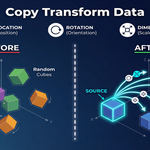
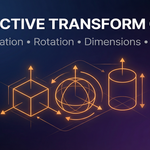
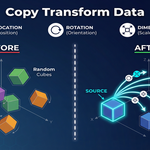
Interactive Transform Copier is a Blender addon that lets you instantly copy Location, Rotation, and Dimensions from any source object to one or many selected target objects — all with a single interactive click!
🛠️ How to Install
-
Go to
Edit > Preferences > Add-ons > Install... -
Select the downloaded
.zipfile. -
Enable the addon from the list.
-
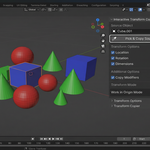
Find the panel under Sidebar > Transform Tools.
🚀 How to Use
-
Select one or more target objects in the 3D Viewport.
-
In the addon panel, choose what to copy:
-
☐ Location
-
☐ Rotation
-
☐ Dimensions
-
-
Click Pick & Copy Source.
-
The cursor turns into an eyedropper 🖱️.
Click the source object you want to copy from. -
Instantly, the selected transforms will be copied to all target objects!
💡 Tips & Notes
-
✅ Batch Operation: Works on multiple objects at once.
-
✅ Dimensions, not Scale: Dimensions ensure consistent size even with constraints or parenting.
-
🔒 Locked Transforms: If an object has locked Location/Rotation/Dimensions, it may not update those axes.
-
⚠️ Constraints/Parenting: Some constraints or parenting setups can override the copied values.
-
🟠 Tested on Blender 3.5–4.x
❓ Frequently Asked Questions (FAQ)
-
Q: Does it work with lights, cameras, or only meshes?
A: It works with all standard Blender objects, but "Dimensions" mainly affect mesh objects. -
Q: Can I copy to hidden or non-selectable objects?
A: Only visible and selectable objects in the 3D Viewport are affected. -
Q: Does it overwrite animation keyframes?
A: No, it only updates the current frame. Keyframed values will return if you play the timeline.
🤝 Support & Updates
Need help? Have a feature request?
Feel free to contact me via Blender Market!
🌟 Boost your Blender workflow — copy transforms instantly, stay creative! 🌟
Have questions about this product?
Login to message
| Published | over 1 year ago |
| Blender Version | 4.0 - 5.0 |
| Extension Type | N/A |
| Render Engine Used | Cycles, Eevee |
| License | GPL |
