Koo Fruit Engine: Banana
 Koo Fruit Engine





● Quick Start (60 seconds)
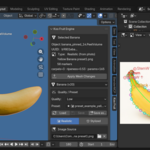
1. Install the extension via Blender 4.2+ Edit → Preferences → Get Extensions →
Install from Disk → select the .zip
2. Open Blender, 3D Viewport → press N → Koo Fruit tab
3. Either click Generate Realistic Banana (no photo needed — uses bundled preset) OR
load a banana photo via Image Source → Auto-trace Contour → Generate Realistic Banana
4. Adjust Length / Radius / Curvature / Color sliders
5. To duplicate: Shift+D — each copy is independent (color, deform, skin all
isolated)
Full Manual
Online: https://github.com/kaiser390/koo-fruit-engine-docs
A 19-page PDF manual is also included in the extension package at
dist/fruit_engine_v1.0.0_manual.pdf. It covers:
- Installation and Quick Start
- Realistic workflow (Photo to 3D)
- Stylized workflow (parametric only)
- Per-banana editing and Shift+D cluster
- Animation (12-strip peel curl keyframes)
- Render guide (Cycles + Eevee)
- Parameter reference (every slider, every default value)
- Tips and troubleshooting
Source code
Source code is included in the extension .zip. Blender extensions ship as source —
installing the .zip gives you every Python file.
GPL-3.0-or-later. Use commercially, redistribute, modify under GPL terms.
Support
Bug reports and feature requests welcomed via Superhive comments on this listing.
Have questions about this product?
Login to message
| Blender Extension Compatible | Yes |
| Published | 5 months ago |
| Blender Version | 4.2 - 5.0 |
| Extension Type | Add-on |
| Render Engine Used | Cycles, Eevee |
| License | GPL |
Discover more products like this
animated Generator photo workflow Banana plant procedural mathematical addon organic parametric