 Carruto


LipSyncX - Fast Editable Lip-Sync for Blender
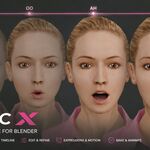
LipSyncX is built for one main purpose: to speed up lip-sync production inside Blender.
It is not meant to promise perfect one-click facial animation. In many cases, it can generate a usable result automatically if you are comfortable with some quality tolerance, but the real value is that it can do most of the repetitive lip-sync work for you, then give the animator a clear way to review, edit, and improve the result.
Instead of manually placing every mouth shape from scratch, LipSyncX helps you generate the first 80% or more of the lip-sync pass automatically. You can then refine the timing, words, visemes, emotions, and bake result until it matches your quality expectations.
The goal is practical acceleration, not removing the animator from the process.
Early Access Launch Price
LipSyncX is launching in Early Access at 50% off.
This discounted price reflects the current stage of the product: the core workflow is working, but we are actively improving profiles, editing tools, documentation, and compatibility based on real user feedback.
The price will increase with the first full release.
If you join during Early Access, you get the tool at the lower launch price while helping shape the direction of future updates.
Why LipSyncX Exists
Lip-sync is repetitive work.
Even for experienced animators, a dialogue shot usually starts with the same slow process: listening to the line, identifying mouth shapes, placing keys, checking timing, fixing mistakes, and adjusting the result until it feels believable.
LipSyncX is designed to reduce that initial workload.
It gives you an automatic first pass, then keeps the result editable so you can still make artistic decisions. This makes it useful for fast production, blocking, iteration, and final polish workflows where you want a better starting point than a blank timeline.
What It Does
With LipSyncX, you can:
- Load voice audio
- Transcribe or manually enter dialogue text
- Generate editable lip-sync timing
- Create visemes from words and phonemes
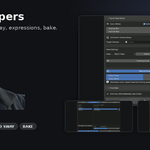
- Edit words, parts, and visemes in the timeline editor
- Add manual word/part entries
- Protect manual edits when regenerating
- Bake animation to your character
- Customize character profiles
- Add basic emotion layers
- Add basic natural head movement
- Add auto-blinks and look-at behavior
The generated result is meant to be reviewed and refined. For some projects, the automatic pass may be enough. For higher-quality animation, it gives you a strong foundation to improve quickly.
Profile-Based Character Mapping
LipSyncX is profile based.
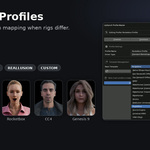
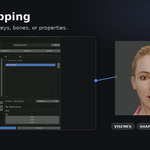
That means the add-on does not assume every character uses the same blendshape names or rig structure. Instead, each profile defines which blendshapes, bones, or properties should be used for each viseme or expression.
The included profiles are intentionally basic starting points for many known character types. They are useful for fast testing and first setup, but the real power is the Profile Manager.
With the Profile Manager, animators can define exactly which blendshapes should respond to each viseme in a simple visual way. This makes it possible to adapt LipSyncX to custom characters, studio rigs, or character packs with different naming conventions.
Included profile targets and starting points include:
- Generic Blender shape-key rigs
- ARKit-style facial rigs
- VRM / VRoid-style characters
- Reallusion / Character Creator style rigs
- Daz Genesis via Diffeomorphic workflows
- MetaHuman-style profile work in progress
- Custom profiles
Because every character is different, some rigs will need profile adjustment. Early Access feedback will help us improve and expand these included profiles.
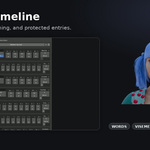
Timeline Editing
Generated lip-sync should not be locked away.
LipSyncX includes an editable timeline workflow so you can adjust the generated result instead of starting over. You can add new words or sound parts manually, move them, assign visemes, protect important edits, and regenerate without losing protected manual entries.
This is useful for cases where transcription misses short sounds, stylized speech, reactions, breaths, or non-verbal mouth sounds.
Basic Acting Helpers
LipSyncX also includes simple acting helpers to make characters feel less static during dialogue.
Current tools include:
- Basic natural emotion layering
- Customizable expression mappings
- Auto-blinks
- Basic speech-driven head movement
- Look-at support
These systems are designed for fast production and quick naturalization, not as a full replacement for detailed facial acting. They will be improved based on what the community finds most useful.
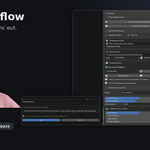
Typical Workflow
- Select your character.
- Choose or create a profile.
- Load your audio.
- Transcribe the audio or enter the transcript manually.
- Generate the lip-sync pass.
- Review the timeline.
- Edit words, parts, visemes, and emotions.
- Bake to the character.
- Polish further in Blender if needed.
Best For
LipSyncX is useful for:
- Animators who want a faster first lip-sync pass
- Indie animation
- Short films
- Game cinematics
- YouTube characters
- Dialogue blocking
- Fast production work
- Custom character workflows
- Rig/profile testing
Early Access Notice
LipSyncX is launching as Early Access.
The add-on works, but this is the first public release and we are actively improving it with the community. We chose Early Access because character rigs vary heavily, and we want future development to focus on the profiles, tools, and workflow improvements users actually need.
If your character needs a better profile, if a workflow feels rough, or if you want deeper emotion/head-motion tools, your feedback will help prioritize future updates.
Compatibility
Current release: v0.11.9
Recommended production target:
- Blender 4.5 LTS
Also tested during release preparation:
- Blender 5.1 smoke-tested with compatibility fixes
Development/test environment:
- Windows
Blender 5.x note:
Blender 5 introduced animation and sequence editor API changes. LipSyncX includes compatibility fixes for Blender 5.1, including layered Action animation support and updated sequence editor handling.
AI transcription dependencies may need to be installed per Blender version using the built-in Install / Repair button.
Known Early Access Limitations
Please read before buying:
- This is an Early Access release.
- The add-on accelerates lip-sync work; it does not guarantee perfect automatic final animation.
- Some characters require custom profile mapping.
- Included profiles are basic starting points and will improve over time.
- MetaHuman-style support is included as an Early Access direction but is not deeply production-validated yet.
- AI transcription depends on local dependency setup.
- Emotion and head-motion systems are basic and intended for fast production support.
- Final animation quality depends on the character rig, audio quality, profile setup, and animator review.