iMeshh Official


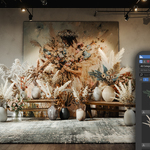
iMeshh Asset Manager with HDRI Adjuster
Free Add-on + 100 Free Assets!
*free account needed to download the free assets click here to make an account
This way if we update an asset you'll get an "Update" button directly inside the addon
Take full control of your Blender workflow with the new iMeshh Asset Manager, designed for Blender 4.2+
What’s Included
- Local asset manager to organize and use your own .blend files.
- 100+ professional assets to download and use directly in Blender from iMeshh.com.
- Blazing fast global search, smart folder setup, and built-in HDRI controls.
🧠 Why Use This?
Blender's default Asset Browser works for certain workflows, but professionals with structured folders on their OS already and thousands of assets, this tool is a much better fit.
There is no need to mark assets manually. Just load your folders and get started.
Blender Asset Browser
This can be time consuming to go through and mark every object and .blend with the correct assets. Give them names and add the thumbnails.
This also does not work well with grouped assets. It will always bring in the group as an instance which will then take extra steps to un-group.

🔑 Key Features
- Works with your existing folder structures.
- Visual thumbnails if the image matches the .blend file name.
- HDRI tool with light adjustment controls.
- 100% free with optional premium assets on iMeshh.com.

📂 Folder Setup
- Add your own folders via the Paths tab.
- Define each folder’s type to stay organised inside of Blender: Objects, Materials, HDRIs, and so on.
- Your OS folder structure is preserved and displayed in the UI without any extra steps!
📸 Pro HDRI Adjuster
This tool also comes with a way to view and manage your HDRI folder. You can easily add any HDRI from the folder, along with adjusting numerous parameters.
Some of the parameters available include overall brightness, plus adjusting independent passes to perfectly fine tune how your HDRI acts in the scene.
Not only that, it also comes with a ground projection mode to plant your model onto the ground! You just need to add a shadow plane below the object to get realistic shadows!

❓ Troubleshooting & Help
- If images are not loading, try restarting Blender or clicking refresh.
- Give a thumbnail .jpg or .png with the exact same name as the .blend file in the same folder and it will automatically link them
- If you hit download limits, contact us at imeshh.com FAQ.
✅ Perfect For
- Archviz professionals.
- 3D artists with large libraries.
- Anyone who wants speed, control, and simplicity in Blender asset management.
🎉 Download now and grab 100+ free assets to get started!
This add-on is completely free with no hidden costs. You will need to create a free account on iMeshh to download the free assets

Who is iMeshh.com?
iMeshh is a website specializing in arch-vis products for Blender. All assets are used in our own commercial projects, so we know exactly what high-end users need.
Visit imeshh.com to see the full catalogue.
All assets include PBR shaders for realism and are built with clean topology for flawless rendering.