Magic Scoreboard
 Digital DiLeo


Overview
Magic Scoreboard is a Blender add-on that automatically creates text objects with star ratings. It’s ideal for game leaderboards, competition scoreboards, or any project where you want names and ratings displayed in a clean, customizable way.
User Interface
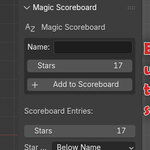
The Magic Scoreboard panel appears in the 3D View > Sidebar (N-panel) under the tab Magic Scoreboard.
Add a New Entry
Name – Type the name to display.
Stars – Number of stars this entry should have.
Add to Scoreboard – Adds the entry to the list.
Name – Type the name to display.
Stars – Number of stars this entry should have.
Add to Scoreboard – Adds the entry to the list.
Scoreboard Entries
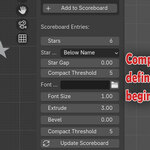
This section lists all current names and star values. Entries update when you click Update Scoreboard.
Layout Options
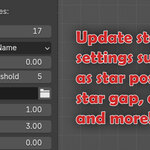
Star Position
Next to Name → Places stars on the same line as the name.
Below Name → Places stars directly under the name.
Star Gap – Controls spacing between name and stars.
Compact Threshold – When set above 0, entries with more stars than this number will switch to Compact Mode (⭐ xN).
Star Position
Next to Name → Places stars on the same line as the name.
Below Name → Places stars directly under the name.
Star Gap – Controls spacing between name and stars.
Compact Threshold – When set above 0, entries with more stars than this number will switch to Compact Mode (⭐ xN).
Font Settings
Font – Choose a font file (supports external .ttf/.otf fonts).
Font Size – Scale the text.
Extrude – Adds depth to the text.
Bevel – Adds beveled edges.
Font – Choose a font file (supports external .ttf/.otf fonts).
Font Size – Scale the text.
Extrude – Adds depth to the text.
Bevel – Adds beveled edges.
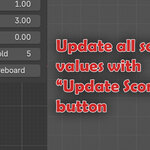
Update Scoreboard
Applies changes to all entries.
Preserves manual positioning of objects in the 3D view (updates content, not transforms).
Applies changes to all entries.
Preserves manual positioning of objects in the 3D view (updates content, not transforms).
Scene Organization
When run, Magic Scoreboard creates a master collection named “MagicScoreboard”:
Within this master collection, the collection “Names” is a collection of empties where each set of names and stars will be parented to. Use these to re-position your names.
Each name added will create a folder containing two text objects. One for the name, one for the stars.
Installation
In Blender, go to Edit > Preferences > Add-ons > Install.
Select the magic-scoreboard.zip (or folder).
Enable the add-on in the list.
- Open the N-panel and find Magic Scoreboard.
In Blender, go to Edit > Preferences > Add-ons > Install.
Select the magic-scoreboard.zip (or folder).
Enable the add-on in the list.
Have questions about this product?
Login to message
| Published | 12 months ago |
| Blender Version | 4.5 |
| Extension Type | N/A |
| License | GPL |

Discover more products like this
text-tools-blender scoreboard score 3D texturing tool text-tools scorer