Material Swap
 Jeslin3d


Easy Material Finder & Replacer – Blender Add-on
🧩 Introduction
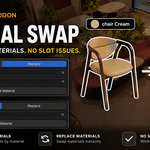
Easy Material Finder & Replacer is a simple and powerful Blender add-on designed to help you quickly find objects using a specific material and replace that material with another — all in just a few clicks. This tool is perfect for cleaning up large scenes, fixing naming issues, or updating outdated materials.
🚀 Features
-
🔍 Find Material – Instantly select all objects using a chosen material.
-
🔁 Replace Material – Replace the selected material on all objects with a new one.
-
🧠 Smart Replace – Replaces only the exact material slot, avoiding unwanted changes.
-
⚡ One-Click Workflow – Fast and efficient, perfect for busy artists.
-
✅ User-Friendly UI – Designed with simplicity in mind, easy for anyone to use.
🛠️ Installation Guide
-
Download the
.zipfile of the add-on. -
Open Blender.
-
Go to
Edit > Preferences > Add-ons. -
Click
Install…and choose the.zipfile you downloaded. -
Enable the add-on by checking the box next to its name.
-
The tool will now be available in the Material Properties Panel.
📘 How to Use
🔍 Find Tab
-
In the Material tab, select the material you want to find (e.g., "Wood").
-
Click the Find button.
-
All objects using that material will be selected.
🔁 Replace Tab
-
In the Replace tab, selected Find material you want to replace (e.g., "Wood").
-
Choose Replace material you want to apply (e.g., "New_Wood").
-
Click the Replace button.
-
The material will be replaced only in the correct slots across all selected objects.
✅ It will not affect other materials or unrelated slots — only the one you selected.
Support
If you have any issues or suggestions, feel free to contact me through Blender Market.
Enjoy fast and hassle-free resolution switching! 🚀
Have questions about this product?
Login to message
| Sales | 10 |
| Published | over 1 year ago |
| Blender Version | 4.0 - 5.1 |
| Extension Type | N/A |
| License | GPL |
Discover more products like this
select-object-with-material material finder find-object-with-material #material #selector material replacer material swap material swapper material replace.