 polygoniq





Why memsaver?


How memsaver works?

Non destructive workflow

memsaver features


Available Licenses



Start Learning
All our products are well documented
and it is the best starting point to learn.
About Us
We are polygoniq,
our mission is to provide high quality, affordable and easy-to-use products for Blender users.
We are a small team of artists and developers who are passionate about creating tools that help artists bring their visions to life.
We offer visualisation services, create optimized asset packs and develop custom solutions and pipelines tailored to your needs. Interested in working with us?


We Care!
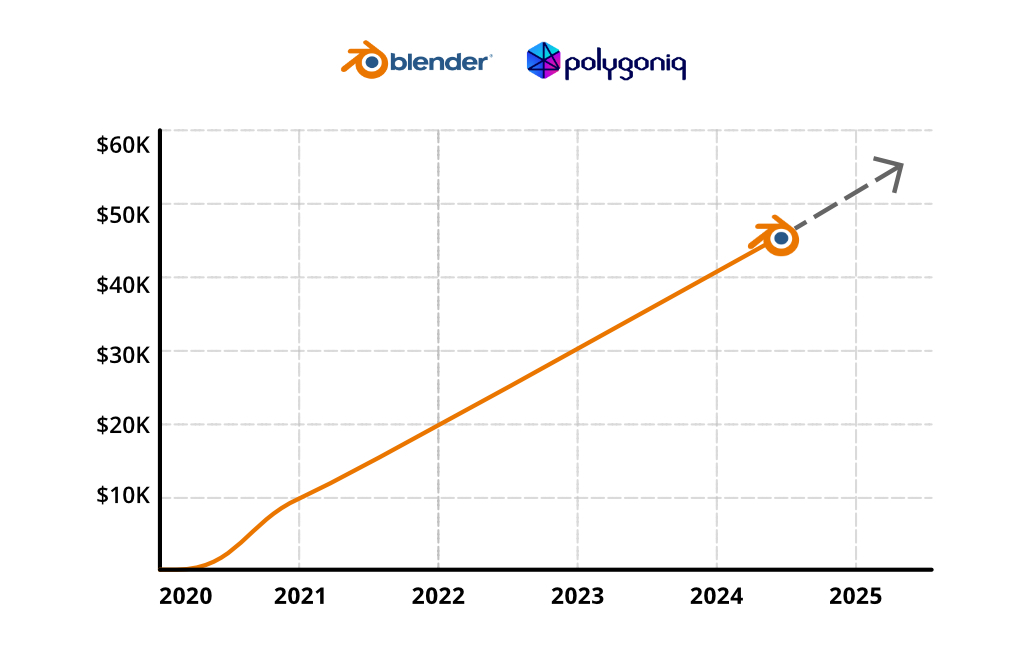
We donated more than $50K to the Blender Foundation over the years.
Frequent Updates
memsaver already got 6 updates.
2025/08/15: memsaver 1.3.1
Fixes
Reverting mesh decimation does not raise an exception anymore. Fixed adaptive optimize failing on some instanced objects.2025/06/03: memsaver 1.3.0
Improvements & Additions
Added Decimate Meshes button similar to Resize Images. Added support forOctane render engineAll memsaver operators now report what happened, how many images were optimized, failed and how much memory was saved. Added control hints to preview adaptive optimize. Added active camera to adaptive optimize operators. Blender 4.4 and 4.5 (Alpha) support. Minor speed up of adaptive optimize. Memory Estimate Overhaul
Estimate memory of a selected directory or blends additionally to current file. Show datablocks or files view with collapsible details with tree navigation. Improved report visuals and report is interactive - sorting and searching is available. Improved estimation algorithm to be more precise for meshes. JSON output for memory estimate for automated processing.Fixes
Preview adaptive optimize doesn't throw error when a camera is selected. Preview adaptive optimize doesn't fail with no camera available. Preview adaptive optimize now uses world position of objects. Removed non-scene object target options for adaptive optimize, these shouldn't be considered at all as they are not in active camera.2024/07/19: memsaver 1.2.2
Changelog
Support for Blender 4.2.0.Added Open Preferences button to the addon's panel header. Clear memsaver related properties on Blender data correctly.And more...
Thank you!
Our addons have been our undisputed core business and it wouldn't be possible without your support and feedback!
polygoniq would not exist without our users and we'd just like to say we're very grateful.
Truly.

