Mesh Extender for Blender
 Andrey Petrov


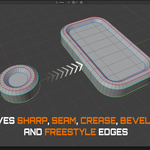
Installation
Drag and drop the downloaded ZIP file directly into the Blender viewport, then confirm the installation.
Alternatively:
Go to Edit → Preferences → Add-ons
Open the top-right menu and select Install from Disk
Choose the AP_MeshExtender ZIP file and confirm
Enable AP | Mesh Extender if necessary
Preferences
Open Edit → Preferences → Add-ons and expand AP | Mesh Extender.
Show in N-panel - Shows or hides the Mesh Extender tab in the 3D Viewport sidebar.
Hotkey - Customize the activation shortcut. The default shortcut is Ctrl + Alt + E.
Workflow
Select a mesh object
Open the Mesh Extender tab and click Extend, or press the configured hotkey
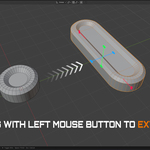
Drag a handle with the Left Mouse Button to extend the mesh
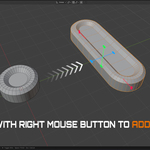
Drag the same handle with the Right Mouse Button to add or remove edge loops
Press W to toggle the wireframe overlay
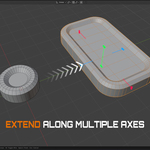
Adjust multiple axes if needed
Press Space to confirm or Esc to cancel
Have questions about this product?
Login to message
| Blender Extension Compatible | Yes |
| Sales | 10+ |
| Published | 3 months ago |
| Blender Version | 4.2 - 5.2 |
| Extension Type | Add-on |
| Render Engine Used | Cycles, Eevee |
| License | GPL |

Discover more products like this
modeling tool modeling 3d_hard_surface hard surface modeling blender Mesh Extender mesh editing blender addon