Modular Product Lighting Kit for Blender — 3 Scene Bundle
 Contrast 3D Design Studio


Documentation — Modular Product Lighting Kit · 3 Scene Bundle
Thank you for purchasing the Modular Product Lighting Kit bundle for Blender.
This bundle contains three complete, ready-to-render product scenes:
- Minimal White Studio — clean, neutral studio with soft shadows and a reflective floor.
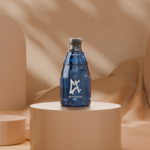
- Desert Silk Studio — warm, editorial set with draped silk, rounded podiums and soft, dappled foliage-style shadows.
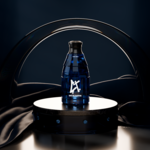
- Dark Luxury Studio — low-key cinematic set with draped silk, a glossy arc, a studded podium and an image-gobo spot light.
Each scene is an independent Blender file. They all share the same structure, so once you learn one, you know the three.
How to use a scene
- Open the Blender file of the scene you want.
- Find the PRODUCT collection.
- Replace the placeholder product with your own 3D model.
- Keep your product centered around the placeholder position for best results.
- Choose one of the included cameras: CAM_01, CAM_02 or CAM_03.
- Render using Cycles.
- If needed, adjust the highlight lights or move the tracking targets to better fit your product shape.
To render the same product in the three moods, place it in one scene first, then append or copy it into the other two files at the same placeholder position.
Shared scene organization
All three files use the same collections:
- BG — the styled background set of each scene.
- PRODUCT — placeholder product area.
- CAMERAS — CAM_01 (main hero view), CAM_02 (clean front view), CAM_03 (detail view).
- LIGHTING_SETUP — the lights of each scene plus TRACK / TRACK_02 tracking targets.
Lighting controls
Each scene has its own lighting rig built for its mood, but they all work the same way: the main lights use tracking constraints aimed at the product area. To change where a light points, simply move its tracking target. This makes it easy to adapt each scene to different product sizes, shapes and materials.
Scene highlights:
- Minimal White Studio — soft, even studio lighting for a clean catalog look.
- Desert Silk Studio — warm key light plus a focused spot that casts the dappled foliage-style shadow pattern.
- Dark Luxury Studio — gobo spot light (DF_L) that projects a soft image-based light pattern. The pattern comes from an image texture inside the light's node setup, so you can swap or scale it.
Render notes
- These files are made for Blender only.
- Designed in Blender 5.1.
- Recommended render engine: Cycles.
- Caustics are enabled for better results with glass and reflective products. Caustics can increase render time — you can disable them during previews and enable them again for final renders.
Compositor
A compositor setup is included for basic color adjustment. You can use it to refine contrast, exposure, color balance and overall render mood. If you prefer a neutral render output, you can bypass or disable the compositor nodes.
Important
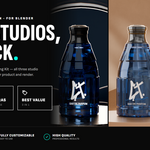
- The product shown in the preview images is for demonstration purposes only.
- Your final result will depend on your own product model, materials and render settings.
- This product does not include external software, plugins or add-ons.
- Do not resell, redistribute or repackage these Blender files as separate asset products.
Created by Contrast 3D Design Studio.
Have questions about this product?
Login to message
| Published | 5 months ago |
| Blender Version | 4.2 - 5.1 |
| Render Engine Used | Cycles |
| License | Creative Commons |
Discover more products like this
Scene bundle product render product-visualization lighting setup ecommerce cosmetics Cycles render setup Studio Lighting