Super Bend Tool
 Mergim Sahiti


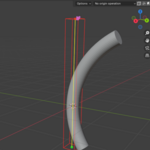
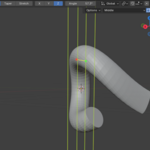
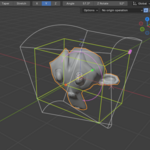
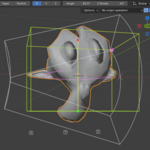
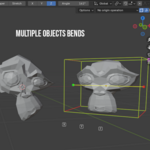
The MS Super Bend Tool is a Blender add-on designed to give you precise and flexible control over bend modifiers. Instead of adding a single deform modifier, this tool allows you to stack multiple bends, manage them individually, and control their behavior with intuitive options—all from one clean UI panel inside Blender.
This tool is perfect for artists and designers who want more control over deformation effects without manually setting up and managing multiple modifiers.
Key Features
-
Add unlimited bend deformers to any mesh.
-
Manage bends directly from a dedicated Advanced Bend panel in the 3D Viewport.
-
Toggle bends on/off without deleting them.
-
Choose bend axis: X, Y, or Z.
-
Control falloff for smooth and localized bending.
-
Quickly select all / deselect all bends.
-
Update button to refresh all active bends at once.
-
Visual overlay that highlights inactive bends in the viewport.
Add unlimited bend deformers to any mesh.
Manage bends directly from a dedicated Advanced Bend panel in the 3D Viewport.
Toggle bends on/off without deleting them.
Choose bend axis: X, Y, or Z.
Control falloff for smooth and localized bending.
Quickly select all / deselect all bends.
Update button to refresh all active bends at once.
Visual overlay that highlights inactive bends in the viewport.
Installation Instructions
-
Download the .zip file after purchase.
-
In Blender, go to:
Edit > Preferences > Add-ons > Install…
-
Select the .zip file and click Install Add-on.
-
Enable MS Super Bend Tool in the Add-ons list.
-
Access the tool under:
3D Viewport > Sidebar (N) > Advanced Bend tab.
Download the .zip file after purchase.
In Blender, go to:
Edit > Preferences > Add-ons > Install…
Select the .zip file and click Install Add-on.
Enable MS Super Bend Tool in the Add-ons list.
Access the tool under:
3D Viewport > Sidebar (N) > Advanced Bend tab.
How to Use
-
Select a Mesh Object
The add-on works only on meshes.
-
Add a Bend
-
In the Advanced Bend panel, click Add Bend (+).
-
A new bend modifier is created and added to your object.
-
Customize Bends
Each bend can be customized with:
-
Active toggle → Show or hide the bend.
-
Axis → Choose X, Y, or Z for the bend direction.
-
Falloff → Control how strong or smooth the bend is.
-
Manage Multiple Bends
-
Add multiple bends to create complex deformations.
-
Use Select All / Deselect All to quickly toggle groups of bends.
-
Use Update All to refresh all active bends.
-
Viewport Overlay
-
Active bends show their deformation in real time.
-
Inactive bends are highlighted with a yellow wireframe overlay, so you always know which ones are turned off.
Select a Mesh Object
The add-on works only on meshes.
Add a Bend
-
In the Advanced Bend panel, click Add Bend (+).
-
A new bend modifier is created and added to your object.
Customize Bends
Each bend can be customized with:
-
Active toggle → Show or hide the bend.
-
Axis → Choose X, Y, or Z for the bend direction.
-
Falloff → Control how strong or smooth the bend is.
Manage Multiple Bends
-
Add multiple bends to create complex deformations.
-
Use Select All / Deselect All to quickly toggle groups of bends.
-
Use Update All to refresh all active bends.
Viewport Overlay
-
Active bends show their deformation in real time.
-
Inactive bends are highlighted with a yellow wireframe overlay, so you always know which ones are turned off.
Requirements
-
Blender 4.0.0 or higher
-
Works only with mesh objects
Blender 4.0.0 or higher
Works only with mesh objects
Included in Your Purchase
-
MS_Super_Bend_Tool.py (main add-on script)
-
license.txt (GNU GPL v3 license text)
MS_Super_Bend_Tool.py (main add-on script)
license.txt (GNU GPL v3 license text)
License
This add-on is licensed under the GNU General Public License (GPLv3).
You are free to use, share, and modify it under the terms of the GPL.
See the included license.txt for the full license text.
Support & Updates
If you encounter any issues, have feature requests, or need support, please contact:
📧 [email protected] (replace with your real contact if required).
Updates to the add-on will be included for free with your purchase.
✨ Tip: For best results, combine multiple bends with different axes and falloffs to achieve organic and dynamic deformations.
Have questions about this product?
Login to message
| Dev Fund Contributor | |
| Published | about 1 year ago |
| Blender Version | 4.0 - 4.5 |
| Extension Type | N/A |
| Render Engine Used | Blender-Internal, Blender-Game-Engine, Cycles, Eevee |
| License | GPL |

Discover more products like this
bend modifier benday arc bend bend 3ds max style bend bend curve bed bend