 OEBS Studios

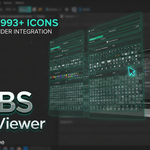
🎨 OEBS Icon Viewer Addon (Free!)
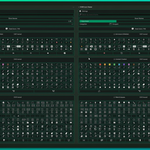
OEBS Icon Viewer is a Free simpler, friendlier tool to help developers browse and use Blender's internal icon library. Whether you are developing an addon and need the perfect UI element, or just exploring what's available, this tool makes it effortless.
✨ Features
- 👀 Visual Search: Don't know the name? Just search for "hand", "eye", or "sun" and find relevant icons instantly.
- 📋 One-Click Copy: Click any icon to copy its Python code name (like ICON_FILE_FOLDER) straight to your clipboard.
- 🔗 Official Reference: Includes a quick link to Blender's official icon reference (ui.blender.org/icons) for the authoritative source.
🚀 How to Use
1. Opening the Viewer
- Open Blender's Text Editor.
- Press N to open the sidebar.
- Click on the Icon Viewer tab.
2. Finding Icons
- Type in the search bar to filter icons.
- You can type names (e.g., TRASH) or descriptions (e.g., delete).
- Click any icon to copy its ID.
🛠️ Installation
- Download the latest release (zip file).
- Open Blender.
- Go to Edit > Preferences > Get Extensions.
- Click the arrow icon (top right) and choose Install from Disk...
- Select the zip file.
📝 Release Notes
v1.3.0
Policy Compliance: Fully compliant with Blender 4.2+ Extension standards (removed sys.path modifications and direct execution blocks).
Official Link: Integrated a direct link to ui.blender.org/icons for the authoritative reference.
Core Focus: Reverted to a pure, high-performance icon viewer (removed experimental export features).
Improved Search: Refined visual keywords for even better search results.
v1.2.0
Initial release with visual search support.
Made with ❤️ by OEBS (Over Engineered Blender Solutions)
N.B: This product is free! If you want to follow on it's development, click on this link: https://github.com/OEBS-OVER-ENGINEERED-BLENDER-SOLUTIONS/OEBS-Icon-Viewer
