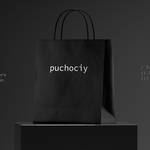
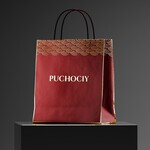
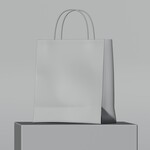
Premium Customisable Shopping Bag Mockup With Foil Embossing Effect
 puchociy


MATERIAL SETUP
Bag Body Material
The bag body uses a single fully procedural material built inside the Shader Editor. The paper
surface is generated entirely through nodes with no external image textures required.
Three inputs are exposed for easy customisation:
BLACK AND WHITE MAP node
Accepts a black and white PNG image. Black areas
define the foil embossing zones. White areas remain as plain paper. Leave empty if no
embossing is needed.
COLOR node Socket A RGB value
Controls the color of the foil embossing highlight. Accepts any
COLOR node Socket B value.
Controls the base paper color of the bag. Accepts any RGB
Bag Handles Material
The handles use a fully independent material. Select the handles in the viewport, open the
Shader Editor and adjust the color directly. This allows complete freedom to mix handle and bag
colors without affecting each other.
FOIL EMBOSSING EFFECT
The foil embossing effect simulates the raised glossy finish found on premium retail packaging
such as hot foil stamped logos and typographic details. It is driven by a black and white input
image plugged into the BLACK AND WHITE MAP node.
To create the embossing map:
1. Create a new document in your design software at your preferred resolution.
2. Set the background to pure white.
3. Paint the areas you want embossed in solid black. Pure black and white only, no grey
values.
4. Export as PNG.
5. Plug the PNG into the BLACK AND WHITE MAP node inside the Bag Body material.
6. Adjust Socket A on the COLOR node to set the highlight color of the embossed areas.
UV LAYOUT
A labelled UV layout PDF is included in the package. Open it in Illustrator, Photoshop or any
design software to use as a template for your custom artwork. The layout covers all surfaces of
the bag: Front, Back, Side Left, Side Right and Bottom. Design your artwork on a pure white
background and export as PNG before plugging into the material.
TIPS
• Design your artwork at a minimum of 3000x3000px for sharp renders.
• Render in Cycles for the most accurate foil embossing and paper surface results.
• Keep embossing shapes bold and simple. Fine details may not read well at typical render
distances.
• The procedural paper texture scales automatically regardless of your image resolution.
• Both materials are fully non destructive. Any change can be undone at any time.
WHAT IS INCLUDED
• premium_shopping_bag_mockup.blend — Main Blender file
• premium_shopping_bag_mockup_UV_layout.pdf — Labelled UV template
• README.pdf — Full usage guide
• LICENSE.pdf — Single user commercial license
LICENSE
Single user commercial license. You may use this asset in personal and commercial projects
including client work, renders, presentations and marketing materials. Redistribution, resale or
sharing of the original file is strictly prohibited. Full license terms are included in LICENSE.pdf.
Have questions about this product?
Login to message
| Dev Fund Contributor | |
| Published | 7 months ago |
| Blender Version | 4.0 - 5.0 |
| Render Engine Used | Cycles |
| Misc Data | Uvs-Unwrapped, Textured |
| License | Creative Commons |
Discover more products like this
marketing mockup business mockup proceduraltextures branding mockup premium-bag 3dbranding Foil shopping bag retail-display paper bag 3d packaging showcase 3d bag