Procedural Flower Generator (Tulip Generator)
 Valeriia Orlova


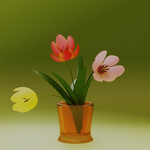
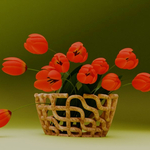
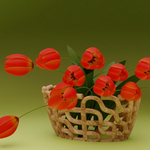
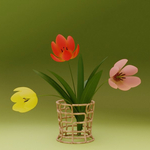

🌸 Procedural Flower Generator (Geometry Nodes)
Create beautiful, fully procedural flowers directly in Blender using this Geometry Nodes setup with procedural materials.
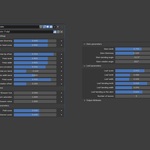
Easily customize shape, color, and structure with 26 adjustable parameters — no coding required.
🧩 Requirements
Blender 4.2 - 5.2
Created with Blender 4.2, tested with Blender 4.5, 5.2
No external add-ons required
Works with Cycles and Eevee
⚙️ Installation & Usage (Asset Library)
Save the asset to your Asset Library
Place the Flower_Generator.blend file into a folder registered as an Asset Library in Blender.
To register a folder:
Go to Edit → Preferences → File Paths → Asset Libraries
Click +, choose the folder, and give it a name (e.g., My Assets).
Using the asset in your project
Open your Blender project.
Open the Asset Browser (Shift+F1 or from the sidebar).
Navigate to the folder containing Flower_Generator.
Drag and drop the generator into your scene — it will create a new object with all controls exposed.
Optional tips
Rename, tag, and categorize the asset for easier search.
Save custom presets by creating objects in your Asset Library.
🌼 Parameters Overview (26 Controls)
Parameter Description
General Flower Settings
Flower blooming Controls how open the flower petals are (higher = more open, lower = more closed)
Flower head scale Overall scale/size of the flower head
Petal Parameters
Petal tip offset Moves the outermost tip point of the petal along its length axis
Petal length Controls how long each petal is
Petal width Controls how wide each petal is
Petal surface curvature Controls the curvature of the petal’s inner surface while keeping the outer perimeter fixed
Petal arc bend Bends the petal along its length by forming an arc, while keeping the base and tip positions fixed
Petal width bend Bends the petal by offsetting its tip while keeping extreme points fixed
Petal scale Scaling factor for the size of the petals
Petal ring rotation offset Applies a consistent rotation offset between adjacent petal rings to control layering and visual fullness
Flower Color Control
Blossom hue Hue (color tint) of the flower petals
Blossom saturation Saturation (color intensity) of the petals
Blossom value Brightness/value of the petals (controls lightness/darkness)
Stamen & Pistil Parameters
Pistil scale Scale/size of the pistil (central female part)
Stamen scale Scale/size of the stamens (male filament parts)
Stem Parameters
Stem length Overall height of the stem
Stem thickness Thickness/diameter of the stem
Stem bending Amount of natural bending/curvature applied to the stem
Stem rotation angle Rotation of the stem around its vertical axis (can affect leaf orientation)
Leaf parameters
Leaf scale Uniform scaling factor for the size of the leaves
Leaf length Length of each leaf
Leaf width Width of each leaf
Leaf bending length How much the leaf bends along its length
Leaf bending width Lateral bending of the leaf
Leaf bending on the stem How the leaf bends where it connects to the stem
Number of leaves Count of leaves on the plant (from 0 to 5)
🎨 Tips for Use
Duplicate and randomize parameters to create natural flower variations.
Combine multiple generators in a scatter system for complex fields.
Adjust lighting and camera depth of field for realistic renders.
📜 License
Standard Royalty Free License
You may use this asset in personal, educational, or commercial projects.
Redistribution or resale of the original .blend file or any part of it is not allowed.
© 2026 Valeriia Orlova. All Rights Reserved.
💬 Author
Created by Valeriia Orlova
Contact: [email protected]
Blender Market / Superhive:
Thank you for supporting Blender creators 💚
 Included
Includes 12 months of
- Support from Valeriia Orlova
- Product updates
Extend this product’s Support Period +12 months: 50% of product price
Have questions before purchasing?
Login to message
| Rating | 4 ratings |
| Published | 8 months ago |
| Blender Version | 4.2 - 5.2 |
| Render Engine Used | Cycles, Eevee |
| License | Royalty Free |
Discover more products like this
procedural flower blooming flower 3d-Asset geometry nodes tulip flower generator Geonodes #nature