 PlugIn3D


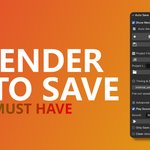
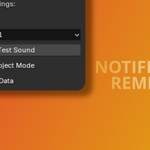
Auto Save+ for Blender – Smarter, Safer Project Saving
Never lose progress again with Auto Save+, the ultimate time-saving Blender add-on designed for artists who value peace of mind and productivity.
🛠️ Key Features:
-
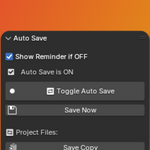
✅ Auto Save with Control: Automatically saves your file at custom intervals. Turn it on/off anytime with a single toggle.
-
⏰ Inactivity Reminder: Get visual + sound reminders if Auto Save is off and you're idle for 10 minutes—ensuring you never forget to save!
-
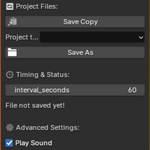
💾 Save Copies with Ease: Create named project copies on the fly. Select which version future auto-saves apply to using the Project to Save To dropdown.
-
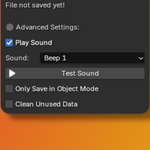
🔊 Custom Sound Alerts: Choose from built-in beeps and test them instantly to suit your workflow.
-
🔍 Status at a Glance: See whether your file has been saved, what the current interval is, and stay informed.
-
🔐 Extra Utilities:
-
Save only in Object Mode.
-
Instantly clean unused data for optimized files.

-
Perfect for 3D artists, animators, and developers looking for a non-intrusive, reliable way to manage their project files. Stay focused on creating—Auto Save+ will handle the rest.
🧩 Compatible with Blender 3.x+
📦 How to Install
-
Download the .zip file of Auto Save+.
-
Open Blender, go to Edit > Preferences > Add-ons.
-
Click Install, select the .zip file, and click Install Add-on.
-
Enable the checkbox next to Auto Save+.
-
You’ll find the add-on in the 3D View > Sidebar (N panel) > Auto Save+ tab.
Download the .zip file of Auto Save+.
Open Blender, go to Edit > Preferences > Add-ons.
Click Install, select the .zip file, and click Install Add-on.
Enable the checkbox next to Auto Save+.
You’ll find the add-on in the 3D View > Sidebar (N panel) > Auto Save+ tab.
🎯 Get Auto Save+ and take the stress out of saving!