 Skava


ProtoBlock — Documentation
v1.0.2 · Blender 4.2 LTS and later · Windows / macOS / Linux
1. Install
- Download the add-on archive (do not unpack).
- Edit → Preferences → Add-ons, press the arrow button in the top right corner, choose Install from Disk, pick the ZIP, enable ProtoBlock.
- Press N in the 3D Viewport → ProtoBlock tab.
After installing, press N in the 3D Viewport: a tab named ProtoBlock appears in the sidebar.
2. Quick start
- Open the ProtoBlock tab. Set Grid Size and press the snap button next to it: grid snap is switched on and your own snap settings are backed up.
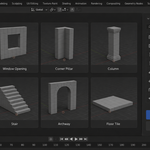
- Pick a primitive — Box / Wedge/Ramp / Cylinder / Arch / Stairs / Floor / Wall / Pillar — and set its Width, Depth and Height.
- Press Add Primitive: the block is added at the 3D cursor.
- For CSG: select two blocks (the active one is the base, the other is the cutter), pick Union / Difference / Intersect in the Boolean Operations panel and press Boolean Op.
3. Primitives
Eight grid-aligned primitives tuned for level blockout. Each one inherits the current grid size for clean snapping.
4. CSG booleans
Auto-apply — the modifier is added and applied in one operator call. The cutter is removed after the operation so the result is a clean mesh you can keep iterating on.
5. Kit pieces
Save As Kit moves the active block into a dedicated ProtoBlock Kit collection (it is taken out of its other collections). Place Kit Piece puts a grid-snapped copy of a kit piece into the active collection. Kit pieces live in the current .blend file.
6. Box UV
Every primitive, and the result of every boolean, gets a box projection automatically: each face is projected along the axis its normal points to most, so tiling textures do not stretch on walls. There is no separate button for it.
7. FBX export with collision
Export Level writes the selected blocks to FBX. Each block gets a bounding-box collider named for the chosen engine: UCX_name for Unreal, name_col for Unity, name-col for Godot.
8. Snap-restore safety
When you enable grid snap, ProtoBlock snapshots tool_settings.snap_elements, use_snap, and use_snap_grid_absolute. Pressing the snap button again restores them exactly — your custom snap config is never lost.
9. Troubleshooting
"Booleans leave a modifier on the object" — they shouldn't; booleans are auto-applied. If you see one, the cutter mesh may have non-manifold geometry. Recalculate normals first.
"Each new block recolours all my blocks" — fixed; the release creates a fresh material per block.
"FBX import in Unreal doesn't get my collision" — verify the collider child has the UCX_ prefix in the outliner.
10. Support & License
Through marketplace messaging. GPL-3.0.
Changelog
v1.0.2 — maintenance release. Minimum Blender is now 4.2 LTS. The package ships the full licence text and an updated README. No changes to the tools.
1.0.1 — Boolean operations work again on Blender 5.x. The add-on asked the Boolean modifier for a solver named FAST, which Blender has since replaced with FLOAT, EXACT and MANIFOLD — the assignment raised, and Quick Union, cut and difference all failed with it. The solver is now picked from what the running Blender actually offers. Verified: two blocks union into one.
Have questions about this product?
Login to message
| Sales | 10 |
| Published | 5 months ago |
| Blender Version | 3.2 - 5.2 |
| Extension Type | N/A |
| Render Engine Used | Cycles, Eevee |
| License | GPL |
Discover more products like this
modular-kit indie-dev auto-uv snap-to-grid grayboxing blockout primitives Level Design game-level Rapid prototyping csg-boolean prototyping