QOL Tools
QOL.. Quality Of Life tools for Blender!
Nodes 2 Blend
Do YOU do a lot of work with Geometry nodes or the Shader editor ?
Blender has an exceptional built-in asset management system, outstanding for working with linked files, materials and objects.
But the asset browser interface and asset marking system is not great for nodegroups.
Setting up your own nodegroup assets is, frankly, a pain in Blender.
So much so, that you often just end up making the same node networks again and again ?
With Nodes 2 Blend, you just select your Nodegroup and click, you're done. It's saved as a preset for all future Blender sessions.

As you see, we have the option of
1) Choose your library
2) Choose the category
3) Choose the preset name to save.
After the first time it remember, so most often you just type the name and go ! :)
As you see, we have the option of
1) Choose your library
2) Choose the category
3) Choose the preset name to save.
After the first time it remember, so most often you just type the name and go ! :)

Afterwards, your presets can be retrieved as easy as adding ANY prebuilt node, every time you start Blender.
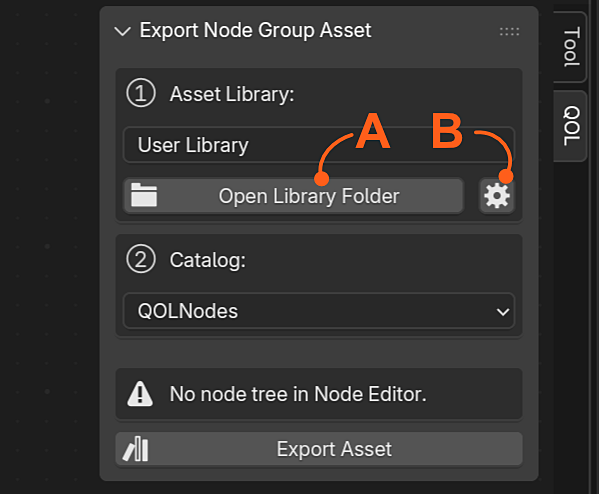
Library management is directly accessible !
A) Takes you directly to the folder on disk, opened with explorer.
B) Takes you directly to blenders Asset file paths so you can add or remove libraries.
The quickest and easiest way to create custom node presets :)
Library management is directly accessible !
A) Takes you directly to the folder on disk, opened with explorer.
B) Takes you directly to blenders Asset file paths so you can add or remove libraries.