Quick Tricks
 Bright Future 3D LLC



How to install
Download the ZIP folder according to your Blender version. Example: Blender 4.4 = Blender_Quick_Tricks_Addon_V1_4-4.zip (do not unzip)
Open Blender 4.0, Go to “Edit”, “Preferences”
Then click “Install”
Locate the downloaded ZIP file and select it
Click “Install Add-on”
In Add-ons, search “Quick Tricks”, then check the box to activate it.
- A new panel called “Quick Tricks” should appear on the right side of the viewport (Press N).
How to use it
Center Pivot (Object Mode Right Click Menu)
Pivot to Bottom (Right Click Menu and Panel Button)
Modify Pivot (Object Mode Right Click Menu)
These three buttons appear when in Object Mode and when right clicking. It adds these buttons above the default menu.
Invert Selection (Edit Mode Right Click Menu)
Grid Fill (Edit Mode Right Click Menu)
These two buttons appear when in Edit Mode and when right clicking. It adds these buttons above the default menu.
Pie Menu inspired by Maya (Object and Edit Mode -- Alt + Right Click Menu)
This pie menu appears when in Object and Edit Mode while Alt Right clicking. You can easily toggle between selection modes, very similar to how Maya works.
Auto Key in Viewport (Available for Blender versions 4.0 - 4.2) :
Toggling this "on" (button appears blue), will add a keymap to the preferences that allows you to press the "I" hotkey while your mouse cursor is in the 3D viewpoint, resulting in 9 keyframes being added to all transform values for that object selected.
Grouping:
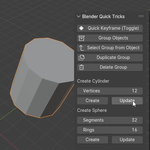
The group buttons allow you to create, duplicate and delete groups. You can also select an object within a group and select the group it's in with the button "Select Group from Object".
Changing cylinder, sphere, torus, and cone attributes:
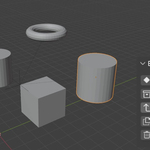
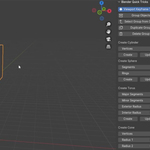
You can create primitive shapes, as well as update existing ones with modified vertices or segments depending on what you need. This is helpful when creating a base mesh, positioning it, then realizing it has the wrong amount of verts or segments. This add-on lets you change it, just don't model or add detail to the base mesh.
Rotation snaps:
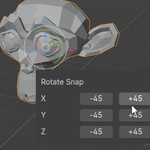
Whichever object you have selected you can click whichever 45 degree button on a whatever axis you'd like it to be rotated on.
Have questions about this product?
Login to message
| Published | about 1 year ago |
| Blender Version | 4.0 - 4.5 |
| Extension Type | N/A |
| Render Engine Used | Cycles, Eevee |
| License | GPL |