 Null Station


Quick Align
Align and distribute objects in Blender with the precision and ease of Adobe Illustrator.
Features
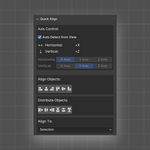
- 6 Alignment Modes: Left, Center Horizontal, Right, Top, Center Vertical, Bottom
- 6 Distribution Modes: Horizontal Left/Center/Right edges, Vertical Top/Center/Bottom edges
- Smart Axis Detection: Automatically detects horizontal and vertical axes based on your current view
- Manual Axis Control: Override automatic detection with manual axis selection
- Custom Icons: Beautiful custom icons that match the Adobe Illustrator interface
- Multiple Align Targets: Align to selection bounds or active object
Installation
- Download the extension as a ZIP file
- In Blender 4.2+, go to Edit > Preferences > Extensions
- Click "Install from Disk" and select the ZIP file
- Enable the "Quick Align" extension
Usage
- Select 2+ objects for alignment (3+ for distribution)
- Open the Quick Align panel in the 3D Viewport sidebar (N key)
- Choose your axis control.
Auto Detect: Automatically uses the correct axes based on your view
Manual: Select horizontal and vertical axes manually - Click alignment or distribution buttons to organize your objects
Axis Control
Top View (Numpad 7): Horizontal = X, Vertical = Y
Front View (Numpad 1): Horizontal = X, Vertical = Z
Side View (Numpad 3): Horizontal = Y, Vertical = Z
Alignment Options
Align to Selection: Aligns objects to the bounds of all selected objects
Align to Active: Aligns objects to the active (last selected) object
Requirements
Blender 4.2.0 or later
Author
Created by Null Station
Website: www.nullstation.co