 Merdan



1. Quick Start
Installation: Go to
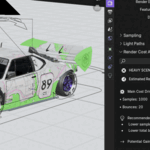
Edit > Preferences > Add-ons > Installand select the.zipfile.Activation: Enable Render Cost Analyzer in the list.
Access: Open the 3D Viewport, and look for it in the "Render" tab.
2. Core Metrics: Understanding "Render Load"
The Render Load Index is the heart of the addon. Unlike a standard progress bar, this is a performance-to-complexity ratio.
100% (Optimized): Your render settings (Samples, Bounces, etc.) are perfectly matched to the geometric complexity of your scene.
150% - 300% (High Load): You are experiencing "Diminishing Returns." Your settings are significantly higher than what is required to resolve the image cleanly.
400%+ (Critical Load): Your hardware is working 4x harder than necessary. This usually indicates redundant subdivision levels or excessive light bounces.
3. The Optimization Roadmap
The addon provides a Recommended Actions panel when your load exceeds 120%.
A. Samples Analysis
The analyzer checks your polygon count vs. your sample rate.
Recommendation: If you have 4096 samples on a low-poly scene, the tool will suggest a target between 512–1024.
B. Light Path Optimization
Excessive Total Bounces are the #1 cause of slow renders in Cycles.
Recommendation: The tool monitors indirect light needs. It may suggest dropping Total Bounces from 12 down to 4 for faster throughput without losing visual accuracy.
C. Geometry & Subdivisions
High-resolution meshes with unnecessary Subsurf modifiers are flagged.
Recommendation: If a mesh is not in the foreground, the tool will suggest lowering the Viewport/Render levels.
4. Technical Specifications
Supported Engines: Cycles, EEVEE.
License: MIT.
5. Troubleshooting
"Load Index is grayed out": Ensure you are in a 3D Viewport and have an active camera in the scene.
"Recommendations not appearing": Recommendations only trigger when the Render Load exceeds the 120% efficiency threshold.
Have questions about this product?
Login to message
| Blender Extension Compatible | Yes |
| Published | 8 months ago |
| Blender Version | 3.6 - 5.0 |
| Extension Type | Add-on |
| Render Engine Used | Cycles, Eevee |
| License | Mit |

Discover more products like this
samples performance Workflow eevee optimization Cycles Geometry Render utility diagnostic