Nodes Interactive
2 months ago
Great to hear! Thanks for sharing!
This item has an average rating of 5 from 23 ratings by the community.
Purchase this item to leave a review!
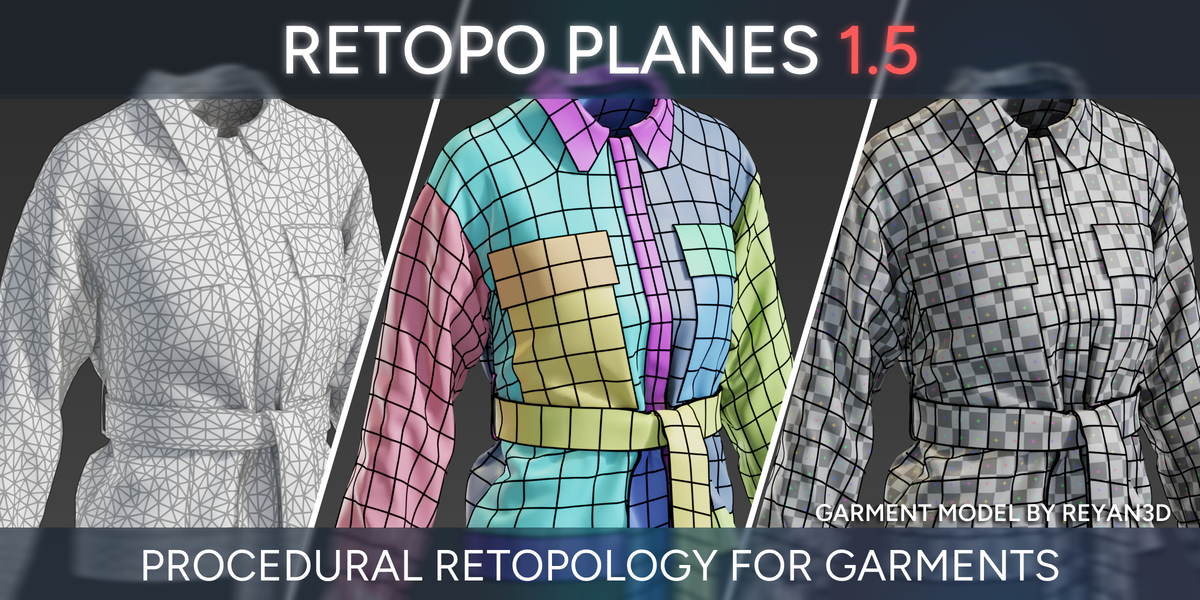
My primary field of work is gaments using marvelous designer, and this could not be more perfect. It saves a ton of time and gives great, clean quad geometry. This is one of the most useful tools in my toolkit.
Nodes Interactive
2 months ago
Great to hear! Thanks for sharing!
Great! Works well and fast even on dense source meshes, which don't necessarily have to be clothes as long as the UVs are fairly neat and in a reasonable number of islands (I don't think it's meant to be a general retopology solution). You can set the quad density of different areas by changing the crease on the guide plane, which is pretty clever, and the reproject option lets you easily clone details from the original mesh onto the new one for multires or baking. I was so impressed that I bought practically all of the creator's other addons, and so far none have disappointed! Every single one (belt, laces, wrapping, tears, etc.) has been extremely easy and intuitive to use, polished, and full of extensive options and customizability.
Nodes Interactive
5 months ago
Thaaank you!
Amazing addon! As always its really well made and is very reliable! Absolutely essential for retopology if you are using cloth simulations!
There are 3 Items in the asset browser and they require a small setup but the documentation and youtube videos are very helpful! Blender 5.0 is adding new asset libraríes with import method "packs" instead of "append" switching it to "append" was necessary for it to work. It's really important to apply the transform of the clothing and make sure the UVMap name is correct in the 3DtoPatterns geometry node.
A suggestion I have is that the creator could make a side panel addon with one button to automatically setup everything. A simple python script could create a copy of the clothing, apply the transform, assign the UVMap name field correctly, add the 3DtoPattern geometry node to the clothing object and the RetopoMain asset item to the scene, assign the curve pattern field and initialize the object!
Also I think that the guidelines should be set to 0 at first because I don't think most people need them and they look confusing when you are not familiar with the addon yet especially because there is no guideline checkmark switch so its easy to overlook the slider setting for the guidelines!
Nodes Interactive
9 months ago
Hey, thanks for the nice words and valuable quality of life propositions. I added them to my todo list for Retopo Planes - will look into it for the update.
Best,
Piotr
Nodes Interactive
Saved me a ton of time having to manually retopo clothes from MD after sculpting on top of them.
Thank you for this amazing tool!!!
I’m facing two problems:
When I try to apply 3DtoPatterns to data imported from Marvelous Designer, it doesn’t unwrap.
Using ORetopoMain causes Blender to crash.
It worked fine the first time, but from the second attempt onward, it completely stopped functioning. :(
Nodes Interactive
over 1 year ago
Hey, make sure you're using Blender 4.2+. It's best to set the import method in the Asset Library preferences to "append" instead of "append and reuse" for this asset. If you're still having trouble, contact me directly through this page or consider joining Discord https://discord.com/invite/5zFatHznhN — there are already a couple of helpful threads.
Great tool, i have one issue which is the seams arent connected once u done retopo. I get that issue once i start rigging clothes and the mesh is not connected on the seam areas. Might need to do some manual adjusting like merging vertices together once done. Or It be could user error and im not sure how to do it. Would love feedback on that!
Nodes Interactive
over 1 year ago
Thanks;) Well it sounds like garment was exported from Marvelous/Clo with patterns "unwelded". Retopo Planes needs to have "welded" patterns from MD to know how they are connected and be able to display it's full power (autodensity, autofill), unless of course you only need seperate parts retopologized. If you have any other questions feel free to can contact me via email or through this site.
Best,
Piotr
Nodes Interactive
Absolutely briliatn tool, magnificent, superb, splendid and just godlike! For everyone working with Marvelous Designer and Blender this is must have! Worth every penny!
Thank you guys for saving me hours of life!
Nodes Interactive
over 1 year ago
Thanks!
This add-on is an absolute game changer for my marvelous workflow! Thank you so much for making such amazing add-ons ♥
Excellent, this has uncomplicated retopology from MD and made my life a lot easier. There are a couple of quirks that pop up every now and then but overall I am very happy with this add-on.
I would highly recommend it for anybody who wants to make their garments more animation-friendly.
Accelerate your workflow with Retopo Planes for Clothes! Effortlessly retopologize clothing in Blender. Thank you for optimizing your projects with us!
Single user - personal and commercial use license
Commercial use license
Have questions about this product?
Login to message
| Sales | 2500+ |
| Rating |
23 ratings
|
| Dev Fund Contributor | |
| Published | over 2 years ago |
| Blender Version | 4.2 - 5.2 |
| License | Royalty Free |