 Prince Eagle


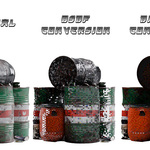
⚡ Fast Retro Console Texture Converter ⚡
Transform your modern textures into authentic retro console styles with lightning speed!
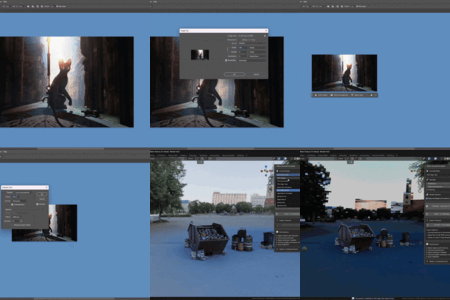
Convert 1 material in under 5 seconds in Blender vs 2-5 minutes the traditional Photoshop way.
Convert 1 to 1000s of Materials with a single click.

✨ Key Features
🎮 10 Console Presets
PlayStation 1 (Classic, Enhanced, High-Res)
Game Boy Advance - Bright, colorful style
Game Boy Color - Saturated palette
PlayStation Portable - High-quality textures
Nintendo 64 - Filtered texture style
Sega Saturn - Unique rendering characteristics
Dreamcast - High-quality retro textures
Nintendo DS - Dual-screen style
PlayStation 1 (Classic, Enhanced, High-Res)
Game Boy Advance - Bright, colorful style
Game Boy Color - Saturated palette
PlayStation Portable - High-quality textures
Nintendo 64 - Filtered texture style
Sega Saturn - Unique rendering characteristics
Dreamcast - High-quality retro textures
Nintendo DS - Dual-screen style
🚀 Lightning Fast Performance
Optimized numpy-based processing
Batch convert multiple materials at once
Real-time preview of settings
Processes dozens of textures in seconds
Optimized numpy-based processing
Batch convert multiple materials at once
Real-time preview of settings
Processes dozens of textures in seconds
🎨 Authentic Visual Effects
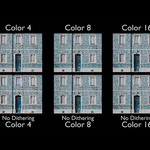
Smart Color Reduction - Reduces colors per channel for authentic look
Floyd-Steinberg Dithering - Smooth gradients with retro charm
Console-Specific Color Shifts - Recreates each system's unique characteristics
Intelligent Resizing - Optimized nearest-neighbor scaling
Smart Color Reduction - Reduces colors per channel for authentic look
Floyd-Steinberg Dithering - Smooth gradients with retro charm
Console-Specific Color Shifts - Recreates each system's unique characteristics
Intelligent Resizing - Optimized nearest-neighbor scaling
🛠️ Easy to Use
One-click conversion with presets
Manual fine-tuning options
Works with existing materials
No complex node setup required
One-click conversion with presets
Manual fine-tuning options
Works with existing materials
No complex node setup required
🎯 Perfect For:
Indie game developers
Retro art enthusiasts
Low-poly modeling projects
Nostalgic art styles
Educational projects about gaming history
Indie game developers
Retro art enthusiasts
Low-poly modeling projects
Nostalgic art styles
Educational projects about gaming history
📋 How to Use
Install the addon in Blender (Preferences > Add-ons) ‼️Restart Blender ‼️
Select objects with textured materials
Choose your desired console style from the sidebar panel
Click "Convert to Retro Style"
Enjoy your authentic retro textures!
Install the addon in Blender (Preferences > Add-ons) ‼️Restart Blender ‼️
Select objects with textured materials
Choose your desired console style from the sidebar panel
Click "Convert to Retro Style"
Enjoy your authentic retro textures!
The addon automatically handles:
Material node setup
Texture processing
Resolution scaling
Color palette reduction
Console-specific effects
🔧 Technical Specifications
Blender Version: 4.4.3+ (compatible with latest versions)
Dependencies: NumPy (included with Blender)
Processing Speed: Up to 50x faster than traditional methods
Memory Efficient: Optimized for large texture batches
Output Format: Packed Blender images ready for use
Blender Version: 4.4.3+ (compatible with latest versions)
Dependencies: NumPy (included with Blender)
Processing Speed: Up to 50x faster than traditional methods
Memory Efficient: Optimized for large texture batches
Output Format: Packed Blender images ready for use
📚 Documentation & FAQ
Q: Why aren't my textures converting?
A: Make sure your materials have Image Texture nodes with loaded images. Procedural materials won't work.
Q: Can I undo the conversion?
A: Yes! Use Ctrl+Z or keep backups. The addon creates new images and doesn't modify originals.
Q: Which console preset should I use?
A:
PS1 Classic - Most authentic retro look
PS1 Enhanced - Good balance of quality and retro feel
GBA - Bright, colorful style
N64 - Softer, filtered appearance
Q: My textures look too pixelated/not pixelated enough
A: Adjust the "Colors per Channel" setting. Lower values = more pixelated, higher values = smoother.
Q: Can I use this for commercial projects?
A: Yes! The addon and its output can be used in commercial projects. Just remember the console names are trademarks.
Q: Does this work with Cycles and Eevee?
A: Yes! Works with both render engines. Set interpolation to "Closest" for pixel-perfect results.
💡 Tips & Tricks
- Turn of Specular (Specular IOR Level --> 0)
-
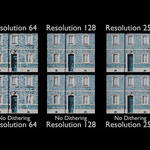
For pixel art: Use lower resolution settings (64-128px)
-
For subtle retro: Use higher color counts (16-32)
-
Enable dithering for smoother gradients
-
Disable dithering for harder pixel edges
- Experiment with presets - each has unique characteristics!
🚨 Important Limitations
This addon does NOT:
Magically improve low-quality source textures
Work with procedural materials (image textures required)
Support animation or video textures
Modify mesh geometry or UV maps
Include actual console ROMs or copyrighted assets
Guarantee exact hardware replication
For best results:
Use high-quality source images
Ensure proper UV mapping
Works best with diffuse/albedo textures
Backup your project before conversion
📱 Connect & Support
Questions? Feel free to reach out through the "Ask a Question" button on Blender Market or shoot an email to [email protected]! 💬
⚖️ Legal Notice
This addon creates visual effects inspired by classic gaming consoles. All console names (PlayStation, Game Boy, Nintendo, Sega, etc.) are trademarks of their respective owners. This addon is not affiliated with or endorsed by any console manufacturer. The addon creates artistic interpretations of retro styles for creative purposes only.
If you represent a trademark holder and have concerns, please contact [email protected] for prompt resolution.
🔄 Changelog
Version 1.0.0
Added 10 console presets
Massive performance improvements
Console-specific color effects
Improved dithering algorithm
Better error handling
Added 10 console presets
Massive performance improvements
Console-specific color effects
Improved dithering algorithm
Better error handling