 guillaume martin



RHINOCEROS ↔ BLENDER
RhiBlendSync
Stop exporting. Start creating.
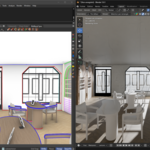
v1.3.1 — Rhino 7 & 8 • Blender 4.0–5.1 • SurfacePsycho inside| ⚡ Edit in Rhino → see the result in Blender in seconds. Geometry, materials, textures, blocks, lights, curves and hierarchy — everything transfers. And with v1.3, your Rhino NURBS can now arrive in Blender as true SurfacePsycho parametric objects: the CAD loop is finally closed, in both directions. Tested on scenes with 15,000+ objects. |
Rhino 7-8 Windows • Rhino 8 Mac • Blender 4.0–5.1 • Bilingual FR/EN
WHAT'S NEW IN V1.3.1
The mesh update. And Rhino 7, complete.
|
MESH QUALITY Density that finally worksMeshing now happens from the geometry with YOUR settings — the viewport cache is out. The initial grid is amplification-driven: real low-poly at the bottom, genuinely dense at the top, independent of surface spans and UV counts. No more _Rebuild workarounds; per-object overrides included. |
TOPOLOGY Grid to the edges (one option away)New option: mesh each face like a standalone surface — a clean quad grid running edge to edge instead of a triangulated border skirt. Perfect on straight-edged solids; watertight stays the default. A tolerant tris→quads pass cleans the remaining border fans either way. |
|
NATIVE SHADING Meshes that behave like Blender's ownFlat/smooth per face + Sharp marks on true creases — zero custom normals. Dissolve, Bevel and editing work without artifacts; SubD and fillets arrive with continuous smooth normals; simplification (Planar by default) merges coplanar faces into clean ngons. |
YOUR WORK SURVIVES Shading, modifiers, block editsShade Smooth / Auto Smooth / Flat choices persist through re-syncs, and editing a block in Rhino no longer wipes modifiers or shading inside your Blender instances: definitions are updated in place. |
|
RHINO 7 Toolbar and connection, fixedA dedicated Rhino 7 toolbar format that loads and shows automatically on install (no restart, no manual activation), and the missing JSON runtime now ships with the build — Rhino 7 connects again. |
LANGUAGE & POLISH Follows YOUR Rhino and BlenderThe plugin language now follows Rhino's interface language, and the addon follows Blender's — an explicit English interface wins over a French system locale. Full audit of hardcoded strings, real version numbers everywhere, phantom-install cleanup in the installer. |
⚠ About mesh simplification (Blender addon preference). Quads and Planar produce much cleaner topology, but they are real geometry processing: on scenes of several hundred objects the pass takes time and memory after the transfer. It is off by default, never runs during reception (transfers keep full speed), processes one mesh at a time with a dedicated progress bar, and skips meshes above 80,000 vertices. Recommendation: leave it off for heavy production scenes, enable it for the models whose topology you care about. |
WHAT'S NEW IN V1.3
The parametric update. And the most reliable RhiBlendSync ever.
|
SURFACEPSYCHO ↔ Rhino NURBS → parametric objectsThe headline feature: NURBS surfaces, polysurfaces and extrusions leave Rhino as STEP and arrive in Blender as genuine SurfacePsycho parametric objects — editable patches, not frozen meshes. Combined with the existing SP → Rhino push, the CAD round trip is now complete. |
PER-OBJECT CONTROL Mesh or SurfacePsycho — you chooseTwo global toggles (full sync / selection sync) plus a per-object override in the Rhino panel. Switch an object between mesh and parametric at any time: transitions are handled cleanly in both directions, with zero duplicates. |
|
RELIABILITY Auto-sync you can forget aboutThe delta engine is now transactional: if a send fails, nothing is lost — changes are replayed automatically on the next tick. Attribute changes (layer, name) are detected, reconnections trigger an automatic full sync, and the Blender server timer can no longer be killed by a stray error. |
HIERARCHY Everything follows your layersMeshes, curves, lights, block instances and SurfacePsycho objects all track Rhino layer changes — even layer-only moves with untouched geometry — in every sync mode. New lights are created directly inside their layer collection. |
|
WORKFLOW Custom source names & portGive each Rhino file a custom source name, stored inside the .3dm itself: rename, move or copy the file, the Blender link survives. The TCP port is configurable on both sides to avoid conflicts with other addons. |
FIDELITY Per-face materials, full round tripMulti-material Breps keep their per-face assignments Rhino → Blender → Rhino. Pushed objects update the originals in place via ID acknowledgment — no duplicates, and your original Blender materials are preferred on return. |
BUILT BY AN ARCHITECT, FOR ANYONE
"I developed this plugin after switching to Blender for my architectural renderings. Using Rhino daily for 3D modeling, I quickly realized how inefficient the transfer process was. After testing existing solutions that didn't meet my professional standards, I decided to build the tool I needed: a seamless, real-time link that just works."
THE PROBLEM YOU ALREADY KNOW
You model in Rhino. You render in Blender. Between the two? Frustration.
❌ Without RhiBlendSync✕ Manual FBX/OBJ export every iteration ✕ Layer hierarchy lost — flat pile in Blender ✕ Materials lost — redo everything ✕ UVs broken, blocks exploded ✕ NURBS flattened to dead meshes ✕ 5–15 min per iteration, dozens of times ✕ No way to push edits back to Rhino | ✅ With RhiBlendSync✓ 1 click, 2 seconds — full scene transfer ✓ Layers → organized Blender collections ✓ Materials transferred as Principled BSDF ✓ UVs preserved, blocks as instanced collections ✓ NURBS → SurfacePsycho parametric objects ✓ Auto-sync — only changes are sent ✓ Push mesh + materials + NURBS back to Rhino |
WHAT YOU CAN DO
Everything transfers. Nothing is lost.
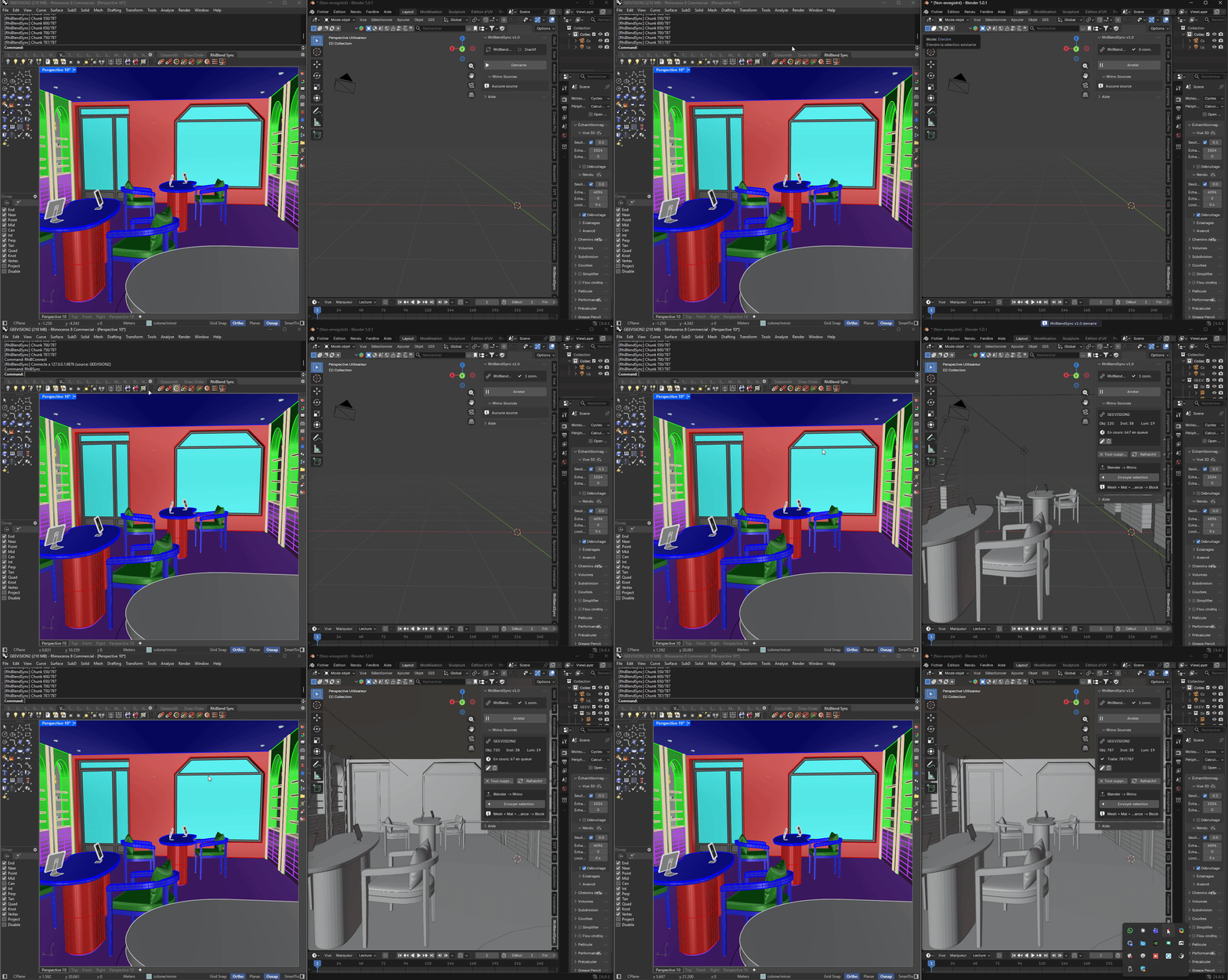
⚡ Sync your entire scene in one click
Click Sync: geometry, materials, textures, blocks, lights, curves and layer hierarchy arrive in Blender. Scenes with 15,000+ objects are handled through a streaming pipeline with zlib compression (10–20x less network data). Progress bar displayed in both Rhino and Blender.
🔄 Work continuously without interruption
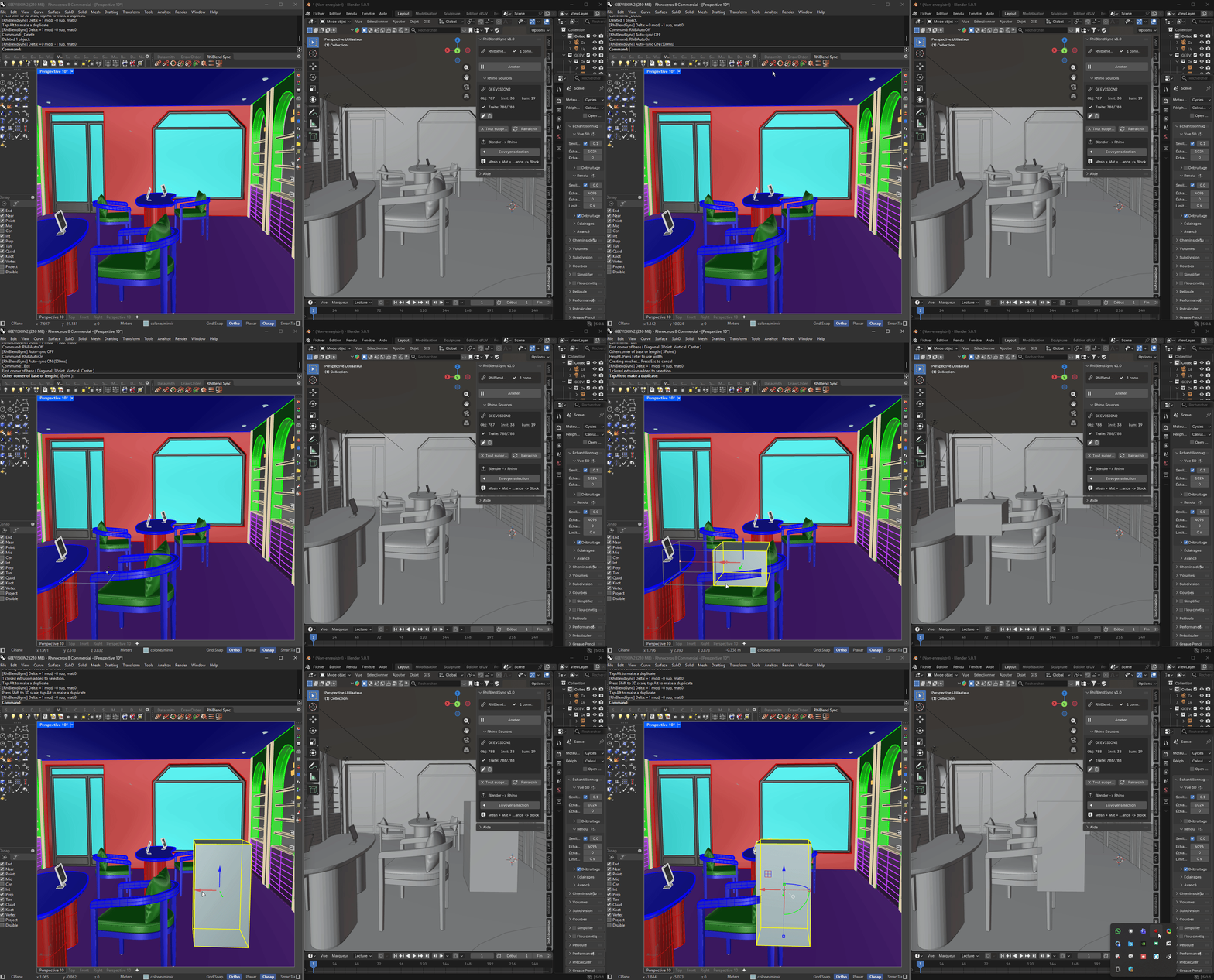
Enable auto-sync: every change in Rhino is automatically detected and sent. Only modified, added, or deleted objects are transferred — not the whole scene. Event-driven detection combined with periodic scan catches every change, including pure attribute changes like renaming an object or moving it to another layer. v1.3 makes the engine transactional: a network hiccup can no longer lose a change, and a reconnection rebuilds the Blender scene automatically.
🌀 SurfacePsycho: true parametric CAD, both ways
Full native integration with the SurfacePsycho add-on for parametric surface modeling in Blender — now in both directions.
| NEW IN V1.3 — RHINO → BLENDER NURBS → SurfacePsycho objects Surfaces, polysurfaces and extrusions are exported as STEP in real time and rebuilt by SurfacePsycho's own importer as editable parametric patches — one patch per face, placed in the correct layer collection, tracked and updated on every sync without duplicates. | BLENDER → RHINO SP patches → native NURBS Bezier & NURBS patches, multi-patch compounds and blend patches travel to Rhino as native NURBS via SurfacePsycho's STEP exporter — control points, weights, knots and degrees preserved with full fidelity. |
Choose the pipeline per workflow: two global toggles (full sync / selection) and a per-object override let you decide which objects travel as lightweight meshes and which as parametric geometry. Layer-only changes on SurfacePsycho objects are transmitted as lightweight metadata — no STEP re-export. Modify the NURBS in Rhino with auto-sync on: the parametric object is replaced in ~2 seconds.
Requires the SurfacePsycho add-on installed in Blender (the rest of the plugin works fully without it). Known limitation: NURBS inside block definitions arrive as meshes — use exploded block mode as a workaround.
🎨 Keep your materials intact
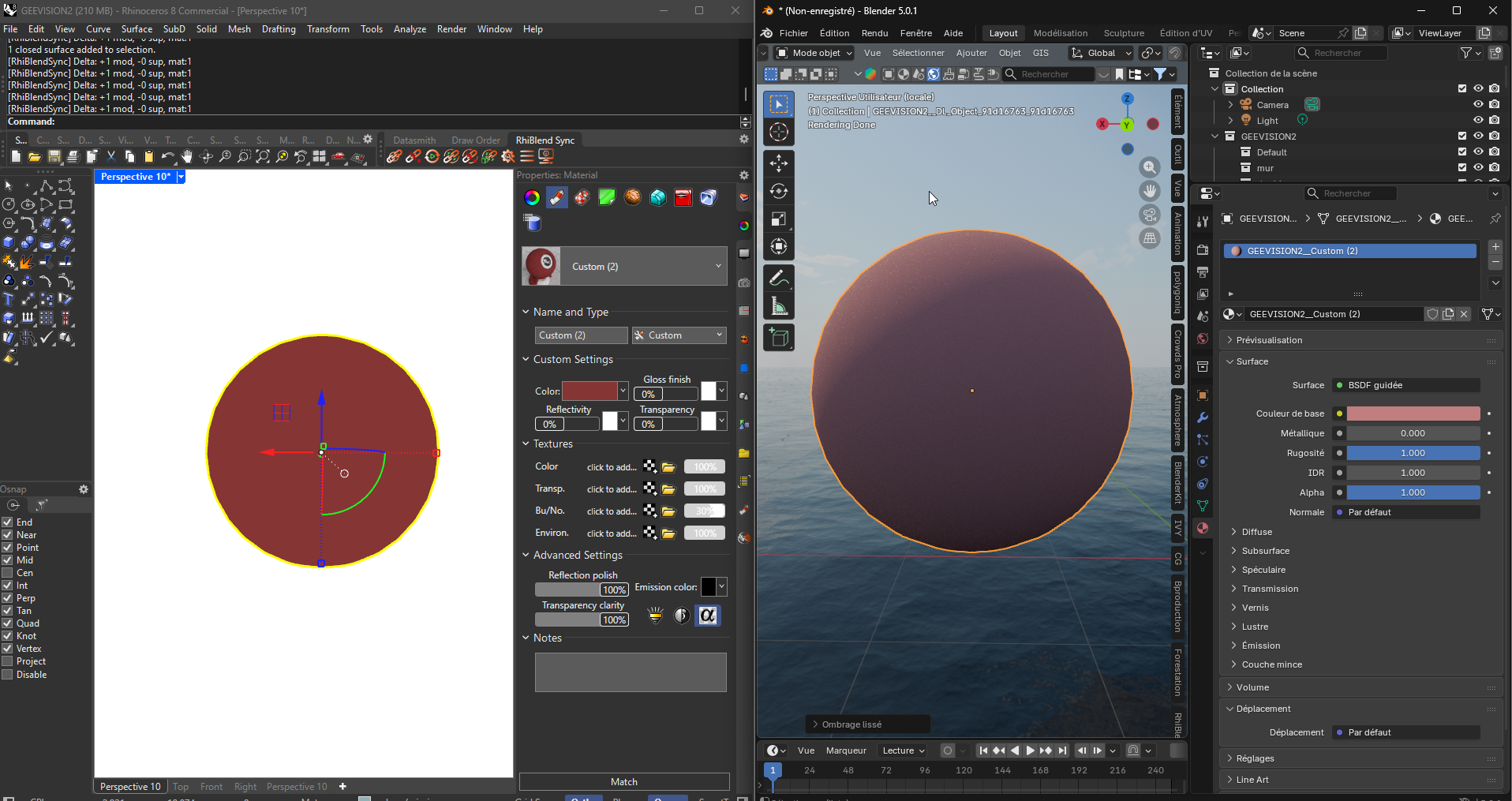
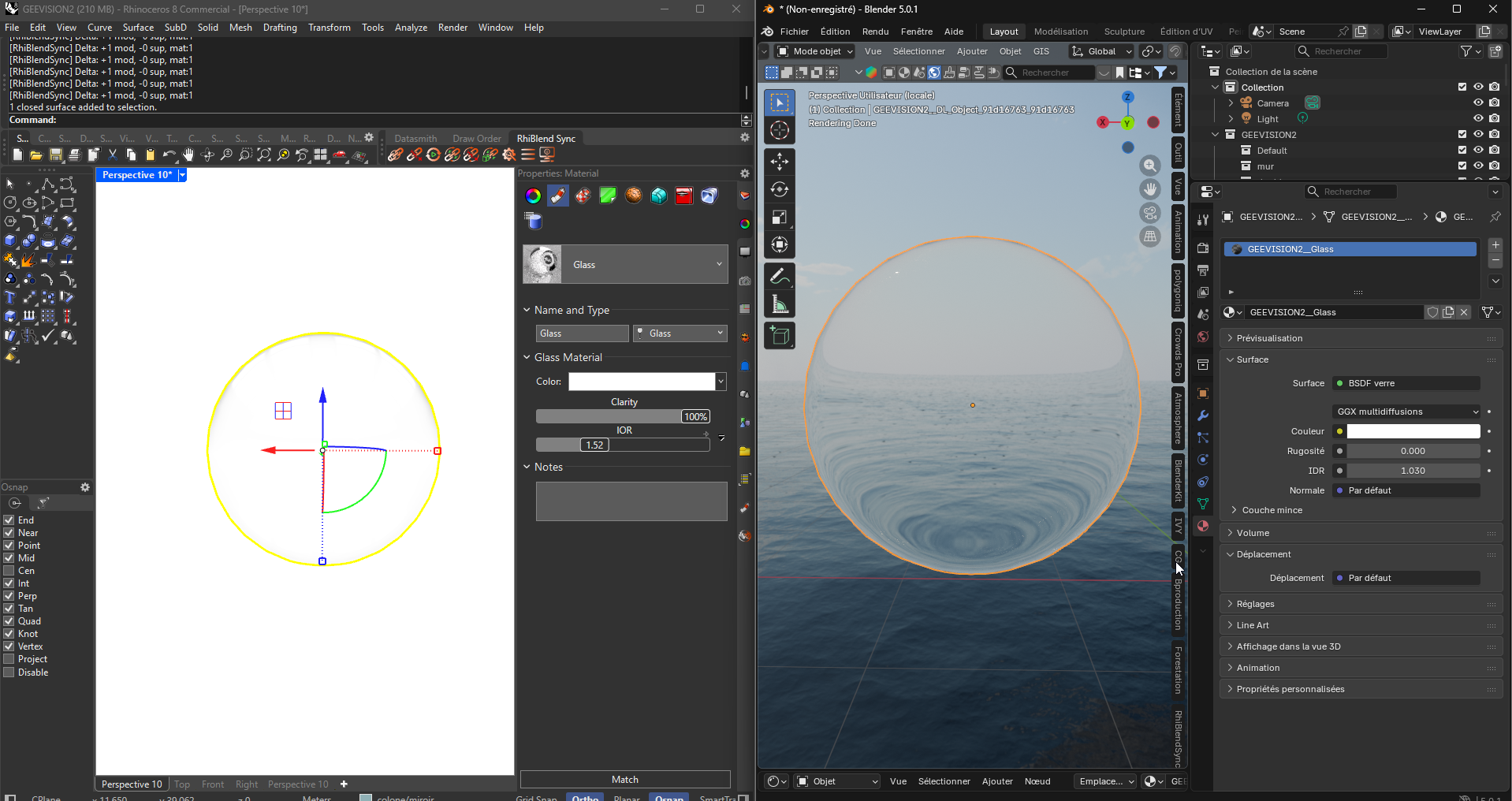
Rhino materials are analyzed and recreated as Principled BSDF shaders in Blender. Full support for ByObject, ByLayer, and ByParent assignment. Per-face materials on multi-material Breps are preserved — and since v1.2.x they survive the full round trip: push a multi-material object to Rhino, edit it there, and it returns to Blender as a single object with per-face assignments intact and your original Blender materials preferred. Glass, metal, emission, and textures are auto-detected, with hash-based texture caching.
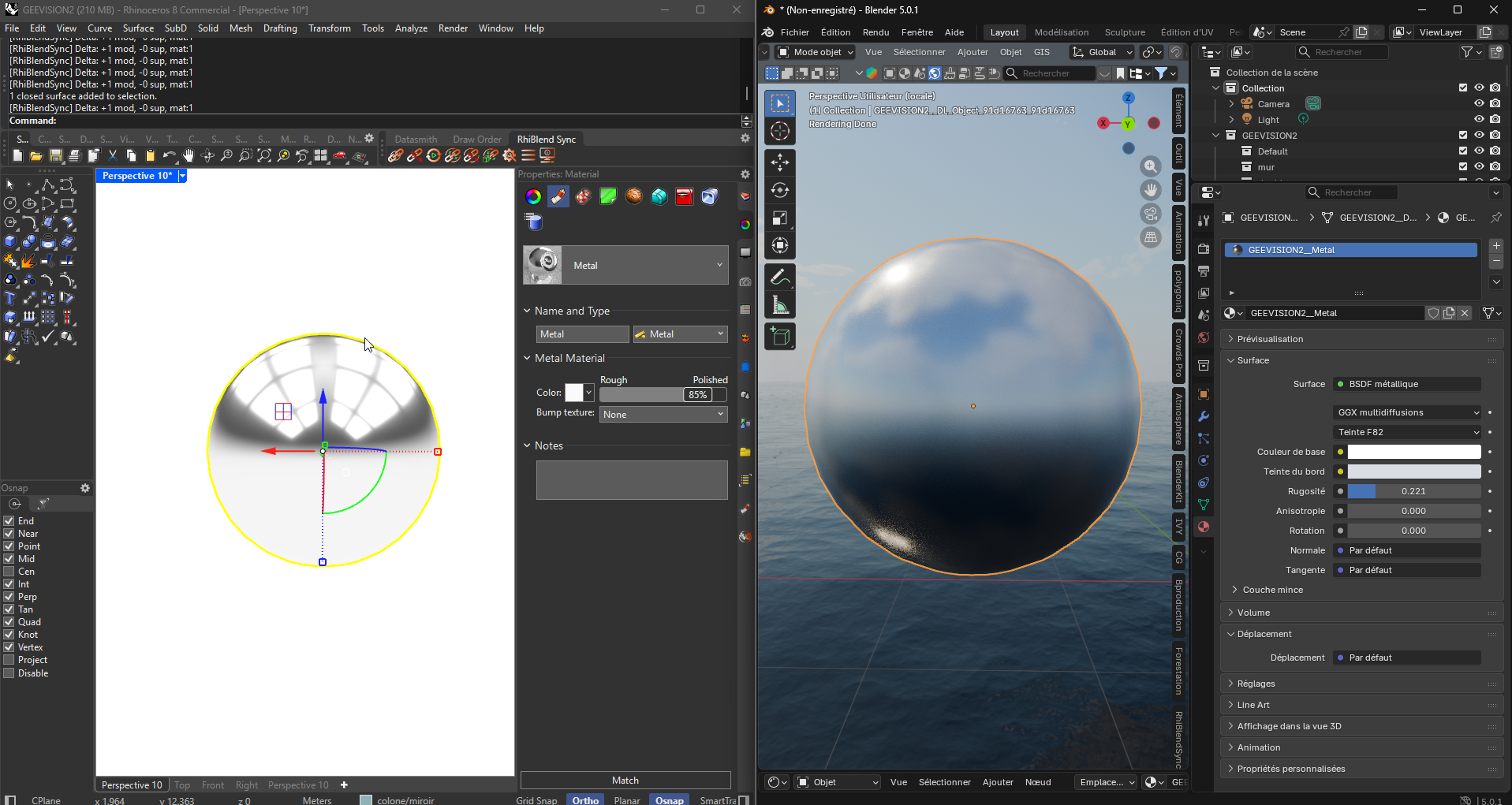
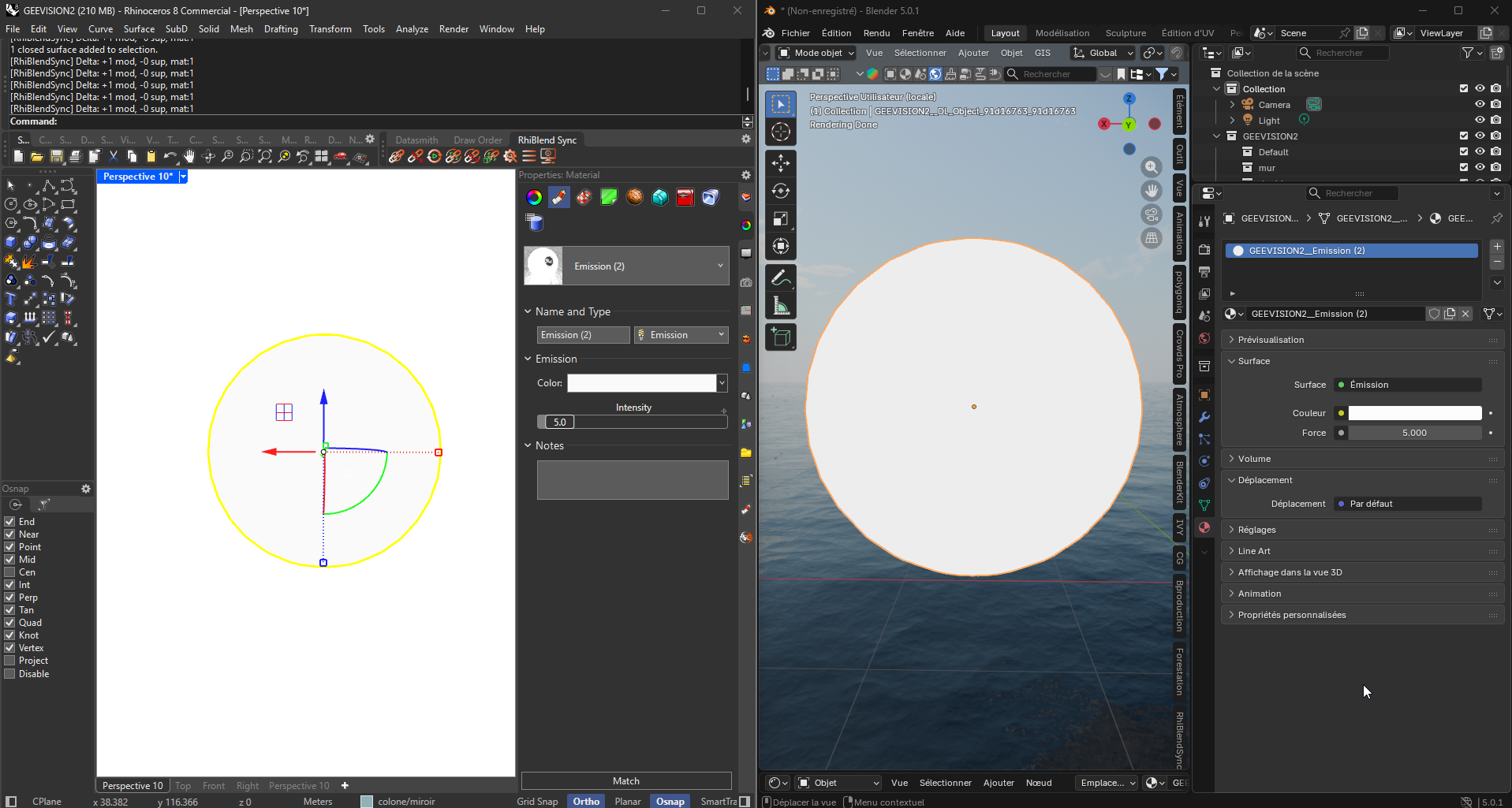
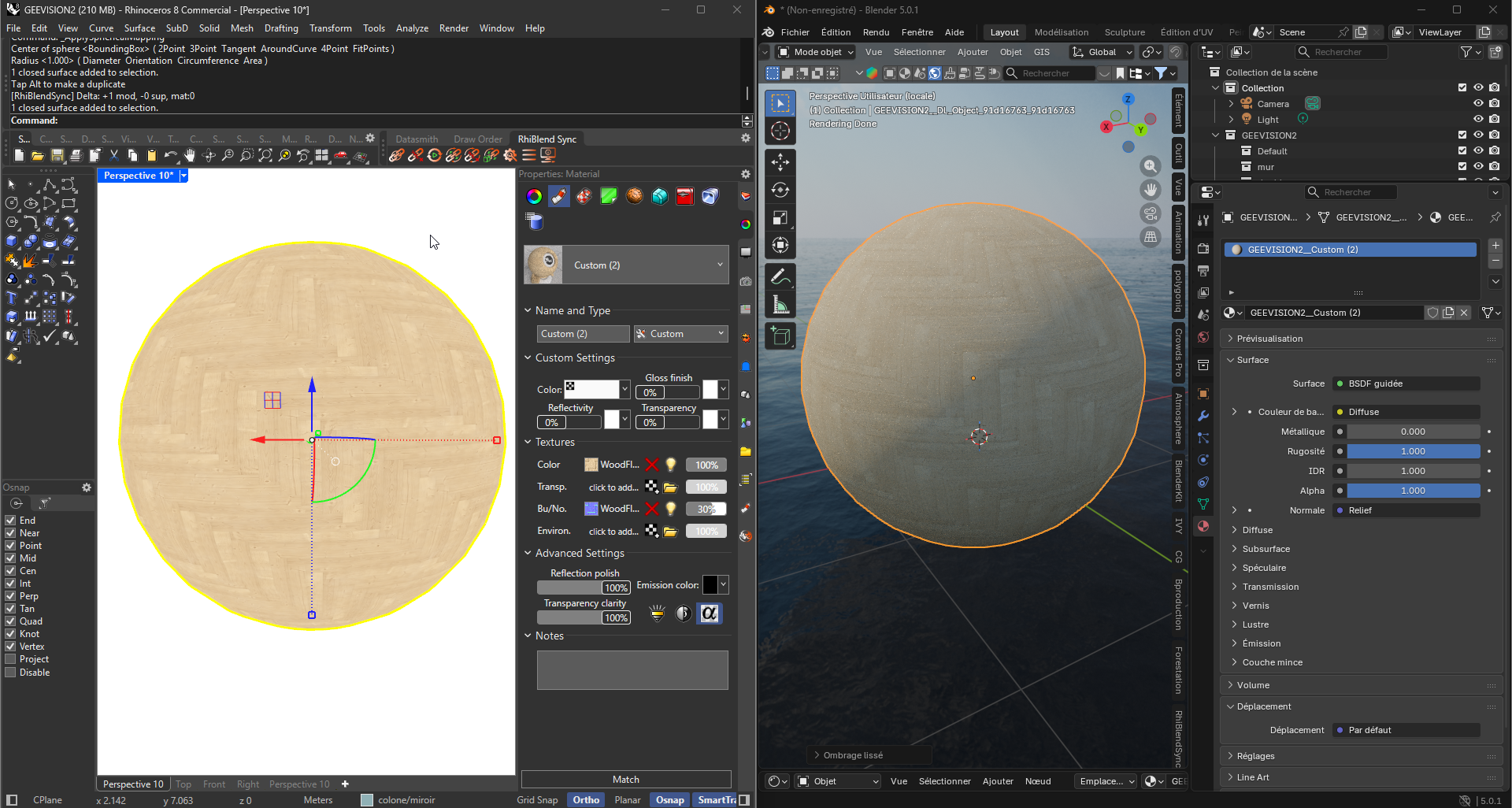
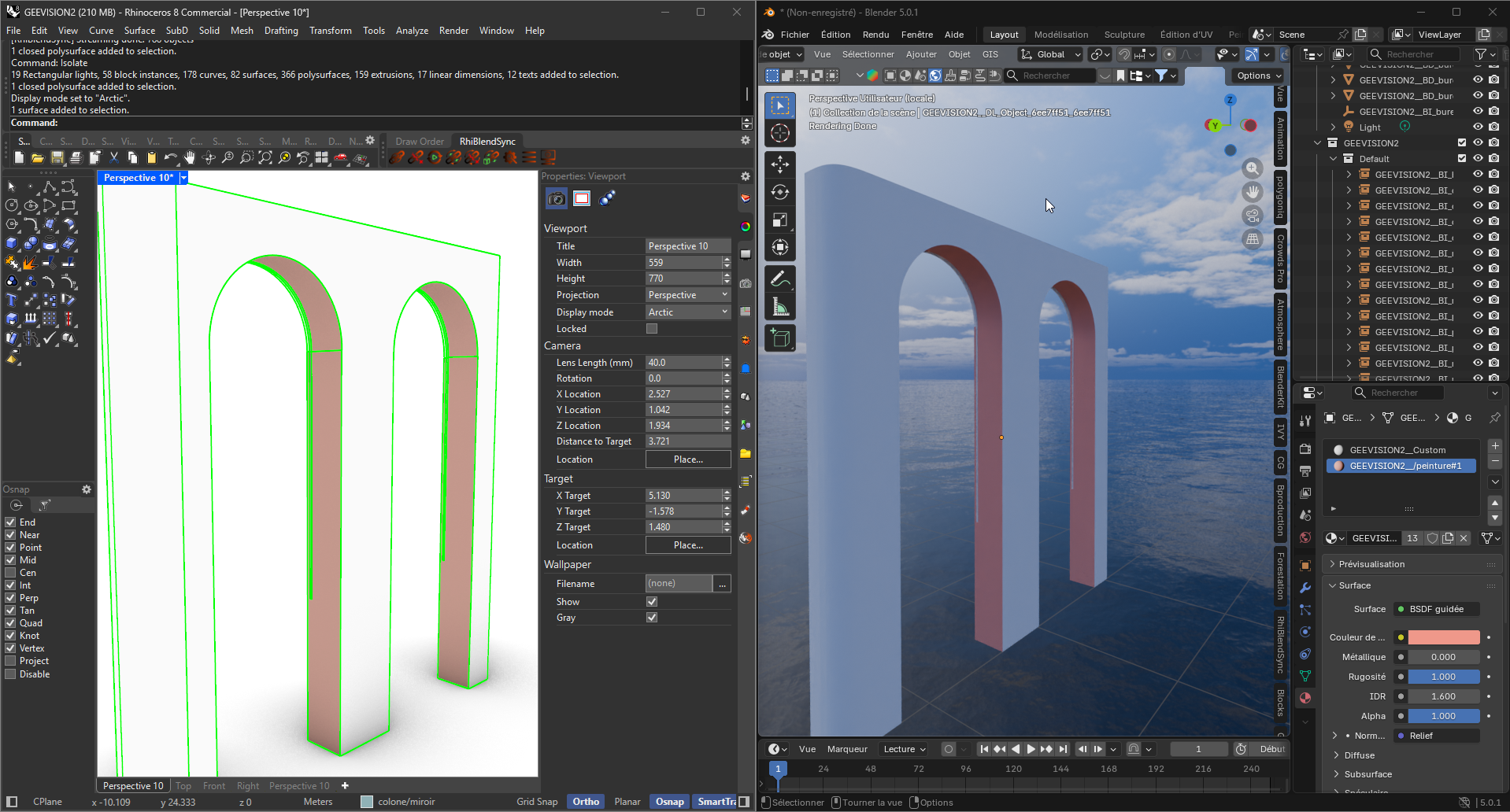
📦 Preserve your blocks as instances
Your Rhino blocks remain instances in Blender (Collection Instances). A block used 200 times is stored once in memory. Moving a block instance only updates the transform — no visual flash, no full reload — and since v1.3, instances follow layer changes in every sync mode. You can also choose to explode them, globally or per block. New in v1.3.1: the source geometry of each block is now visible in the Outliner, grouped in a « Block Definitions » collection that sits at the world origin and is excluded from the view layer — invisible and unrendered, but one checkbox away. Tick it, edit the definition, untick it: every instance in the scene updates at once. And your work there survives Rhino-side block edits.
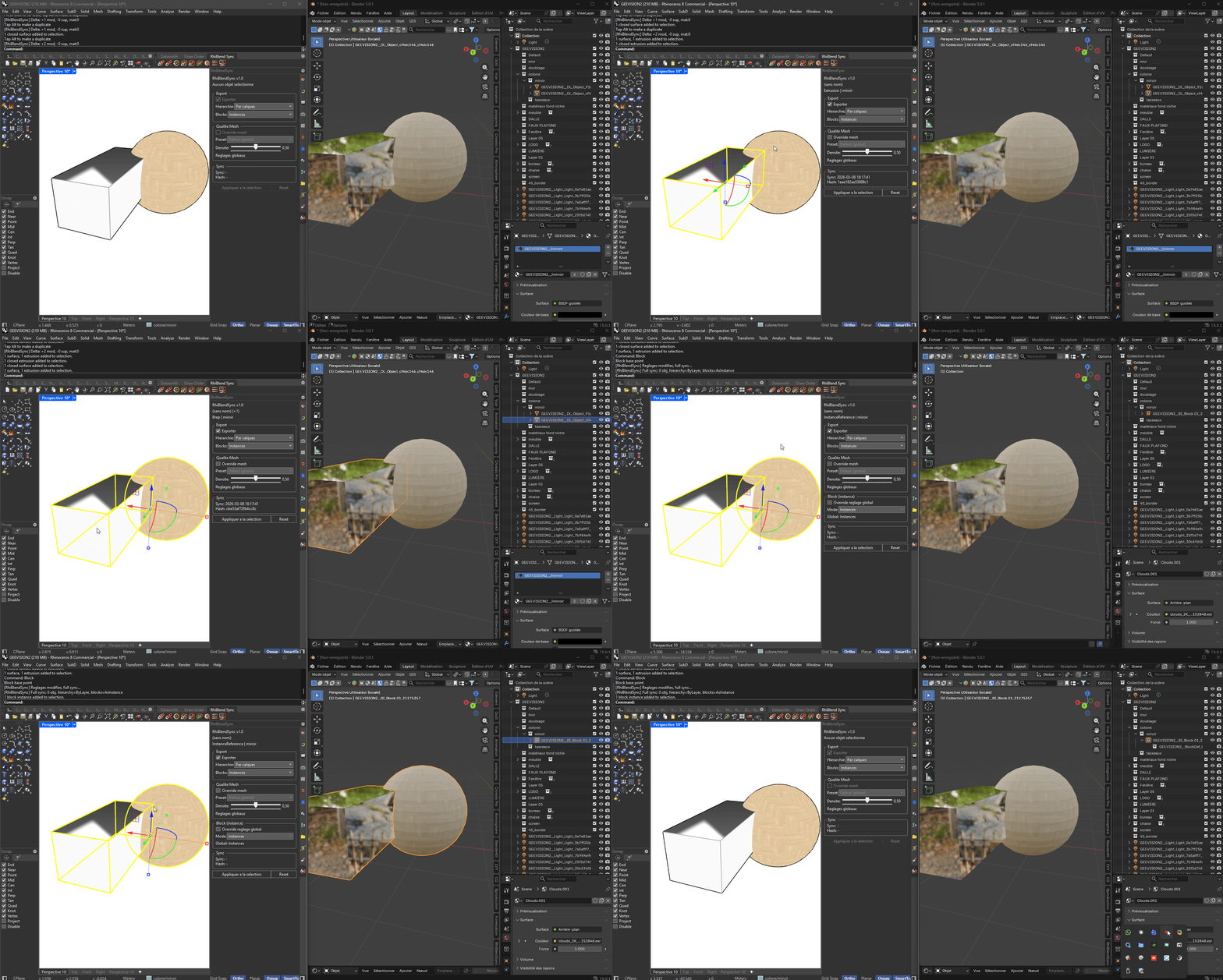
💡 Synchronize your lights
All 4 Rhino light types transfer to Blender: point, spot (with cone angle), directional (sun), and rectangular (area) — including the area light's rectangle geometry. Position, direction, color, and intensity are preserved. Since v1.3, lights are created directly inside their Rhino layer collection and follow layer or attribute changes live; lights modified in Rhino are detected by hash and re-synced without duplicating Blender-origin lights.
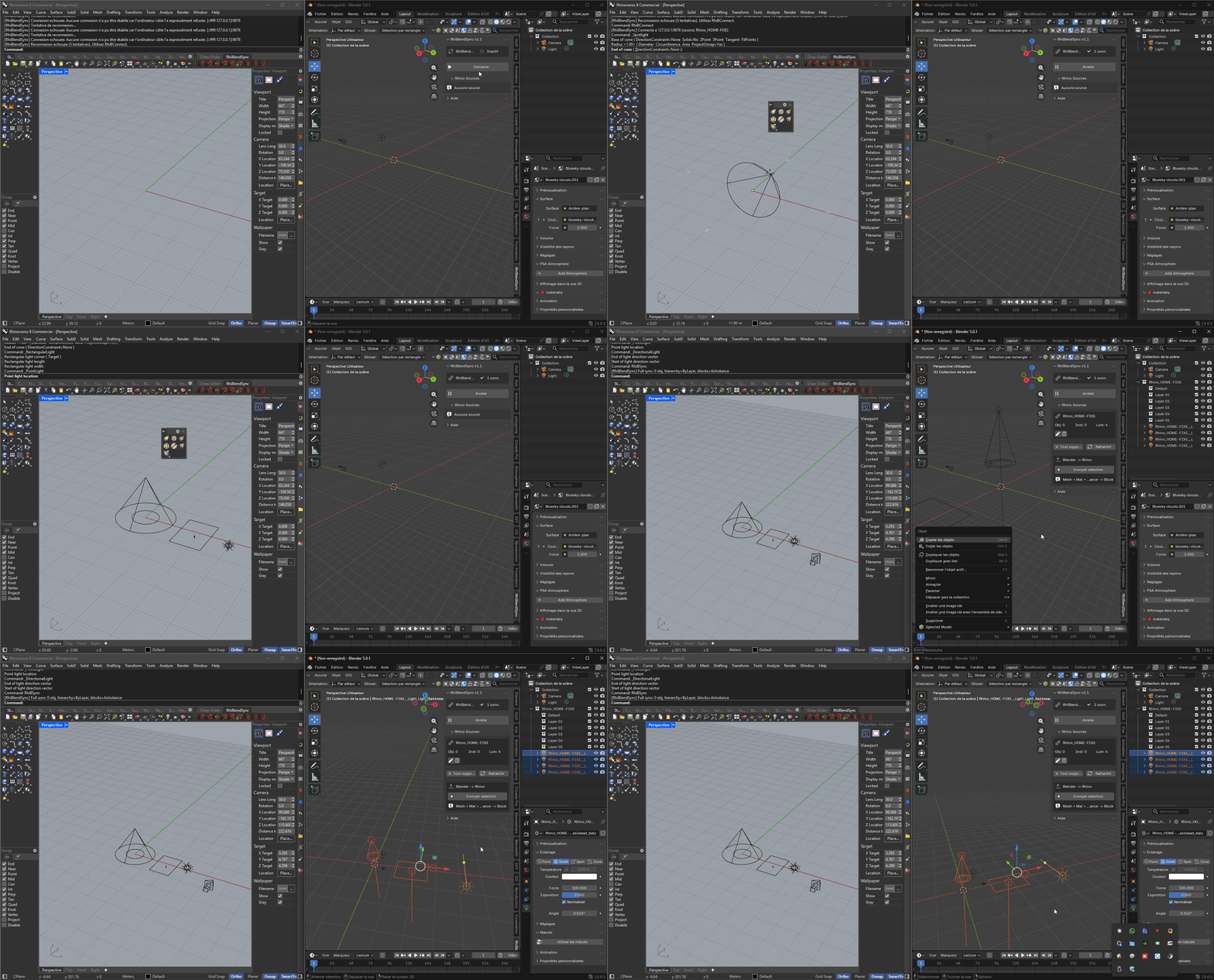
⇄ Send your Blender edits back to Rhino
Modified meshes in Blender? Select multiple objects and click "Send to Rhino." The originals are replaced (not duplicated) — GUIDs preserved, and thanks to push acknowledgment the link works in both directions: when the object later returns from Rhino, RhiBlendSync updates your original Blender object instead of creating a copy. NURBS curves and surfaces are included in the push, with each object automatically routed to its original Rhino file.
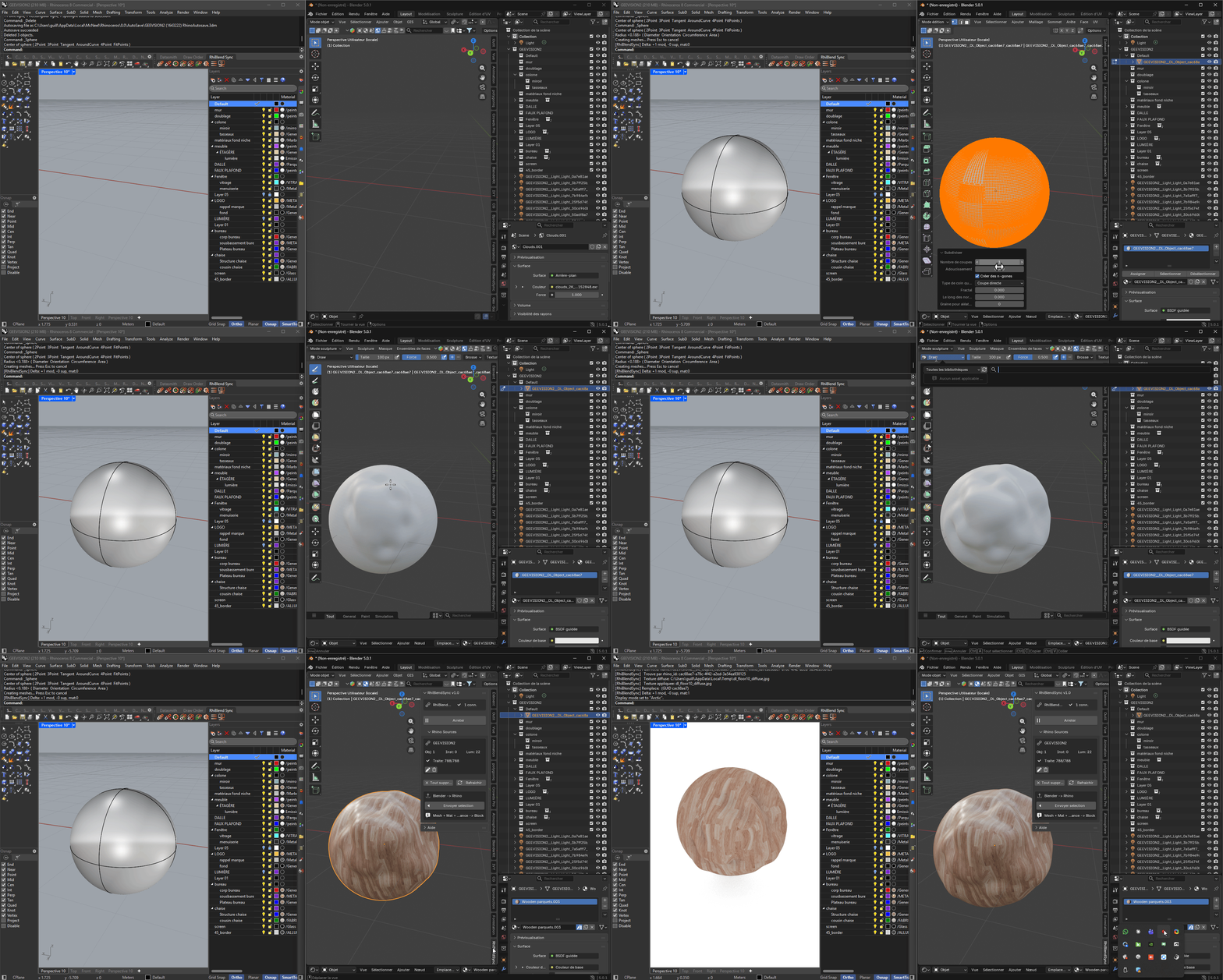
📈 Bidirectional NURBS curves
Select curves in Rhino and use RhiBSyncSel to send them to Blender as editable NURBS curves — and since v1.3, native Rhino curves are part of the full sync too, following layer changes like everything else. In the other direction, Blender NURBS, Bezier, and polyline curves are sent back to Rhino as native NURBS. Control points, weights, degree, and closure are preserved both ways, and curves you created in Blender are never touched by the native flow.
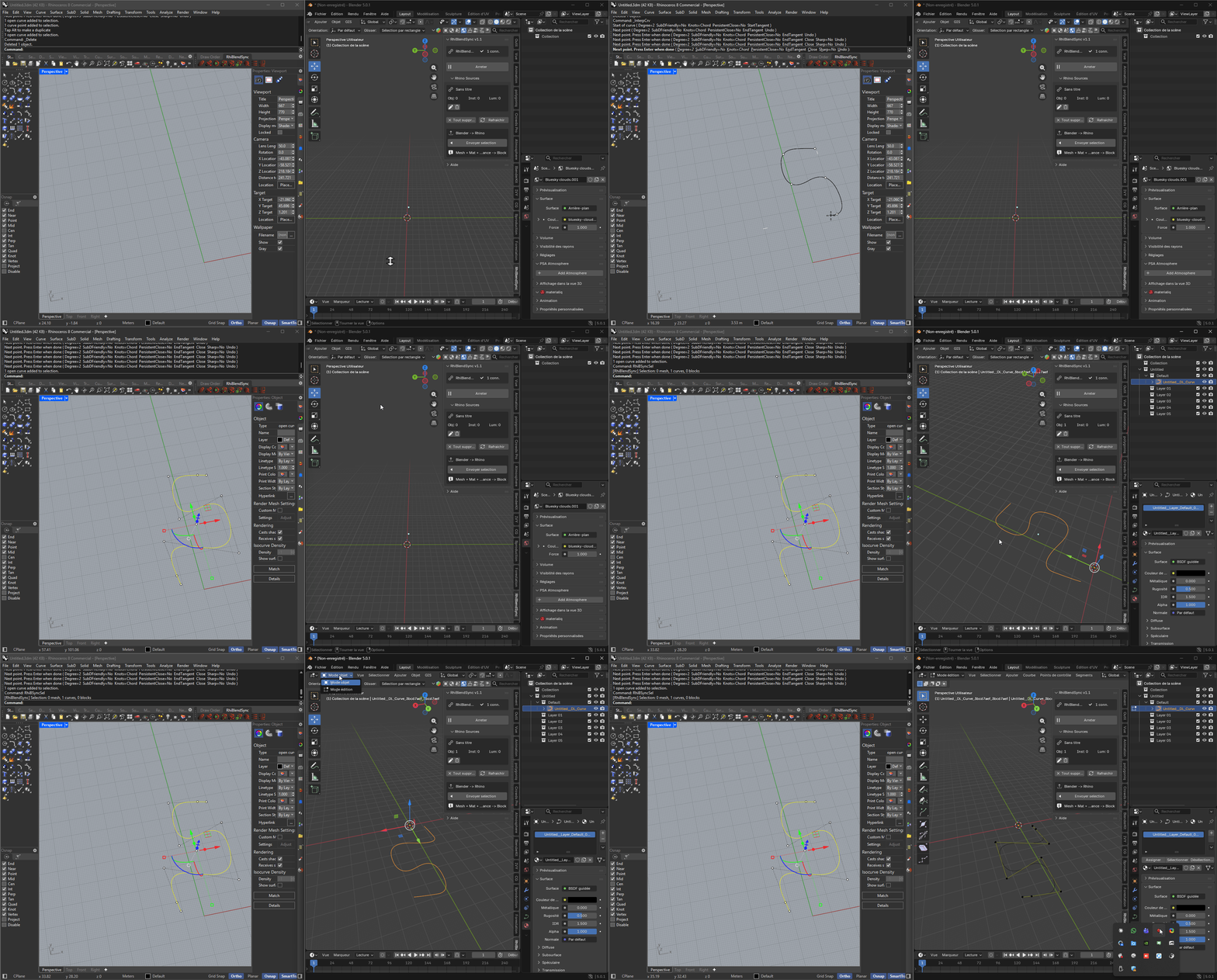
📁 Automatically organize your scene
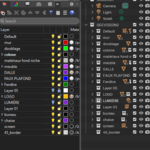
Choose how to organize: by layers (each Rhino layer becomes a Blender collection) or by materials (objects grouped for quick render control). In v1.3 the hierarchy is finally complete: every object type — meshes, curves, lights, block instances, SurfacePsycho objects — follows Rhino layer changes, even when nothing else changed.
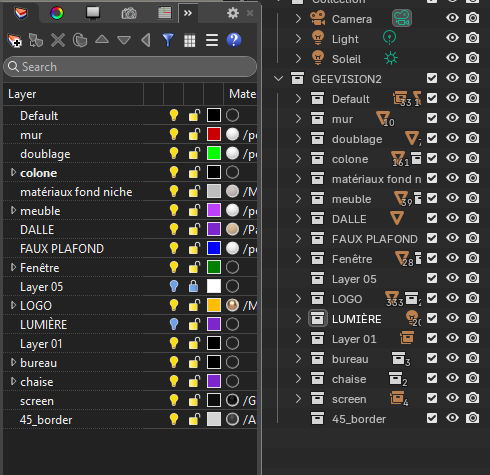
SYNCHRONIZED DATA
What travels between Rhino and Blender.
| TYPE | DETAILS |
|---|---|
| Geometry | Vertices, faces, normals, UVs — density-true NURBS meshing (v1.3.1), grid-to-edges topology, welded with exact creases |
| NURBS Curves | Bidirectional — control points, weights, degree, knots preserved both ways; native curves included in full sync (v1.3) |
| NURBS Surfaces | Bidirectional — Rhino → Blender as SurfacePsycho parametric objects (v1.3); Blender → Rhino as native NURBS |
| SurfacePsycho | Rhino NURBS/polysurfaces/extrusions → SP parametric patches; SP Bezier, NURBS, Compound & Blend patches → Rhino, via STEP pipeline |
| Materials | Color, transparency, metallic, emission, roughness, IOR + per-face on multi-mat Breps, round trip preserved |
| Textures | Bitmap images via base64 + UV coordinates, with hash-based caching |
| Blocks | Definitions + instances (position, rotation, scale) with smart transform updates and layer tracking |
| Lights | Point, spot, directional, rectangular (area) — with layer hierarchy and attribute tracking (v1.3) |
| Named Views | Rhino named views → Blender cameras (position, target, lens, projection) |
| Hierarchy | Layers → collections OR materials → collections — all object types follow layer changes live (v1.3) |
| Transforms | Position, rotation, scale (unit auto-conversion to meters) |
PLATFORM COMPATIBILITY
Cross-platform, fully tested.
| Windows | Mac | Blender | |
|---|---|---|---|
| Rhino 8 | ✅ Full support | ✅ Full support | ✅ 4.0 – 5.1 |
| Rhino 7 | ✅ Compatible | ❌ Not supported | ✅ 4.0 – 5.1 |
| Plugin format | .rhp (net48) | .rhp (net7.0) | __init__.py |
| Tested on | Windows 10/11 | macOS Sonoma+ | Blender 4.0 – 5.1 |
INSTALLATION
Install in under a minute.
Each Rhino version has its own archive — the toolbar file format and the required runtime differ. Extract it to a folder you will keep: the plugin and its toolbar must stay together.
Rhino 8 (Win / Mac): RhiBlendSync.rhp + RhiBlendSync.rui + RhiBlendSync.pdb
Rhino 7 (Win): RhiBlendSync.rhp + RhiBlendSync.rui (Rhino 7 format) + Newtonsoft.Json.dll + RhiBlendSync.pdb
Rhino loads a plugin toolbar automatically when the .rui sits next to the .rhp under the same name — that is why the files must never be separated. The .pdb only carries debug symbols for crash reports.
Upgrading? Remove the previous version first. Close Rhino, then delete the old plugin file. If you are unsure where it is, run _PlugInManager in Rhino, select RhiBlendSync and read its File name — that is the file actually loaded. A leftover .rhp registered elsewhere can keep loading instead of the new one.
Rhino 8 — Windows
Extract the archive, then either method:
Drag & Drop: drag RhiBlendSync.rhp from the extracted folder onto the Rhino window, then restart Rhino. Keep that folder where it is — Rhino registers the plugin at its current location and finds the toolbar beside it.
Manual copy: copy all extracted files (.rhp + .rui + .pdb) into the Rhino plugins folder:
%APPDATA%\McNeel\Rhinoceros\8.0\Plug-ins\RhiBlendSync (26c0600c-...)\
The toolbar appears by itself a few seconds after Rhino starts. If it ever goes missing, the RhiBToolbar command brings it back instantly — no restart needed.
Rhino 7 — Windows
Same methods, with the Rhino 7 archive — install all of its files together: without Newtonsoft.Json.dll the plugin loads but cannot connect, and Rhino 7 needs its own .rui format. Plugin folder path:
%APPDATA%\McNeel\Rhinoceros\7.0\Plug-ins\RhiBlendSync (26c0600c-...)\
Rhino 7 only: load the toolbar once, manually — run RhiBToolbar, or Tools → Toolbar Layout → Open → RhiBlendSync.rui. Rhino 7 remembers it at every launch afterwards.
Rhino 8 — Mac
Copy RhiBlendSync.rhp (the net7.0 build) into the Rhino plugins folder:
/Applications/Rhino 8/Contents/Frameworks/RhCore.framework/Versions/A/Resources/ManagedPlugIns
To open this folder: Finder → Go → Go to Folder (Cmd+Shift+G) and paste the path above. Create the folder if it doesn't exist. Restart Rhino after copying.
Blender 4.0+ (all platforms)
1 Edit → Preferences → Add-ons → Install
2 Select Rhiblendsync_addonblender.zip and check RhiBlendSync
3 The RhiBlendSync tab appears in the sidebar (N key)
The Blender addon is identical on Windows and Mac. Optional: install SurfacePsycho to enable the parametric Rhino → Blender pipeline.
HOW IT WORKS
No configuration. No external server.
RhiBlendSync uses a local TCP connection between Rhino (client) and Blender (server). Default port 9876, configurable on both sides.
| RHINO 7 / 8 C# Plugin (.rhp) TCP Client | ← JSON + zlib → TCP localhost:9876 (configurable) | BLENDER 4.0+ Python Addon TCP Server |
Get started in 4 steps:
1 In Blender: RhiBlendSync tab → click Start
2 In Rhino: click Connect (or type RhiBConnect)
3 Click Sync to send the full scene
4 Enable Auto-Sync so every change is sent automatically
SYNCHRONIZATION MODES
4 modes for every workflow.
Full Sync (streaming)Send everything at once with streaming extraction. Objects sent in batches of 50 with inline materials; native curves, lights and SurfacePsycho objects included. Handles 15,000+ objects without memory issues. Progress bar in both applications. |
Auto-Sync (event-driven)The plugin monitors Rhino continuously using object events + attribute events + periodic scan. Only what has changed is sent — moving a block instance sends only the new transform; a layer-only change on a SurfacePsycho object sends lightweight metadata. Transactional since v1.3: failed sends are replayed automatically, and reconnections trigger a full sync. |
Selection SyncSend only the selected objects: meshes, blocks, NURBS curves, lights — and NURBS as SurfacePsycho objects when the selection toggle is on. Useful for testing a single element without resynchronizing the other 15,000. |
Push Blender → RhinoSend selected meshes, NURBS curves, and surfaces (including SurfacePsycho patches) from Blender back to Rhino with GUID preservation and push acknowledgment. Multi-selection supported. Each object routed to its source automatically. |
PERFORMANCE
Tested on large architectural scenes.
| 15,000+ Objects handled via streaming extraction with automatic garbage collection. Blender stays responsive during import. | 10–20× Less data over the network thanks to zlib compression on all messages, plus 80–90% reduction on textures via hash cache. | Δ only Smart transactional delta sync: only modified objects are re-sent, and no change is ever lost. Your Blender edits, custom UVs, and materials are never overwritten. |
RHINO COMMANDS
Full command set with custom toolbar.
| COMMAND | DESCRIPTION (FR) | DESCRIPTION (EN) |
|---|---|---|
| RhiBConnect | Connecter à Blender | Connect to Blender |
| RhiBDisconnect | Déconnecter | Disconnect |
| RhiBSync | Synchronisation complète | Full synchronization |
| RhiBSyncSel | Sync sélection (mesh+courbes+SP) | Sync selection (mesh+curves+SP) |
| RhiBAutoOn / Off | Activer / désactiver l'auto-sync | Enable / disable auto-sync |
| RhiBStatus | État de la connexion | Connection status |
| RhiBSettings | Paramètres (hôte, port, nom de source...) | Settings (host, port, source name...) |
| RhiBPanel | Ouvrir le panneau latéral | Open side panel |
| RhiBToolbar | Recharger la barre d'outils | Reload the toolbar |
FAQ
Frequently asked questions.
▶ Does it work over a network (two machines)?
By default, communication is on localhost. Both host and port are configurable: enter the Blender machine's IP in Rhino's settings to sync between two computers on the same LAN. Texture hash caching keeps network transfer highly optimized.
▶ Are my Blender edits overwritten on each sync?
No. RhiBlendSync preserves your custom UVs, Edit Mode modifications, and Blender materials. Only the Rhino geometry is updated, and objects you created in Blender are marked and never touched by the native flows.
▶ What exactly does the SurfacePsycho integration do?
Both directions. Rhino → Blender: NURBS surfaces, polysurfaces and extrusions are exported as STEP in real time and rebuilt by SurfacePsycho's own importer as editable parametric patches, tracked without duplicates. Blender → Rhino: SP patches travel as native NURBS. You choose per object or globally which geometry uses the parametric pipeline. Requires the SurfacePsycho add-on for the Rhino → Blender direction.
▶ What if I don't have SurfacePsycho?
Everything else works exactly as before: NURBS are meshed at your chosen density. The SurfacePsycho toggles simply do nothing, and the Blender panel shows a clear "SurfacePsycho unavailable" indicator if you enable them without the add-on.
▶ How stable is auto-sync on long sessions?
v1.3 made the delta engine transactional: tracking is only committed after a successful send, so a network hiccup can never silently lose a change — it is replayed on the next tick. Attribute-only changes (layer, name) are detected, a dropped connection triggers an automatic full sync on reconnection, and the Blender server timer is hardened against errors.
▶ Can I rename a Rhino source?
Yes, two ways: set a custom source name in RhiBSettings — it is stored inside the .3dm file itself, so it survives renaming, moving or copying the file — or rename the source directly in Blender's Sources panel.
▶ Port 9876 is already used by another addon?
Change it: the port is configurable in the Blender addon preferences and in Rhino's RhiBSettings. Both sides must use the same port.
▶ How many objects can the plugin handle?
The plugin has been tested on scenes with over 15,000 objects. Streaming extraction with automatic garbage collection and zlib compression handles heavy scenes without memory issues.
▶ Does it work on Mac?
Yes. The Rhino plugin supports Rhino 8 on Mac (net7.0 build). The Blender addon works on all platforms. Rhino 7 is Windows only.
▶ Is it compatible with Blender 5.x?
Yes, fully — tested through Blender 5.1, with batch mesh operations (foreach_get/foreach_set) 50–100× faster than a naive implementation.
▶ Do I need to install anything else?
No. The Rhino .rhp contains everything (code, icons, toolbar). The Blender addon is self-contained. SurfacePsycho is optional, only needed for the parametric Rhino → Blender pipeline.
▶ The toolbar doesn't appear after installation?
Run the RhiBToolbar command, or open the Toolbar Manager (Rhino → Tools → Toolbar Layout) and activate the RhiBlendSync toolbar. It will load automatically on subsequent launches.
SPECIFICATIONS
Technical details.
| Rhino plugin | Compiled C# (.rhp) |
| Windows build | .NET Framework 4.8 (Rhino 7 & 8) |
| Mac build | .NET 7.0 (Rhino 8 only) |
| Blender addon | Python (__init__.py) — all platforms |
| Protocol | TCP + JSON + zlib compression |
| Default port | 9876 (configurable both sides) |
| SurfacePsycho | Optional — enables the parametric Rhino → Blender pipeline |
| Max tested | 15,000+ objects |
| Language | French / English (auto-detection) |
| Version | 1.3.1 |
SUPPORT & CONTACT
| Guillaume Martin Design, development, maintenance, and technical support |
SUPPORT THE PROJECT
Help shape what comes next.
| RhiBlendSync is designed, developed and supported by one independent developer. If it saves you time, you can help fund its future: ongoing development, user support and continuous improvement of the existing tools — plus the next bridges already on the drawing board: Revit ↔ Blender • Blender ↔ Cinema 4D • new modeling tools for Blender Every contribution, one-time or recurring, directly funds development time.
|

RhiBlendSync v1.3.1 — Bidirectional Rhino ↔ Blender Sync
Rhino 7/8 • Blender 4.0–5.1 • SurfacePsycho integration • Bilingual FR/EN
© 2025–2026 Guillaume Martin. All rights reserved.