Scattering Objects
 Mergim Sahiti
in VSE
Mergim Sahiti
in VSE




Overview
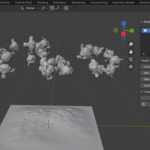
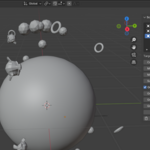
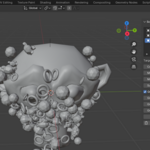
Scattering Objects is a Blender addon designed to quickly populate a mesh with multiple objects using rigid body physics and optional harmonic gravity pull. This tool is perfect for creating natural-looking distributions of rocks, trees, props, or other assets in your scene. It streamlines the process of placing and aligning multiple objects, saving time while maintaining realism.
Getting Started
-
Install the Addon:
-
Download
scattering_objects.zip. -
Open Blender, go to
Edit > Preferences > Add-ons. -
Click Install, select the
.zipfile, and click Install Add-on. -
Enable the addon by checking Scattering Objects.
-
You will find the panel in View3D > Sidebar > Scattering Objects.
-
-
Add Objects to Scatter List:
-
Select an object in your scene.
-
Click Add Scatter Object in the panel.
-
Repeat for all objects you want to scatter.
-
-
Set Target Mesh:
-
Select a mesh in your scene where objects will be scattered.
-
Assign it as Target Mesh in the panel.
-
-
Adjust Parameters:
-
Count: Number of objects to scatter.
-
Scale Min/Max: Range for random scaling.
-
Surface Offset: Distance from mesh surface.
-
Gravity Pull (optional): Enable to attract objects toward the mesh with harmonic force.
-
Adjust Strength, Distance, and Offset Max.
-
-
-
Scatter Objects:
-
Click Scatter with Rigid Body.
-
Objects will be placed with random rotation, scale, and optional gravity pull.
-
-
Delete Scattered Objects:
-
Click Delete All to remove all objects created by the addon.
-
Features
-
Multiple Object Support: Scatter any number of objects in a scene.
-
Rigid Body Physics: Each object becomes an active rigid body, while the target mesh is passive.
-
Random Rotation & Scale: Natural variation for realism.
-
Harmonic Gravity Pull: Optional attraction to target mesh with adjustable strength and distance.
-
Easy Management: Add or remove objects from the scatter list and delete all scattered objects with one click.
-
Highly Customizable: Control count, scale, offset, and gravity parameters to match your scene requirements.
Customization
-
Target Mesh: Any mesh object in the scene.
-
Scatter Objects List: Add as many objects as needed for variety.
-
Parameters:
-
Count, scale range, surface offset.
-
Gravity pull with strength, distance, and maximum offset.
-
-
Workflow: Combine multiple objects and scatter operations for complex environments.
Best Practices
-
Always save your scene before scattering many objects.
-
Start with fewer objects to test scale, placement, and gravity settings.
-
Combine different scatter objects for a natural look.
-
Use Delete All if you need to quickly reset placements.
Have questions about this product?
Login to message
| Dev Fund Contributor | |
| Published | about 1 year ago |
| Blender Version | 4.0 - 4.5 |
| Extension Type | N/A |
| Render Engine Used | Arnold, Blender-Internal, Cycles, Eevee, Octane |
| License | GPL |

Discover more products like this
Trees environment props random placement harmonic field rigid body scatter rocks physics procedural