Scene Optimizer Pro
 active clay




cene Optimizer Pro - Documentation
Overview
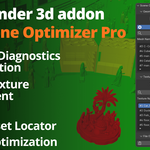
Scene Optimizer Pro by Active Clay is a comprehensive diagnostic and cleanup toolkit for Blender artists. It is designed to identify and resolve performance bottlenecks caused by heavy geometry and unoptimized texture memory (VRAM).
Installation
In Blender, go to Edit > Preferences > Add-ons.
Click Install... and select the
scene_optimizer_pro.pyfile.Search for "Scene Optimizer Pro" and check the box to enable it.
The tool is located in the 3D Viewport Sidebar (N-Panel) under the Tool tab.
Feature Guide
1. Geometry Diagnostics
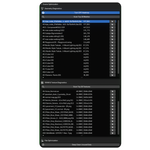
Scan Top 20 Meshes: Generates a ranked list of the most polygon-heavy mesh objects in the scene.
Target Icon (Locate): Clicking the crosshair next to a mesh name instantly selects that object and frames it in the viewport.
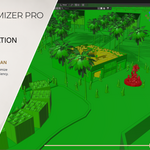
Toggle Density Heatmap: Visually audits your scene by color-coding objects based on density. Green represents optimized geometry, while Red highlights the heaviest performance bottlenecks.
2. VRAM & Texture Diagnostics
Scan Top 20 Textures: Analyzes all loaded images to calculate their uncompressed VRAM footprint. It accurately accounts for bit-depth (8-bit vs 32-bit) and UDIM tiles.
Locate Texture Users: Click the crosshair next to a texture to find and select every 3D object in your scene that uses that specific image in its material setup.
3. File Optimization
Deep Clean Unused Data: Performs a one-click recursive purge of all "orphan data" (materials, meshes, and node groups with zero users). Check the Blender status bar after clicking for a detailed report of deleted items.
Best Practices
Regular Audits: Run a scan after importing large FBX or OBJ assets to check for unoptimized geometry before it impacts your viewport performance.
VRAM Management: Use the Texture Scan before rendering to ensure your project stays within your GPU's memory limits.
Hierarchy Hygiene: Use the Deep Clean tool frequently during large projects to keep your
.blendfile size small and efficient.
-
$10
-
$40
Have questions about this product?
Login to message
| Blender Extension Compatible | Yes |
| Published | 4 months ago |
| Blender Version | 4.2 - 5.1 |
| Extension Type | Add-on |
| Render Engine Used | Cycles, Eevee |
| License | GPL |
Discover more products like this
Scene Management textures blender utility cleanup Geometry Workflow performance vram polygon optimization addon