 shakal0lo



SCI-FIX | User Documentation
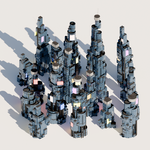
This guide covers the basic setup and control of the SCI-FIX procedural generator.
1. Installation and Interface
Requirements: Blender 4.5 or higher.
Access: After installation, the tool is located in the N-Panel (Sidebar) under the "scifix" tab.
Panel Layout: The UI includes two main execution buttons (Add Building and Space Fill) followed by parameter sliders.
2. Main Functions
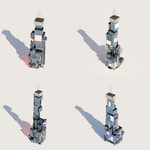
Add Building: Spawns a single procedural tower at the 3D cursor's location.
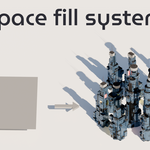
Space Fill: Distributes multiple buildings across a defined area or object to create a cluster.
3. Parameter Controls
The following settings allow you to modify the generated geometry:
Seed: Randomizes the structural arrangement and detail placement of the building.
Height: Controls the vertical scale and number of floors.
Lights Density: Adjusts the amount of emissive window panels on the surface.
Grid/Cubes Density: Increases or decreases the frequency of surface "greebles" and paneling.
Lowpoly Toggle: Simplifies the mesh to maintain viewport performance during heavy scenes.
Foundation & Top Plate: Checkboxes to enable or disable the bottom base and the roof structures.
4. Night Mode & Lighting
Night Mood: A checkbox that activates emissive materials for low-light renders.
Lights Strength: A slider to control the brightness and intensity of the glowing parts.
Color: Allows you to set the primary light color for the emissive panels.
5. Technical Notes
Geometry Nodes: The tool is built entirely on Geometry Nodes, making it non-destructive.
Optimization: For large city clusters, it is recommended to keep "lowpoly" active while blocking out the scene.
Have questions about this product?
Login to message
| Sales | 10 |
| Published | 8 months ago |
| Blender Version | 4.5 - 5.0 |
| Extension Type | N/A |
| Render Engine Used | Cycles, Eevee |
| License | GPL |

Discover more products like this
building architecture building generator procedural kitbash cyberpunk sci fi 3d building city skyscraper Blender_Geometry_Nodes Generator city