 Timon K.



# Select Similar Pro for Blender
**Select Similar Pro** is a powerful Blender add-on that lets you instantly select objects in your scene based on customizable similarity criteria.
---
## 🔧 Features
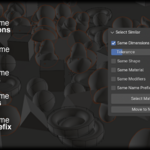
- **Match by Dimensions**
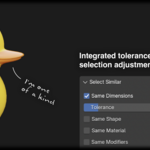
Select all mesh objects with the same dimensions as the active object. Use the *Tolerance* slider to control how strict the comparison is.
- **Match by Shape**
Compares vertex count, face count, and relative dimensions (shape ratio). Includes a *Shape Tolerance* setting.
- **Match by Material**
Select all objects that use the same set of materials.
- **Match by Modifiers**
Finds objects that use the same modifiers (by type).
- **Match by Name Prefix**
Selects objects with a similar naming pattern. For example, selecting `Cube.001` will also select `Cube.002`, etc.
- **Group into Collection**
Once selected, you can move similar objects into a new collection for better organization.
---
## 🚀 How to Use
1. Install the add-on via **Edit > Preferences > Add-ons > Install...**
2. Enable "Select Similar Pro" from the add-on list.
3. In the 3D Viewport, open the **Sidebar (N key)** and find the **Similar** tab.
4. Select an object in your scene.
5. Choose your similarity criteria via checkboxes.
6. Adjust tolerance sliders (for Dimensions and Shape).
7. Click **"Select Matching Objects"**.
8. Optionally, click **"Move to New Collection"** to organize the result.
---
## 🛠 Compatibility
- Blender 2.80 and above
- Tested with Blender 4.3
---
## 👤 Author
**Timon K.**
Version 3.0.1
License: GNU General Public License v2 or later (GPL)
---
## 📄 License
This add-on is free software: you can redistribute it and/or modify it under the terms of the GNU General Public License as published by the Free Software Foundation.
---
Have questions about this product?
Login to message
| Blender Extension Compatible | Yes |
| Dev Fund Contributor | |
| Published | over 1 year ago |
| Blender Version | 5.0 |
| Extension Type | Add-on |
| Render Engine Used | Arnold, Blender-Internal, Blender-Game-Engine, Cycles, Eevee, Freestyle, Luxrender, Mental-Ray, Octane, Vray, Yafaray |
| License | GPL |
Discover more products like this
selectsimilar Selection Workflow select-same similar auto selection tools autoselect quick selection Select Similar Size select select-similar upgrade tools same selectsame speed Fast