Selection Pro — Save, Restore & Organize Blender Selections
 RealDevCode



Selection Pro Documentation
Selection Pro is a lightweight Blender addon for saving, organizing, and restoring object selections using reusable bookmarks. It is designed to make repetitive selection work faster and easier, especially when working with large or frequently changing Blender scenes.
🔖 Selection Features
Getting Started
After installing Selection Pro, open the 3D View Sidebar (N) and locate the SelectionPro panel.
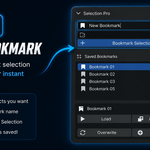
Select the objects you want to remember and use Bookmark Selection to create a new saved selection.
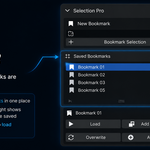
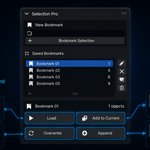
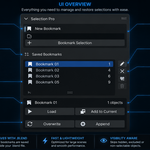
Your saved bookmarks will appear in the Saved Bookmarks list, where you can select and manage them.
💾 Saving a Selection
- Select the objects you want to save.
- Open the Selection Pro panel.
- Click Bookmark Selection.
- Enter a name for the bookmark.
- Your selection is now saved and available in the bookmark list.
Bookmarks are stored with the Blender scene, so they remain part of your .blend project.
▶️ Loading a Bookmark
Select a bookmark from the Saved Bookmarks list and use Load to restore the saved selection.
Selection Pro restores the objects associated with that bookmark and can also restore the active object when the saved reference is available.
➕ Add to Current Selection
Use Add to Current when you want to keep your existing selection and add the objects stored in a bookmark.
This is useful when combining multiple saved object groups into one working selection.
🔄 Overwrite & Append
Overwrite replaces the objects stored in an existing bookmark with your current selection.
Append adds your current selection to an existing bookmark without replacing its existing objects.
✏️ Rename-Safe Bookmarks
Selection Pro assigns stable internal IDs to objects used by bookmarks. Because bookmarks use these IDs for lookup, changing an object's name does not automatically break the saved reference.
This makes Selection Pro more reliable than a selection system that depends only on object names.
⚙️ Compatibility & Installation
Compatibility
Blender 4.2.0 or newer
📦 Installation
- Download the Selection Pro ZIP file.
- Open Blender.
- Go to Edit → Preferences → Add-ons.
- Click Install.
- Select the Selection Pro ZIP file.
- Enable Selection Pro.
- Open the 3D View Sidebar (N) and locate the Selection Pro panel.
Have questions about this product?
Login to message
| Blender Extension Compatible | Yes |
| Dev Fund Contributor | |
| Published | about 2 months ago |
| Blender Version | 4.2 - 5.2 |
| Extension Type | Add-on |
| Render Engine Used | Cycles, Eevee |
| License | GPL |
Discover more products like this
selection sets Workflow Scene Management selection bookmark Object Management Selection blender addon modeling bookmarks selection manager Object Selection productivity